

Wage Navigator
The Wage Navigator shows the wage range Job Bank publishes for an occupation in a place. Open lexpoint.io/tools/wage-navigator. You do not need an account.
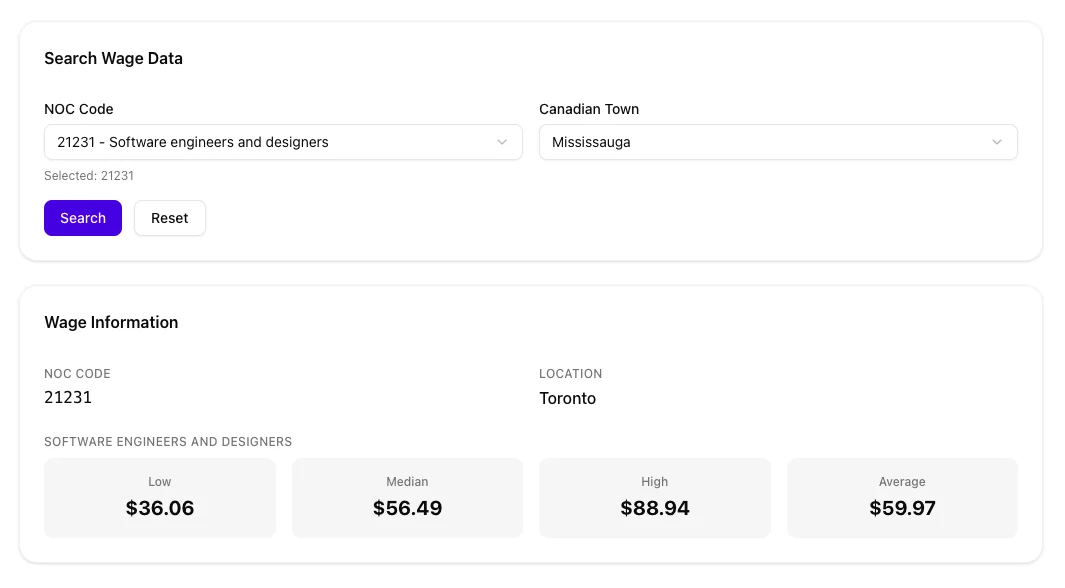
Look up a wage
Section titled “Look up a wage”- Under NOC Code, search by code or title and choose one.
- Under Canadian Town, search and choose the town where the job is.
- Run the search. The Wage Information card shows the NOC code, the location the figure applies to, and the Low, Median, High and Average wage.
Which figure you get
Section titled “Which figure you get”The town only locates the job. Lexpoint looks for the published wage in this order and uses the first place that publishes a median:
- the town’s Job Bank economic region;
- the province;
- Canada.
The Location field on the result tells you which place the figure is for. When no figure exists the page says so.
Related
Section titled “Related”- NOC Navigator: find the code to look up
- Job offers: where a wage on an offer is compared with Job Bank’s figure
- NOC Intelligence: the wage trend for a job on your profile
- Free tools: the other tools
Frequently asked questions
Why does the result name a place that is not my town?
The town only locates the job. Wage Navigator uses Job Bank's figure for the town's economic region. When the region has no published median it falls back to the province, then to Canada.
Is this the wage I have to pay or earn?
No. It is the wage range Job Bank publishes for the occupation and place. What a program asks for is the program's to say.
Why does it match what ImmiReport shows for my job offer?
ImmiReport, the NOC Navigator and Lexi read the same Job Bank figure for a job's economic region.