

Payment plans
A payment plan splits the professional fee into instalments. It is set on the proposal, before you accept — this is the only point at which you can change it, because accepting locks the schedule and signing freezes it into the retainer.
Payment plans cover professional fees only. Government fees are never part of a schedule.
Where to set it
Section titled “Where to set it”The schedule sits inside the Professional Fees section of a proposal, under Payment Schedule. It is editable only while the proposal is in the Review stage.
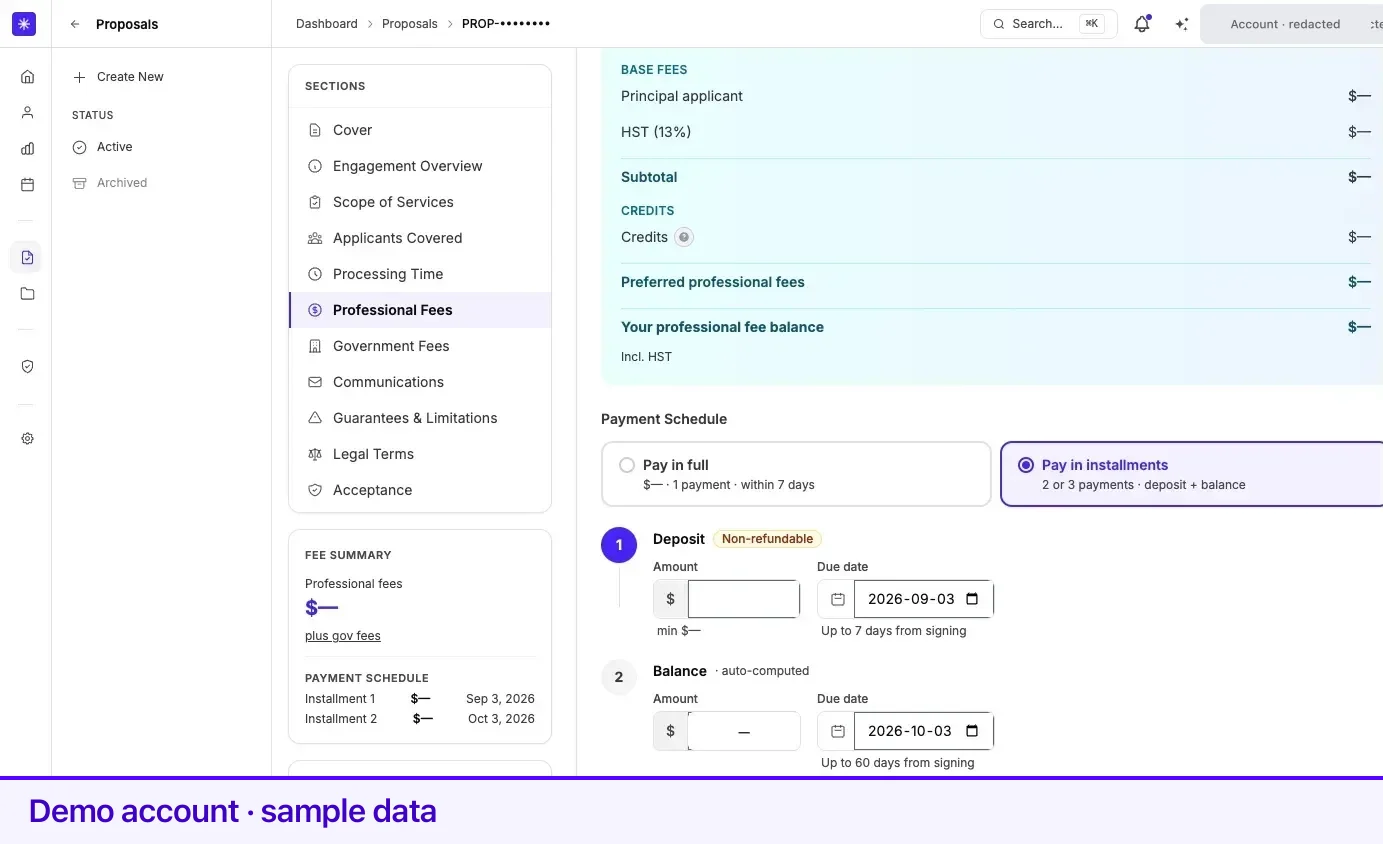
Two modes
Section titled “Two modes”| Mode | What it is |
|---|---|
| Pay in full | One payment for the whole professional fee. The amount is fixed; you choose the date. |
| Pay in installments | A deposit plus a balance. Permanent-residence engagements can be split into three payments instead of two. |
Switching between modes rebuilds the rows. Instalments mode always opens with a deposit and a balance; on a permanent-residence proposal a Split into 3 payments button adds a third, and Remove takes it away again.
What you can change, and what you cannot
Section titled “What you can change, and what you cannot”Each row has an amount and a due date, and the two behave differently:
- Pay in full — the amount is locked to the full fee. Only the date is yours.
- Deposit — you set the amount, subject to a minimum shown beneath the field. It is marked Non-refundable.
- Balance — computed automatically from the deposit in a two-payment plan, so it always closes the gap. In a three-payment plan the second and third amounts are both editable and adjust against each other.
Every date field carries its own limit, shown as a hint under the picker — Up to N days from signing. The first payment’s window is 7 days by default; later instalments have longer windows, and the third payment in a three-way split has the longest. The limits come from the firm’s configuration rather than being fixed in the product, which is why the editor shows you the number rather than assuming you know it.
A bar beneath the rows shows how the total is divided. Below it, the editor confirms Total balanced when the instalments add up to the fee, or lists exactly what is wrong when they do not — an amount below the minimum deposit, a date past its limit, or a total that does not match.
After you sign
Section titled “After you sign”The saved schedule becomes the payment schedule on your case, listed under the Payments tab with one row per instalment. The first payment is made from the proposal itself; the rest are paid from the case. See Payments and invoices.
If a payment is missed
Section titled “If a payment is missed”A payment is overdue when its due date has passed and part or all of it is still outstanding. When that happens:
- The row is marked Overdue and shown in red, and it stays in your Outstanding total.
- Pay stays available on the row. A partly paid instalment offers Balance instead, for the remainder only.
- An overdue amount can trigger a payment reminder by email, carrying a Pay now link that works without signing in. Reminders are rate-limited, so a single overdue payment will not produce a stream of email.
Paying an overdue instalment is the same as paying any other: the row opens a Stripe payment link and returns you to the Payments tab.
What a missed payment means for your engagement is set out in the Legal Terms section of the agreement you signed, which stays readable on the proposal.
Related
Section titled “Related”- Understanding your proposal — where the professional fee total comes from
- Payments and invoices — paying each instalment and finding receipts
- Accept and sign a retainer — the point at which the schedule locks
- Cases — where the schedule lives once the case is open
Frequently asked questions
Can I change my payment schedule after accepting?
No. The schedule is editable only while the proposal is in the Review stage. Accepting locks it, and signing freezes it into the retainer.
Is the deposit refundable?
The first instalment is labelled Non-refundable in the schedule editor. What that means in your engagement is set out in the Legal Terms section of your agreement.
Does a payment plan cover government fees?
No. A payment plan applies only to professional fees. Government fees are paid in full to the relevant authority when your application is filed.