

Confirmations and limits
Two rules govern everything Lexi does with your data. It reads within your own account, and it changes nothing you own without asking — the one exception is Message my case team. This page is what “asking” looks like, and where the boundaries sit.
Anything that changes your records pauses first
Section titled “Anything that changes your records pauses first”When Lexi is about to write a record — a job, a diploma, a language test result — the run stops before the write and a card appears in the chat:
Review before saving, followed by a plain-language summary of exactly what will be saved. View field details expands the individual fields so you can check a date or a title before it lands.
Two buttons finish it:
| Button | What happens |
|---|---|
| Confirm | The record is written and Lexi finishes the reply — Confirmed. Finishing Lexi response… |
| Skip | Nothing is written — Skipped. Updating the reply… — and Lexi continues without the change. |
A Google Doc is the same Confirm / Skip pair. The summary reads Save draft notes to your Drive as “Lexpoint · {title}” (not for IRCC filing). Confirm creates the Doc in your Drive; Skip does not. You need Google Drive connected first.
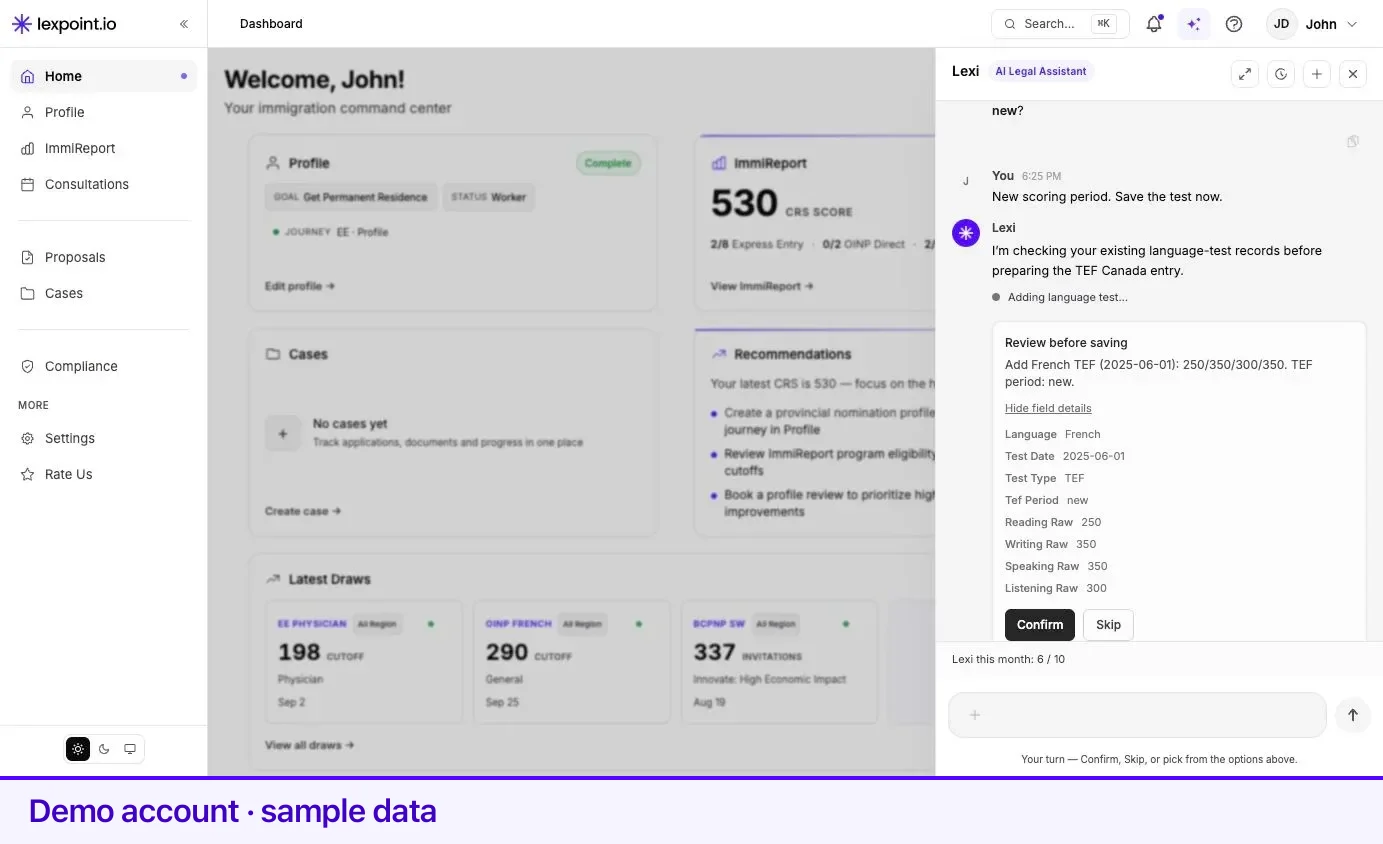
While a confirmation is waiting, the message box locks and reads Choose an option above…, with the hint Your turn — Confirm, Skip, or pick from the options above. That is deliberate: it stops a new question from burying a decision that has not been made.
If a change needs several records, confirming one can open the next confirmation immediately. Each one is a separate decision.
The one action that does not pause
Section titled “The one action that does not pause”Message my case team posts a message from you into your case’s application or requirement thread without a confirmation card. It exists so a question raised in chat reaches the people working on your case without a second step. It works only from your private Lexi chat, with a case in scope; the message shows in the thread as sent by you (via Lexi), your case team is notified, and repeated sends are rate-limited. It changes no record in your profile.
The other things Lexi will stop and ask
Section titled “The other things Lexi will stop and ask”Not every pause is a write. Lexi also stops when it cannot safely guess which thing you mean.
| Card | When it appears |
|---|---|
| Pick the job you mean | Your question could apply to more than one job in your work history. |
| Choose the closest city | A place name you gave is not in the locations list, so Lexi offers the nearest matches. |
Both offer Skip, and skipping ends that branch of the conversation.
What Lexi has no ability to do
Section titled “What Lexi has no ability to do”These are not policies Lexi is asked to observe. The capability does not exist, so there is nothing to ask for.
| Not possible | Where it is handled instead |
|---|---|
| Editing your personal details — name, date of birth, contact information | You edit them in your profile. Lexi is explicitly built not to claim otherwise. |
| Deleting any profile record | Delete it yourself in your profile. Lexi only adds and updates. |
| Changing account, security, or billing settings | Your account. |
| Reading your invoices or case payment records | Case fees and statements. |
| Reading, or writing to, anyone else’s account | Every capability is bound to the signed-in account. The one read from outside it is your linked partner’s facts while your accounts are linked — see What Lexi can do. Lexi never writes to their account. |
| Writing an internal note on your case | A staff capability, blocked for client accounts. |
| Sending anything to IRCC or a province | No such capability exists in the product. A Google Doc in your Drive is still not a filing. |
Where Lexi stops short on purpose
Section titled “Where Lexi stops short on purpose”It will not give you regulated advice. Lexi explains what your file contains and what the product is showing you. Whether you qualify, which program to choose, or how to answer a procedural fairness letter is a professional judgment. Lexi will say so and point you to a consultation. For program research and immigration education, read immigratic.com.
It will not quote scores from a report that is not unlocked. If your profile is missing one of the four sections — personal, work, education, language — Lexi does not cite figures from a locked ImmiReport. It tells you which section is incomplete and links you to it, and it can offer to fill the gap with a confirmed write. See ImmiReport.
It will not invent an answer. Lexi is instructed to ground factual claims in what it actually read from your account, and to say plainly when something is not supported rather than guessing. That is a strong instruction, not a guarantee — the reminder under every message that AI-generated content may be inaccurate applies to all of it. Check anything you are about to act on.
Privacy and the record
Section titled “Privacy and the record”Your private Lexi conversation is visible to you and Lexi only. A message sent with Message my case team is the exception: it lands in your case thread, where your case team reads it.
Lexi’s actions are recorded. Every capability it runs is logged as a step of the reply that ran it. What Lexpoint stores about you, and how to ask for it, is set out in Privacy and your data.
Related
Section titled “Related”- What Lexi can do — the full capability list these rules apply to
- Asking Lexi — where the confirmation cards appear
- Lexi settings — the monthly message limit is a separate, hard limit
- Your profile — where confirmed changes land
Frequently asked questions
Can Lexi change something in my account without asking?
No. Every capability that writes to your records pauses first and shows a Review before saving card with the exact record. Nothing is written until you select Confirm. The one action that does not pause is Message my case team, which posts your message to your case thread straight away.
What happens if I select Skip?
Nothing is saved. Lexi acknowledges the skip and carries on with the rest of the answer.
Does a confirmation expire if I walk away?
The card waits for you. If the conversation has already moved on by the time you answer, the card says the request is no longer available, and you can ask again.
Who can see my Lexi conversation?
Only you. The private assistant thread is visible to you and Lexi. A message Lexi posts to your case team with Message my case team is visible to that team. Lexi is separately told never to guess — if the answer is not in your data, it says so.