

Understanding your proposal
A proposal is a written offer: what will be done, who it covers, how long it should take, what it costs, and on what terms. It is the first point at which money is discussed in writing, and nothing is billed until you accept it, sign, and pay.
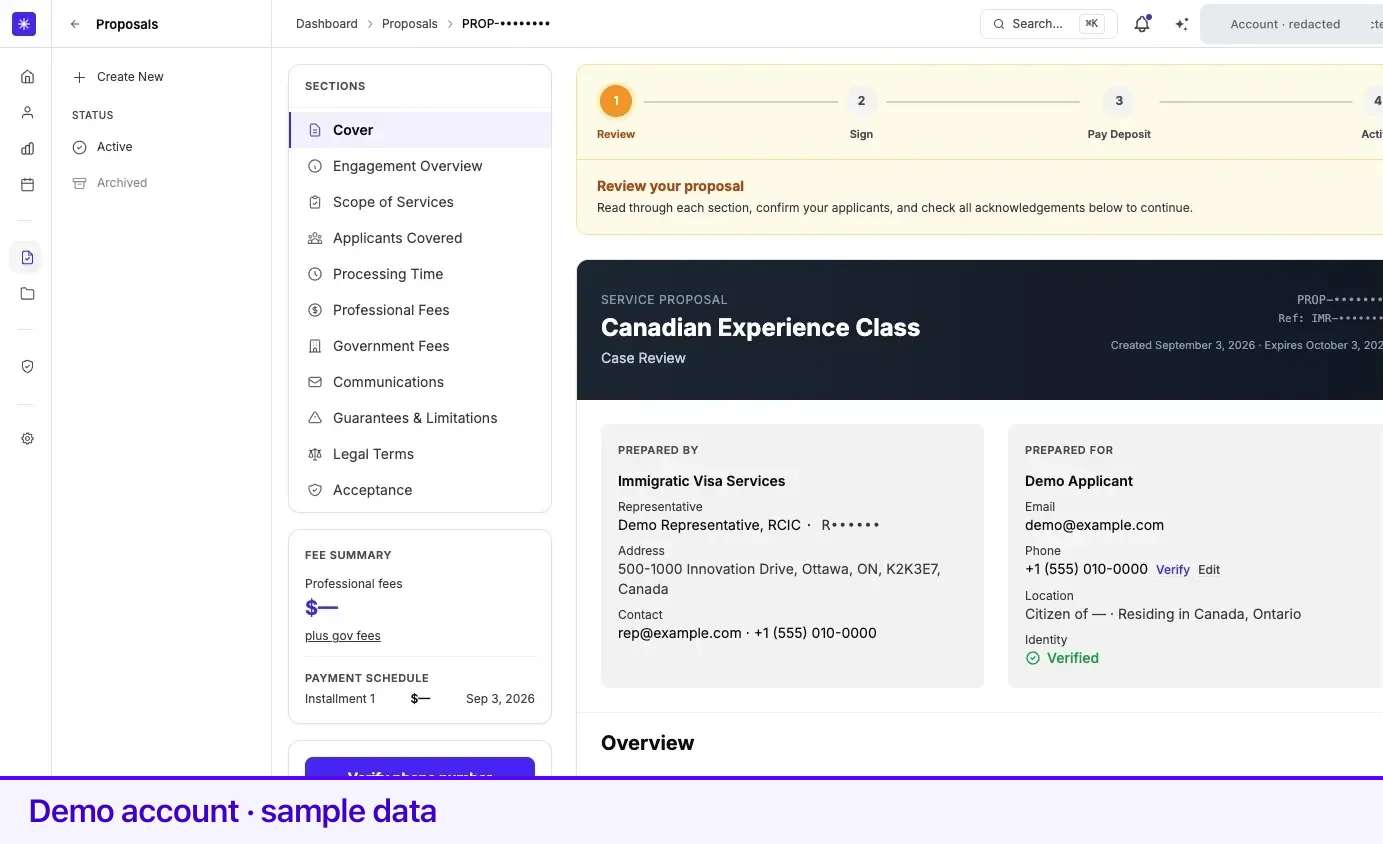
Proposals live at Proposals, newest first. The sidebar filters them: Active, plus Expired and Archived once either has something in it. Opening one shows the full document.
The four stages
Section titled “The four stages”A tracker at the top of every proposal shows where you are:
| Step | What it means |
|---|---|
| Review | The offer is open. You read it, confirm applicants, and set the payment schedule. |
| Sign | You have accepted. The retainer is waiting for your signature. |
| Pay Deposit | Signed. Once any family details are complete, the first payment opens the engagement. |
| Active | Signed and paid. Your case is being set up. |
Nothing on the proposal is charged before Pay Deposit, and no case exists before Active.
How the document is laid out
Section titled “How the document is laid out”Eleven sections, reachable from the rail on the left. The URL keeps the section you are reading, so a link you save returns you to the same place.
| Section | What is in it |
|---|---|
| Cover | Program, service type, proposal number, Prepared By (the firm and the representative with their licence number), and Prepared For (you). |
| Engagement Overview | What the engagement is, in plain terms. |
| Scope of Services | Included Services, Not Included, and Assumptions. |
| Applicants Covered | Every person the fee covers — you, and any spouse or dependents. |
| Processing Time | Our preparation time and the government’s processing time, separately. |
| Professional Fees | What you pay for representation, and your payment schedule. |
| Government Fees | Third-party fees paid to IRCC or another authority, not to us. |
| Communications | How you will be kept informed. |
| Guarantees & Limitations | What is and is not promised about the outcome. |
| Legal Terms | The full agreement text, section by section. |
| Acceptance | The confirmations, and the button that moves you to signing. |
If your ImmiReport was used to prepare the proposal, its code appears on the cover as a reference.
Scope is the part to read twice
Section titled “Scope is the part to read twice”Scope of Services is what you are buying. It is split three ways, and the second and third parts matter as much as the first:
- Included Services — the work covered by the professional fee.
- Not Included — work that is out of scope. If something you expected is on this list, raise it before you accept, not after.
- Assumptions — the facts the price was built on. If an assumption is wrong, the price was built on the wrong facts.
Applicants covered
Section titled “Applicants covered”The fee depends on who is covered. The section names the principal applicant and lists any spouse or dependents included in the quote.
While the proposal is still in Review, a Change family control lets you add or remove a spouse and dependents, and the fees update before you accept. After acceptance the composition is locked. Some proposals — those funded by a school or employer, or custom priced — have the family composition locked from the start; a new proposal is needed to change it.
If the proposal covers a spouse or dependents, their details must be filled in before you can accept. The Accept button will send you back to this section until they are.
Each covered person’s card also lists anything still missing for payment after the word Needs, with a Complete details link that opens a Complete family details window: first and last name, date of birth, citizenship, country of residence, status in that country, email, and phone. Save details updates your family record. This stays available after you accept, because the checks in Before you can pay apply at payment, not at acceptance.
Processing time
Section titled “Processing time”Two separate clocks, shown separately because only one of them is ours:
- Our Service Timeline — how long preparation takes, counted from the day you have uploaded everything that is needed, not from the day you sign.
- Government processing — IRCC’s own published time, and for an Ontario nomination, the provincial stage before it.
A View live IRCC processing times link opens the current published figures. Times shown in a proposal are estimates that were current when it was prepared.
Professional fees
Section titled “Professional fees”This is the part with a payment schedule. It builds up in a fixed order:
- Base fees — a line per person covered, plus a prior-refusal line where one was disclosed.
- Add-ons — anything added to the base engagement, each named.
- HST — added where applicable. Whether it applies depends on where you live, which is why the proposal states whether tax was applied.
- Subtotal.
- Credits — consultation credit, loyalty, admin, or another courtesy applied by the firm, subtracted with the reason shown.
- Preferred professional fees — the total after credits.
- Your professional fee balance — what you actually owe.
Where a school or employer is funding part of the engagement, a Covered by your school/employer line appears above the balance, and your balance is what remains after it. If they cover the whole professional fee, the schedule section says so outright.
Below the breakdown sits your payment schedule. While the proposal is in Review you can adjust it within limits and must save it before accepting — see Payment plans.
Government fees
Section titled “Government fees”A separate section, kept separate on purpose. Direct Government Fees itemizes what each covered person is charged, plus provincial and biometrics fees where they apply.
Government fees are set by IRCC or the relevant authority and are paid in full when your application is submitted. They are never part of your professional-fee payment schedule. On a full-representation case, the case’s Payments tab shows where to send them — see Payments and invoices.
Expiry
Section titled “Expiry”An offer does not stay open forever. The cover reads Created … · Expires … for as long as the proposal is unsigned. Once signed, that line changes to show the signing date, then the payment date — the expiry no longer applies to a proposal that has become a retainer.
If the offer lapses, the proposal opens with a banner saying it is no longer active and a New proposal button. Expired proposals stay readable under the Expired filter.
What has to be in place before you can accept
Section titled “What has to be in place before you can accept”The Accept button in the sidebar tells you what is missing, in order. All of these come before the confirmations, not after:
- A phone number on your account. Canadian and US numbers need an SMS code first.
- Identity verification. Started from the proposal itself; Accept unlocks when it completes.
- Spouse and dependent details, if the proposal covers them.
- A saved payment schedule.
- Four confirmations in the Acceptance section, each ticked individually — that you have read every section, that your information is accurate, that you understand the fee structure and payment schedule, and that you agree to the terms.
Accepting locks the payment schedule and moves the proposal to signing.
Before you can pay
Section titled “Before you can pay”After you sign, the Pay Deposit button is replaced by Complete family details until every spouse and dependent the proposal covers has, in their family record:
- a real first and last name — not a placeholder such as Spouse
- a date of birth
- a citizenship country other than Unknown
- a country of residence, and their status in that country
- an email or phone number — a dependent with neither still passes if your account has a phone
- if they have an email, one different from yours
Complete family details scrolls to Applicants covered, where each card lists what is missing. Once the last gap is filled, Pay … Deposit returns. A proposal with no spouse or dependents is never held here, and one with nothing to pay activates at signing without this check.
Create or delete a proposal yourself
Section titled “Create or delete a proposal yourself”New Proposal at the top of Proposals, or Create New in the sidebar, opens the proposal builder. You choose the service, the application type, and the program, add family and add-ons, and watch the price build in Proposal Summary before you select Create Formal Proposal.
A proposal still in Review or waiting for your signature can be deleted from the More actions menu on its row. Deleting asks you to confirm — Delete this proposal? This cannot be undone. — and the proposal moves to Archived. Once signed, a proposal cannot be deleted.
Related
Section titled “Related”- Accept and sign a retainer — what happens after you accept
- Payments and invoices — paying the first payment and everything after
- Payment plans — setting the schedule before you accept
- Book a consultation — a call before you decide
- Cases — what opens once the retainer is active
Frequently asked questions
Does a proposal charge me anything?
No. A proposal is an offer. Nothing is charged until you have accepted it, signed the retainer, completed any family details it asks for, and paid the first payment yourself through Stripe Checkout.
What is the difference between professional fees and government fees?
Professional fees are what you pay for representation, and they are the only part with a payment schedule. Government fees are set by IRCC or the relevant authority, are itemized separately, and are paid in full when your application is submitted.
My proposal expired. Can it be reopened?
No. An expired proposal shows a banner saying it is no longer active, with a New proposal button. The expiry date applies only to the offer stage — once a proposal is signed, the countdown stops applying and the cover shows the signing date instead.