

Profile completeness
The profile dashboard, headed Your Immigration Profile, lists four required sections and five optional ones. Only the required four count toward completion, and they are the same four your ImmiReport checks before it shows scores.
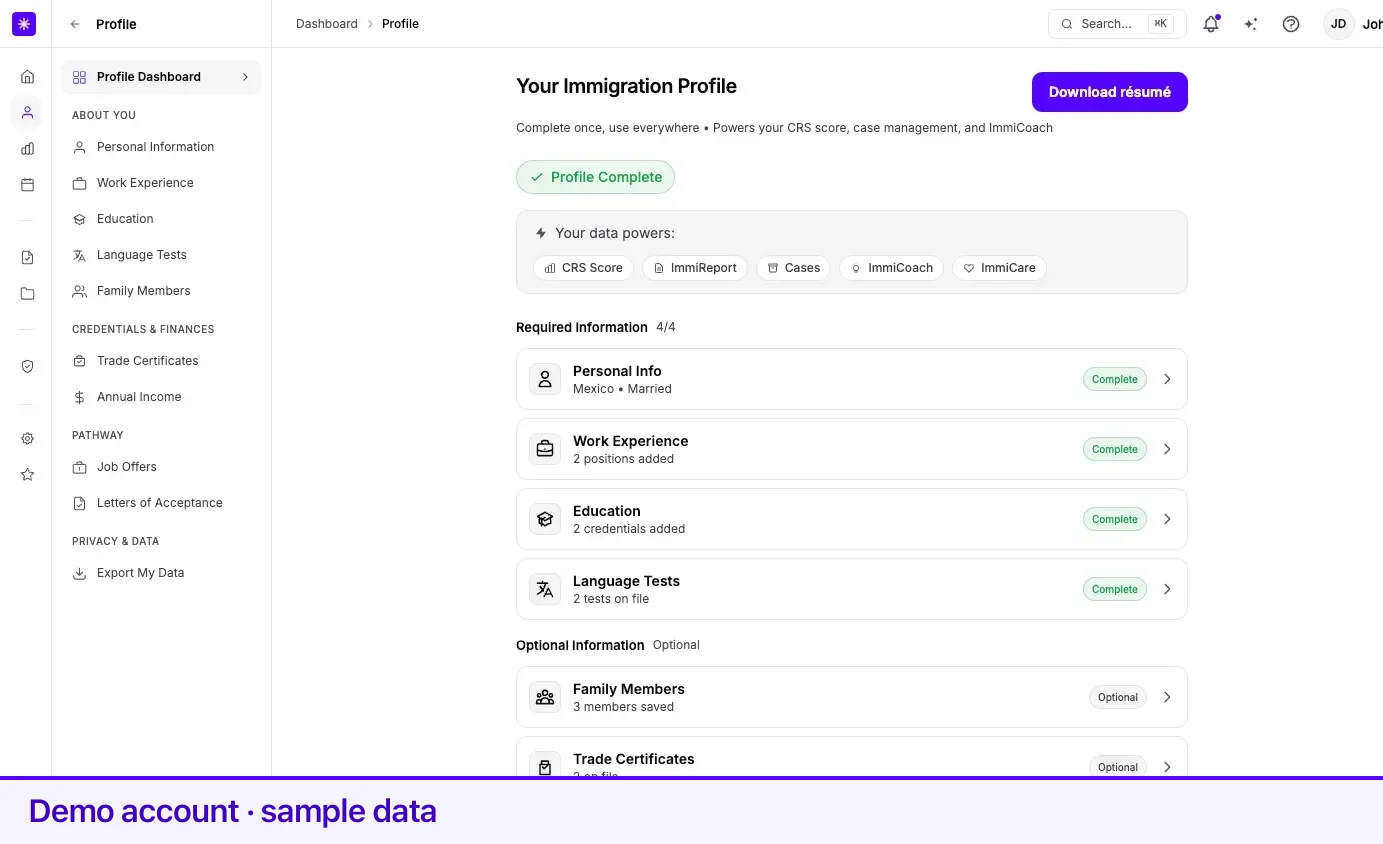
Required Information
Section titled “Required Information”| Section | Complete when | Row shows |
|---|---|---|
| Personal Info | Date of birth, citizenship country, and marital status are all recorded. | Your citizenship and marital status, or Required for assessment. |
| Work Experience | At least one job is recorded. | N positions added, or Add your work history. |
| Education | At least one credential is recorded. | N credentials added, or Add your education. |
| Language Tests | At least one test is recorded. | N tests on file, or Add test results. |
Each row carries one badge:
| Badge | Means |
|---|---|
| Complete | The section meets the rule above. |
| Review Needed | Migrated accounts only — the section has not been confirmed since the move. |
| Not Started | Nothing that meets the rule is recorded yet. |
Above the list, a progress pill shows one bar per section and the count, for example 3/4, with Complete with Lexi →, which opens Lexi to help you fill in what is missing. When all four are complete the pill is replaced by Profile Complete.
Optional Information
Section titled “Optional Information”Family Members, Trade Certificates, Annual Income, Job Offers, and Study Acceptance (letters of acceptance) each carry an Optional badge and a count of what you have saved. They feed the programs that read them but never change the 4/4 count.
Scores and the completion gate
Section titled “Scores and the completion gate”Until all four required sections are complete, your ImmiReport keeps its scores locked, names the sections still missing — Personal Info, Work History, Education, Language — and links to each one. Lexi reads the same result, so it points you to a specific section.
The legacy review flag
Section titled “The legacy review flag”Some accounts were migrated from Lexpoint’s earlier system. On those accounts, and only those, Lexpoint tracks whether you have confirmed each required section since the move.
| Condition | Effect |
|---|---|
| A required section has not been confirmed | Its row shows Review Needed instead of Complete. |
| Any required section is unconfirmed and you have an ImmiReport | Scores are masked, and the report gives a pending review as the reason. |
| All four are confirmed | Normal completeness rules apply. |
Clearing it
Section titled “Clearing it”Open the section and select Confirm & Complete. The button appears on the Basic Information card of Personal information and beside the add button on Work experience, Education, and Language tests. Saving your personal information also confirms that section.
If you have never seen Review Needed, this does not apply to your account.
Related
Section titled “Related”- How your profile is used — what reads each section once it is complete
- Personal information — the three fields the Personal Info rule checks
- Language tests — usually the last section people complete
Frequently asked questions
Which sections count toward profile completion?
Four — Personal Info, Work Experience, Education, and Language Tests. Family members, trade certificates, annual income, job offers, and letters of acceptance are listed as optional and do not change the count.
What does Personal Info need to count as complete?
A date of birth, a citizenship country, and a marital status. It is the same rule your ImmiReport uses before it shows scores.
What does an amber "Review Needed" badge mean?
It appears only on accounts migrated from Lexpoint's earlier system. The section has not been confirmed since the move. Select Confirm & Complete on that section's page to clear it.
Why are my scores hidden even though every section has data?
On a migrated account with an ImmiReport, scores stay masked until all four required sections have been confirmed, however complete the data looks.