

Family members on one case
One case holds everyone applying together. Each person on it is a member, and each member can have their own application under their own program.
Open Members from the case overview tabs.
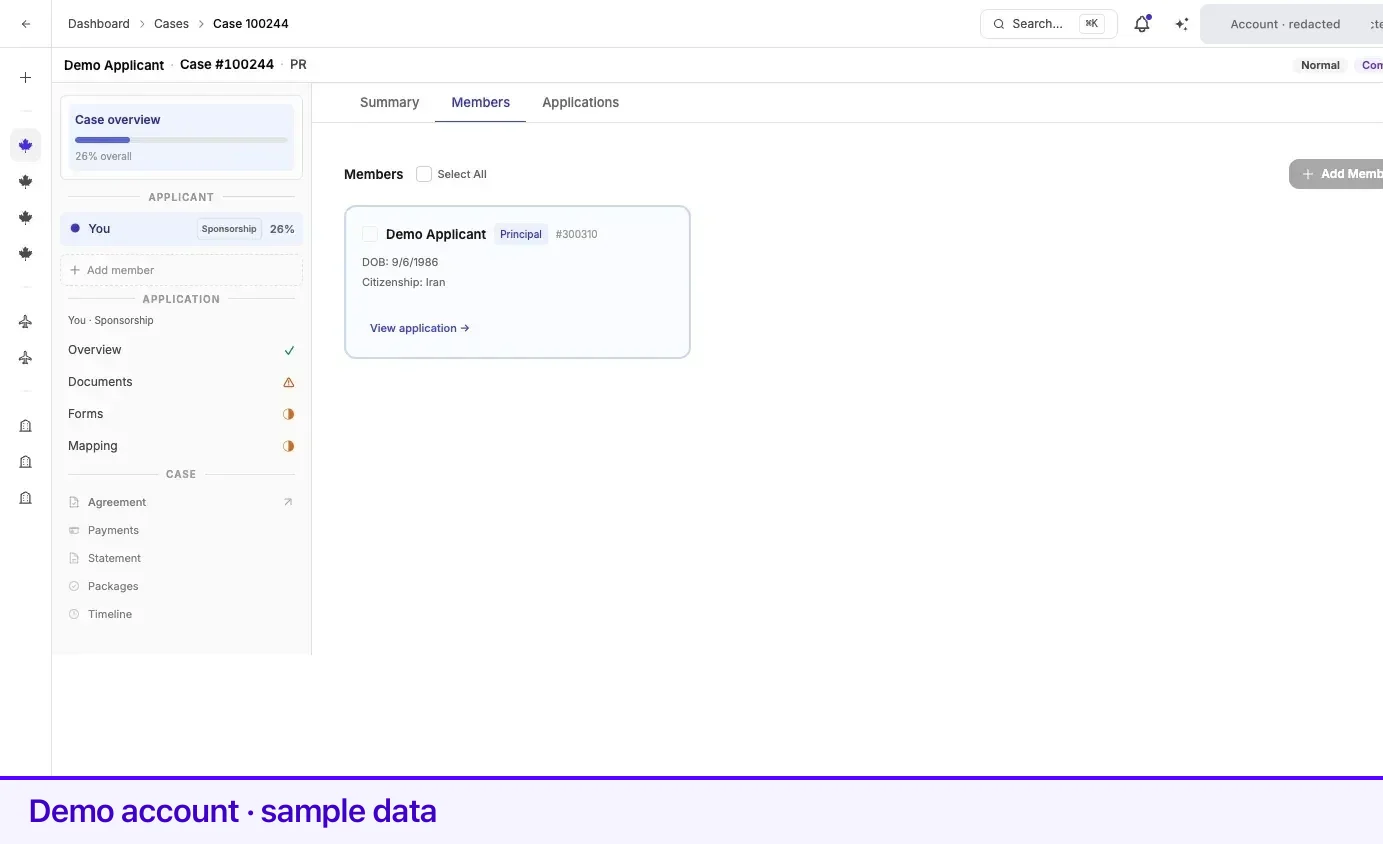
Reading a member card
Section titled “Reading a member card”| On the card | What it is |
|---|---|
| Name | The member’s name as it will appear on their forms. |
| Principal | The principal applicant. Their card is outlined and sits first. |
| Spouse / Child / other | The member’s relationship to the principal. |
| #n | The member number on this case. |
| DOB and Citizenship | The identity details captured when the member was added. |
| View application → | The member already has an application. |
| + Create Application | They do not yet. |
Members are always ordered principal first, then spouse or common-law partner, then children, then anyone else — on this tab and in the case tree. In the case tree, your own row reads You.
Adding a member
Section titled “Adding a member”The principal applicant is created with the case; you never add them.
- Select Add Member.
- If you have people saved in your family directory, they are offered first — Choose from your family directory or add someone new. Pick one, or select Add New Person.
- Fill the form. Every field is required:
| Field | Notes |
|---|---|
| Relationship | Spouse, Child, or Other. |
| First Name, Last Name | English letters, spaces, hyphens, and apostrophes only. |
| Date of Birth | |
| Citizenship Country | |
| Country of Residence | |
| Status in country of residence |
- Save. The member appears on the tab, and you can start their application from their card.
Choosing Spouse or Child pre-fills what Lexpoint already knows from the principal’s profile. The family directory itself is managed at Profile → Family.
When Add Member is blocked
Section titled “When Add Member is blocked”If the case’s family composition is fixed by the proposal you signed, Add Member is disabled and explains: This case is limited to the family members listed on the proposal. Contact your representative if you need to change the family composition.
If some family members could not be brought across when the case was created, the tab shows Some family members could not be added automatically and asks you to add them with + Add Member before submitting.
Editing and removing members
Section titled “Editing and removing members”- The principal applicant cannot be edited or removed from this screen.
- A member who already has an application is locked for editing — the pencil is disabled with Delete application first.
- To remove members, tick their checkboxes and use Delete in the toolbar that appears. Select All ticks every eligible member; the principal’s checkbox stays disabled.
Who sees what
Section titled “Who sees what”Access is granted at the level of the whole case, not per member.
| Who | What they see |
|---|---|
| The principal applicant | The entire case. |
| Anyone else granted access to the case | The entire case — every member, application, document, and form on it. |
| A delegate the principal invited | Not the case itself. A summary card under Cases shared with you — status, stage, requirement count, latest update, and firm. They can contact the firm about the case. See Cases shared with you. |
| Everyone else | Nothing. A case page returns not found. |
There is no per-member privacy inside a case. A dependant with access sees the principal’s documents and the principal sees theirs.
A delegate is not a member. The principal invites one from Settings → Access, signs a consent, and can remove them at any time — see Add a delegate.
Two things stay tied to the principal specifically:
- Review & Confirm on IRCC forms is completed by the principal applicant on their own account. On another member’s form the page reads Waiting for principal applicant.
- The case’s context bar and case list are labelled with the principal’s name.
Related
Section titled “Related”- Case Studio tour — how members appear in the case tree
- Applications and IRCC forms — who confirms which form
- Requirements and checklists — each member’s application has its own checklist
- Your profile — where the family directory lives
- Add a delegate — give someone view access to one case without making them a member
Frequently asked questions
Can my spouse see my documents?
Anyone with access to the case — the principal applicant or a member with an account — sees the whole case, including every member, every application, and the documents and forms on them. Access is not split per person. If that is not what you want, raise it with your representative before uploading. A delegate is different — they see only a summary card, not the case itself.
Why can I not add another member?
Either the case's family composition is fixed by the proposal you signed, in which case Add Member is disabled with an explanation, or a spouse already exists — a case can hold only one.
Why can I not edit a member?
A member with an active application is locked for editing; the tooltip reads "Delete application first". The principal applicant cannot be edited or removed from this screen at all.