

Temporary residence
Temporary residence sits under /app/immireport/tr, and
is organised by purpose rather than by document: Visit, Study, and Work. Each purpose hub
lists the instruments inside it.
| Purpose | Instruments | Assessed today |
|---|---|---|
| Visit | Visitor visa (TRV), eTA | Yes |
| Study | Study Permit | Yes |
| Work | Work Permit | No — stream matching not built yet |
The TR Options card on the ImmiReport hub counts these four.
Your situation
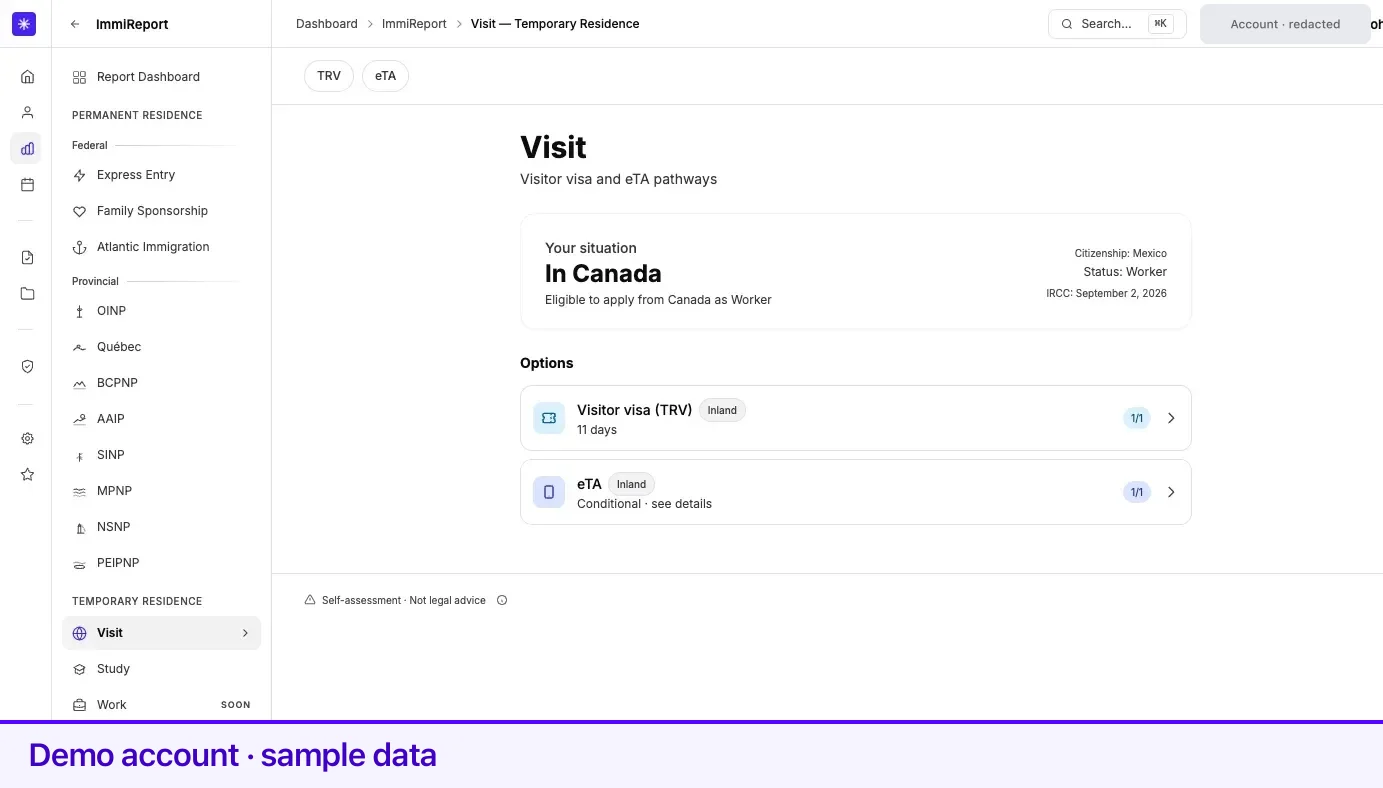
Section titled “Your situation”Every TR hub opens with a Your situation card. It is facts, not a verdict: whether Lexpoint has you in Canada or outside it, what it can tell you about applying from where you are, your citizenship, your current status, and the date of the IRCC processing-time data behind the page.
Two of your profile fields drive most of what follows. Residence country decides whether Lexpoint uses inland or overseas rules and processing times — pages are chipped Inland or Outland accordingly. Citizenship country decides which travel document class applies to you at all.
Instrument statuses
Section titled “Instrument statuses”Instrument rows and cards carry one of these labels:
| Label | Means |
|---|---|
| Eligible to apply | You clear every requirement Lexpoint checks |
| May qualify | It may apply, subject to conditions — open the page for which |
| Not eligible to apply | A checked requirement is unmet |
| Not applicable | This document class does not apply to you |
| More info needed | Your profile is missing a fact Lexpoint needs to classify this |
| Coming soon | Lexpoint does not assess this yet |
On the compact hub rows the same statuses show as 1/1, 0/1, N/A, More info, or Soon.
When Lexpoint cannot classify a document, the row’s caption tells you what to fix rather than leaving you guessing — Confirm citizenship for visitor documents, and for the study permit one of Add LOA, Update LOA dates, or Confirm LOA details.
Visit — visitor visa and eTA
Section titled “Visit — visitor visa and eTA”The TRV and eTA pages each run the standard section order: how selection works, requirements, then next steps. Their selection ladder is short and says so — No pool, no ranking — an officer assesses your application on its own merits for the TRV, and for the eTA most eTA applications are decided within minutes.
The requirements list is derived from what Lexpoint knows about your citizenship, your location, and your current status. Where a document does not apply to you at all, the list says so in one row and stops, with a link to update your citizenship.
The eTA card can be conditional — its caption reads Conditional · see details. That means your citizenship normally needs a visitor visa, but an eTA may still apply to you under conditions IRCC publishes. The eTA page lists them. For the rules themselves, see immigratic.com.
Both pages end with a card showing the IRCC processing time and the fee, and a chart of how that processing time has moved.
Study — study permit
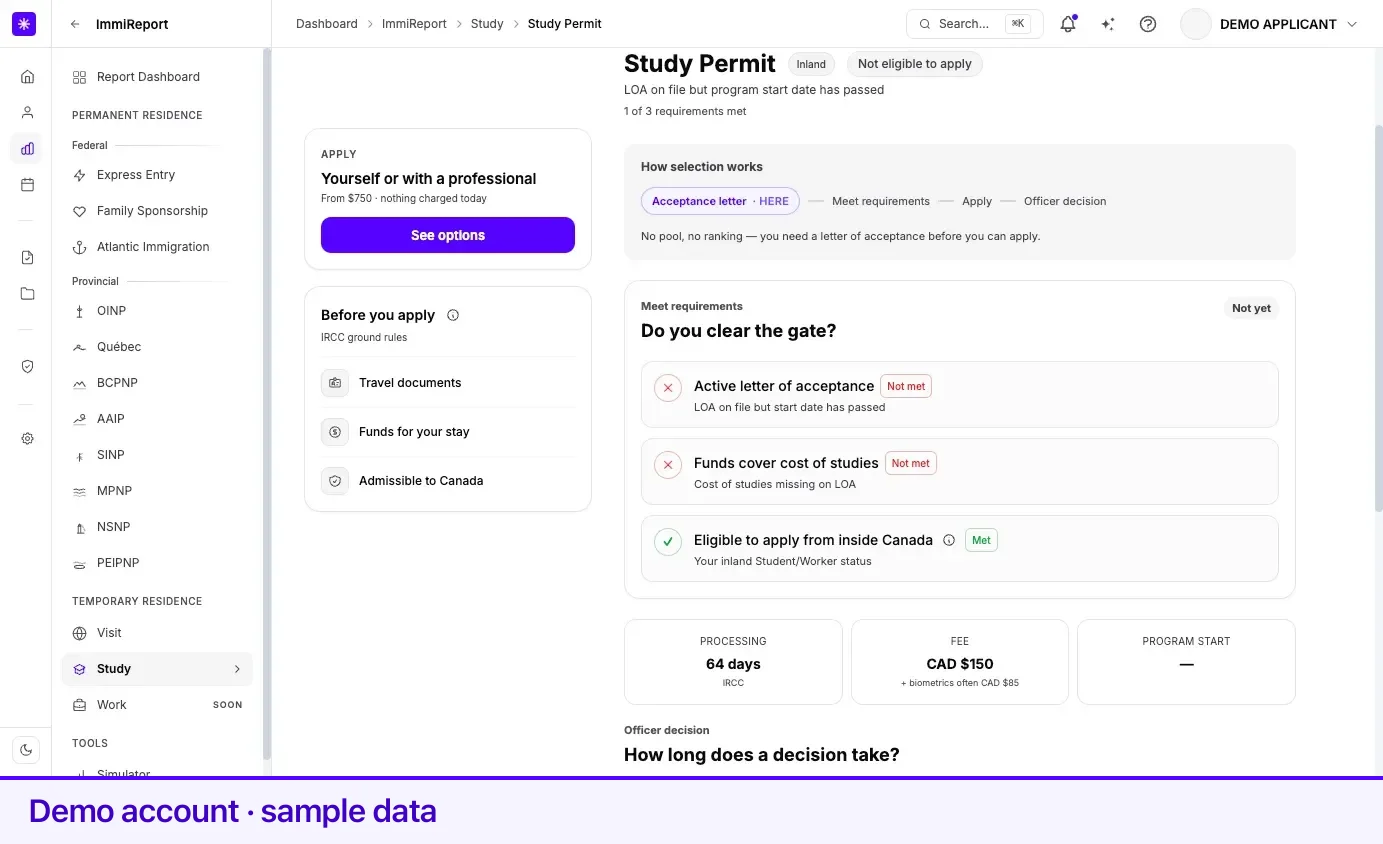
Section titled “Study — study permit”The study permit ladder puts the acceptance letter first: No pool, no ranking — you need a letter of acceptance before you can apply. That is why the study card asks for a letter of acceptance before it will assess anything.
The requirements list marks each row Met, Not met, or N/A, with a detail line under rows that need explaining. Where a requirement depends on something only you can confirm, the page gives you the control to confirm it inline rather than sending you elsewhere.
When your profile holds a letter of acceptance with cost of studies, a proof of funds card compares the funds recorded against the cost and shows any shortfall.
The next-steps row shows the IRCC processing time, the fee, and your program start date.
Work — work permit
Section titled “Work — work permit”The work permit page opens, shows the ladder — No pool, no ranking — the basis for the permit decides which requirements apply — and then states in the requirements section that stream matching is coming soon. It carries a Coming soon verdict rather than an eligibility answer.
What it does give you today is real: the IRCC processing time for a work permit from where you are, the fee, and the processing-time trend.
Processing times
Section titled “Processing times”Every TR page shows a processing time drawn from IRCC’s published bulletins, with the source and the publication date visible. Lexpoint picks the right figure for you from your residence country: the inland figure when you are in Canada, and your country’s overseas figure when you are not. Where IRCC has published nothing for your combination, the card reads Not published by IRCC rather than inventing an estimate.
For the rules behind any of these documents, see immigratic.com.
Related
Section titled “Related”- Reading your report — the section order these pages follow
- What ImmiReport is — coverage and recalculation
- Your profile — citizenship, residence, status, and letters of acceptance
- Documents — where a letter of acceptance is stored
Frequently asked questions
Why does my work permit page say "Coming soon"?
Work permit stream matching is not built yet. Lexpoint shows the IRCC processing time and the fee for a work permit, and says plainly that it cannot yet tell you which stream fits — rather than showing a verdict it cannot support.
Why does my eTA card say "Conditional"?
Lexpoint marks the eTA conditional when your citizenship normally needs a visitor visa but an eTA may still apply to you under conditions IRCC publishes. The eTA page lists them. For the rules themselves, see immigratic.com.
Are the processing times on these pages Lexpoint's estimates?
No. They are IRCC's published figures, and the card is marked IRCC when the value came from a published bulletin. Lexpoint chooses which figure applies from your residence country — inland when you are in Canada, your country's overseas figure when you are not. If IRCC has published nothing, the card reads "Not published by IRCC".