

Payments and invoices
Money moves at two points and only two: the first payment that activates a signed retainer, and the scheduled payments that follow it on the case. Everything else on this page is a record of one of those.
The first payment
Section titled “The first payment”The first payment is made from the proposal, after signing. The Acceptance section shows Pay … Deposit, which opens Stripe Checkout in a separate step.
If the proposal covers a spouse or dependents whose family records are incomplete, the button reads Complete family details instead. It scrolls to Applicants covered, where each card lists what is missing and Complete details opens a window to fill it in; Pay … Deposit returns once every gap is closed. The checks are listed in Understanding your proposal.
When Checkout completes you are returned to a setup screen rather than the proposal. It reports the case being built as it happens — payment confirmed, signed agreement confirmed, the case created, each applicant added, applications started, profile data copied in, and the first checklist loaded. Leaving that screen does not interrupt anything.
Later payments
Section titled “Later payments”Every payment after the first is made on the case, under the Payments tab.
A summary bar across the top shows Total, Paid, Outstanding, Credits where any have been applied, and Gov. Fees where the engagement is full representation.
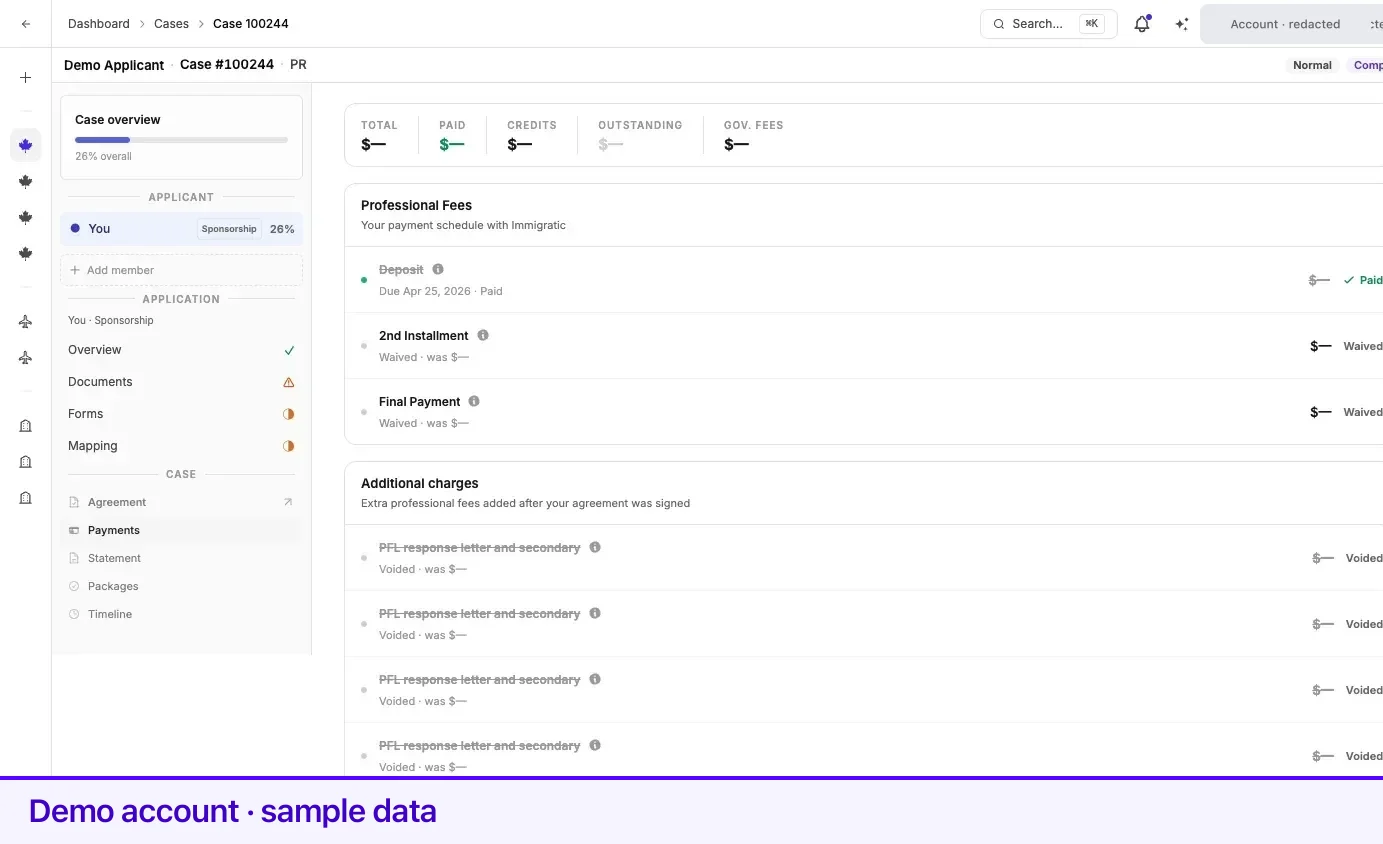
Below it, Professional Fees lists your payment schedule with the firm. Each row carries a status, an amount, and an action:
| Status | What it means | Action available |
|---|---|---|
| Upcoming | Scheduled, not yet payable. | None |
| Due | Payable now. | Pay |
| Overdue | The due date has passed. | Pay |
| Partial | Part of the amount has been paid. | Balance |
| Paid | Settled. The row is struck through. | None |
| Waived | Not collected. | None |
| Written off | Closed without collection. | None |
| Voided | Cancelled. | None |
| Refunded | Returned, with the refunded amount shown. | None |
Selecting Pay or Balance opens a Stripe payment link for that specific row and returns you to the Payments tab afterwards. Nothing is charged inside Lexpoint itself.
Two more panels can appear below the schedule:
- Additional charges — extra professional fees added after your agreement was signed. They carry the same statuses and the same Pay action.
- Government fees — informational only, on full-representation cases. They are itemized per person and paid to the government when the application is filed, with e-Transfer details and the reference to quote shown beneath the total.
Where a school or employer is funding the professional fees, the schedule says so and no client payment is requested for the covered portion.
Paying from an email link
Section titled “Paying from an email link”Payment reminders carry a Pay now link that works without signing in, and it lands on a plain outcome page afterwards:
- Payment received — thank you. Your payment went through, with the case, the charge, and the amount paid listed. A receipt is emailed if an address is on file.
- Payment cancelled. No charge was made. Use the reminder email’s link again, or sign in and pay from the case.
Both pages offer a link back into your account.
Receipts and statements
Section titled “Receipts and statements”Records live on the case, under the Statement tab, split into two:
- Statement — the latest formal statement issued on your case.
- Receipts — one entry per fee recognized, newest first.
Opening a receipt shows a Statement of Professional Fees: the firm’s letterhead, a reference number, the recognition date, who it was prepared for, the milestone it relates to, the case, the line items, the subtotal, tax where it applies, and the total recognized. Print / Save PDF at the top produces a copy.
Until your representative has recognized any fees, the Receipts list says so rather than showing an empty table. Statements and receipts are access-checked on every open: an account that is not entitled to a particular document is sent back to billing rather than shown it.
Related
Section titled “Related”- Payment plans — how the schedule was set and what happens if an instalment is missed
- Accept and sign a retainer — the signature that creates the schedule
- Cases — where the Payments and Statement tabs live
- Case fees and statements — the Due and Statements tabs in Settings
- Billing — your Lexpoint subscription, which is separate from case fees
Frequently asked questions
Is a case payment the same as my Lexpoint subscription?
No. Case fees are billed against a signed retainer and appear on the case. A Lexpoint subscription is separate and is managed on the Subscription page in Settings.
I paid from a link in an email and never signed in. Did it go through?
The page you land on says so directly — "Payment received — thank you." with the amount paid, or "Payment cancelled" with no charge made. Signing in and opening the case payments tab confirms it either way.
Why does my receipt say it is not a request for payment?
A fee receipt records fees that have already been recognized. Amounts that are still due are collected through the payment schedule and additional charges on the case, not through that document.