

Your first look at the dashboard
Finishing onboarding drops you on /app/dashboard. Expect
it to look like a set of starting points rather than a set of answers — you have given Lexpoint five
facts, and almost everything it shows is calculated from more than five facts.
That is the whole job of this first visit: see what is empty, and fill the one thing that unlocks the rest.
The welcome dialog
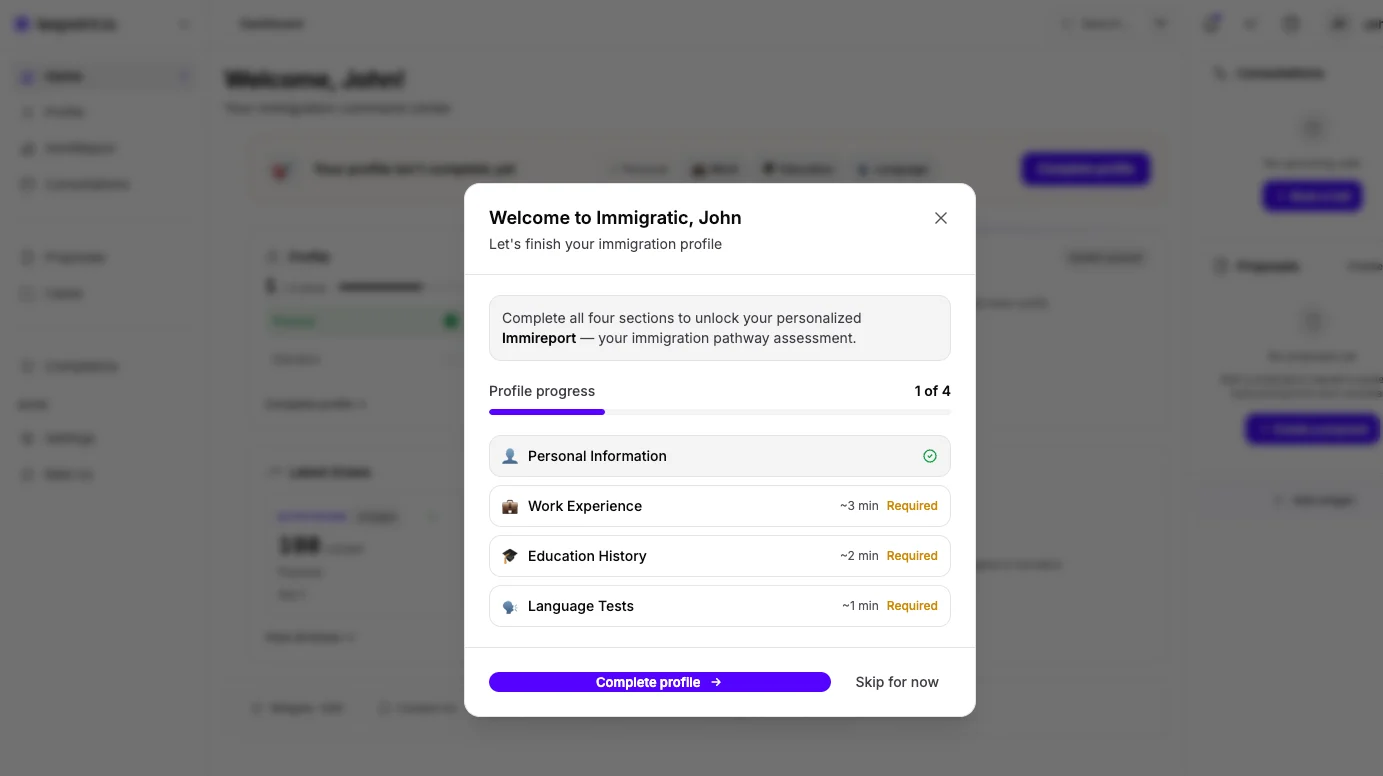
Section titled “The welcome dialog”A dialog opens over the dashboard on the first visit, subtitled Let’s finish your immigration profile. It states that completing all four sections unlocks your personalized ImmiReport.
Below that is a Profile progress counter and the four sections, each with a rough time and a Required marker until it is done:
| Section | Time shown |
|---|---|
| Personal Information | ~2 min |
| Work Experience | ~3 min |
| Education History | ~2 min |
| Language Tests | ~1 min |
Complete profile takes you to the first unfinished section. Skip for now closes the dialog and leaves you on the dashboard.
Skipping costs you nothing permanent — the same checklist is on the Profile card, in the same order.
The Profile card
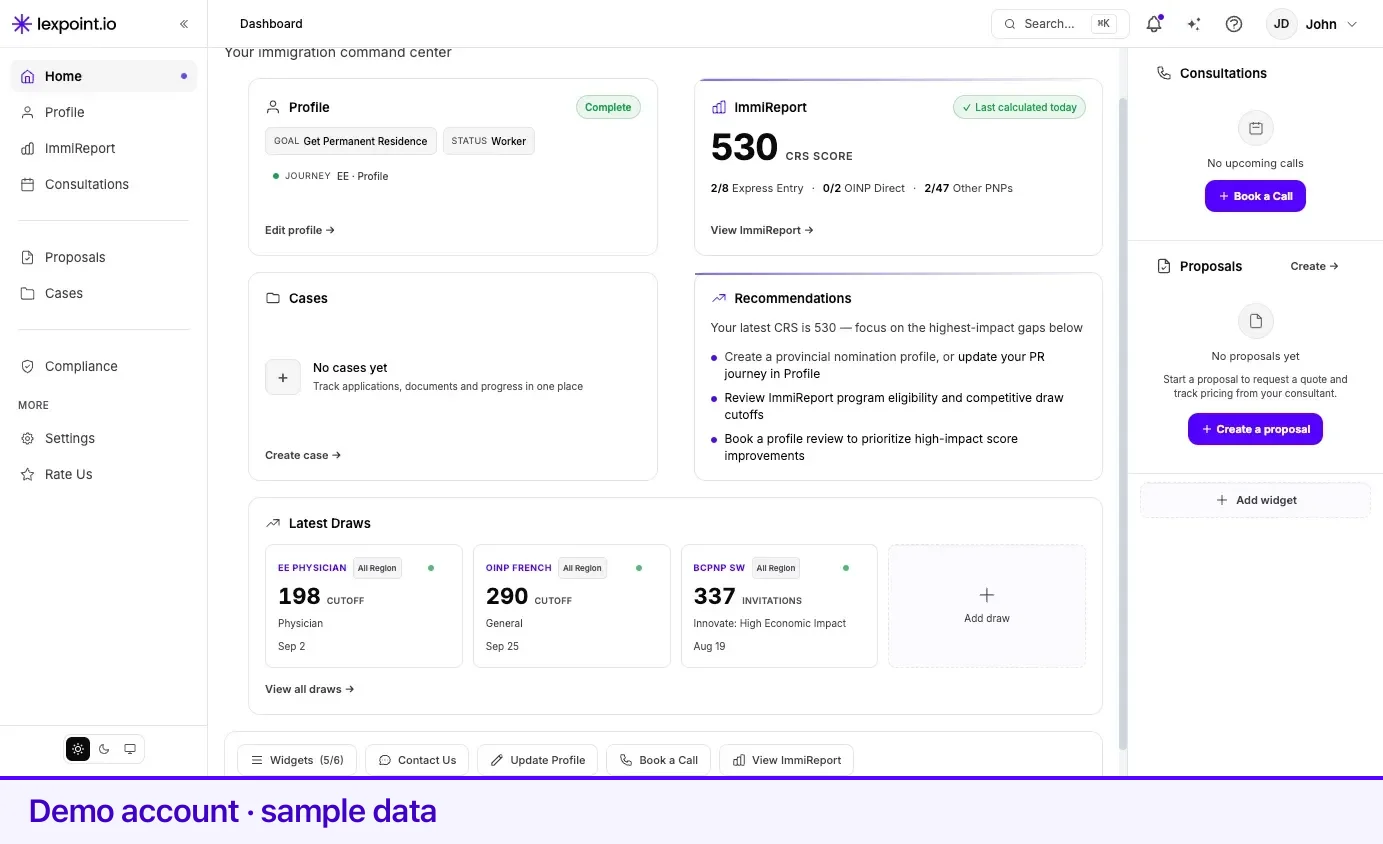
Section titled “The Profile card”Headed Profile, this card is on every dashboard. On a new account it reads Get started — Complete your profile to unlock eligibility scoring — above the same four-item checklist, where each item is a link into that section of your profile. It also shows the Goal and Status you gave during onboarding, with a control to change either, and an Edit profile link.
This is the card to act on first. Everything else on the page is downstream of it.
The ImmiReport card
Section titled “The ImmiReport card”Headed ImmiReport. Until your assessment is complete it shows Program eligibility — Federal and provincial pathways vs latest draw cutoffs — and a Complete profile link. There is no score yet because there is nothing to score.
If your onboarding answers recorded you as a Canadian citizen, or as a permanent resident living in Canada, this card instead reads Not applicable for your status, and says Lexpoint is building tools suited to that situation. Nothing has gone wrong.
Once a report exists, the card carries a freshness label showing when it was last calculated and whether a recalculation is under way.
The rest of the page
Section titled “The rest of the page”- Latest draws appears when there are recent draws to show.
- Cases appears when your account has case access. A new self-serve account normally does not.
- Consultations and Proposals sit in the right-hand column on a wide screen, and move into the main flow on a narrow one. Both are empty until you book or receive something.
- Cards tied to a stage you have not reached — an application timeline, a filing deadline, a processing-time estimate — are not shown as empty boxes. They appear when the situation that makes them meaningful exists.
The chip row
Section titled “The chip row”A strip of controls runs along the bottom of the page:
| Chip | What it does |
|---|---|
| Widgets | Opens the dashboard layout picker. The number beside it is how many of the six main-column slots are in use. |
| Contact Us | Opens support. |
| Update Profile | Goes to your profile. |
| Book a Call | Opens the consultation booking options. |
| View ImmiReport | Appears once a report exists. |
What to do next
Section titled “What to do next”Open your profile and complete the four sections. In order of what they unlock: Personal Information, then Work Experience, then Education History, then Language Tests. The welcome dialog’s own estimate for all four is about eight minutes.
The dashboard is not worth revisiting until then. With the sections done, the ImmiReport card stops being a link and starts being a report.
Related
Section titled “Related”- Your profile — the four sections, field by field
- ImmiReport — what the report calculates once your profile is complete
- Free and Pro — which of these surfaces is free, and what a paid plan adds
- Onboarding, step by step — the answers this dashboard is built from
Frequently asked questions
Why is my dashboard mostly empty after onboarding?
Onboarding collects five facts. The cards on the dashboard are calculated from your full profile, so they show a starting state and a link until the four profile sections are filled in.
I dismissed the welcome dialog. Can I still see what is missing?
Yes. The Profile card on the dashboard carries the same four-section checklist, with a link into each section.
Why do I not have an ImmiReport card?
The ImmiReport card is shown to people whose profile suggests they may be working toward Canadian status. An account recorded as a Canadian citizen, or as a permanent resident living in Canada, gets a card saying the report is not applicable to their status instead.
Can I change which cards are on the dashboard?
Yes. The Widgets control in the chip row at the bottom of the page opens the picker, and the count beside it shows how many of the six slots are in use.