

Scores and how they are calculated
Every number on ImmiReport is calculated, not entered. This page explains where each one comes from and where the work happens.
One calculation, one record
Section titled “One calculation, one record”When your report is recalculated, a single orchestrating function in Lexpoint’s database does the whole job at once: it reads your profile, computes every score and every eligibility flag, and writes them to your report record in one pass. Nothing is computed in your browser, and no page calculates a number of its own — the pages read what was already written.
This is why a recalculation moves several numbers together, and why a partially updated report is not a state you can land in.
What feeds it
Section titled “What feeds it”The calculation reads these parts of your profile:
| Source | Feeds |
|---|---|
| Personal info | Age, marital status, citizenship, residence, current status |
| Work history | Canadian and foreign experience, occupation, hours, overlapping roles |
| Education history | Credentials, where they were earned, field of study |
| Language tests | Your best result in each of English and French |
| Job offers | The primary offer’s occupation, wage, location, and employment terms |
| Letters of acceptance | Institution, dates, and cost of studies, for study permit assessment |
| Trade certificates | Active certificates and licences, for streams that ask for one |
| Income | Recorded income, for streams that score earnings |
| Family | Your spouse or partner, whether they accompany you, and relatives in Canada |
If your partner’s Lexpoint account is connected to yours through a household link, the spouse facts come from their own profile — their education, language tests, Canadian work, date of birth, and status — instead of the family details you entered. Whether they accompany you still comes from your own family details, and their edits queue your report for recalculation too.
Where you have more than one language test, Lexpoint uses your best result per language rather than your most recent. Where you have more than one job offer, the offer marked as primary is the one that drives your scores — switching which offer counts is an ImmiReport Pro feature.
Where you have overlapping jobs, Lexpoint works out the overlap in days rather than adding the two periods together.
The CRS total, and its four parts
Section titled “The CRS total, and its four parts”Lexpoint stores your CRS score as the total and the four components that make it up. The spouse component is also stored split into education, language, and Canadian work, so the spouse drawer reads the same figures the calculation produced.
| Component | What it holds |
|---|---|
| Core | Your own age, education, language, and Canadian work experience factors |
| Spouse | Your accompanying partner’s contribution |
| Transferability | Points that come from combinations of your factors rather than any one of them |
| Additional | Everything scored outside the core factors |
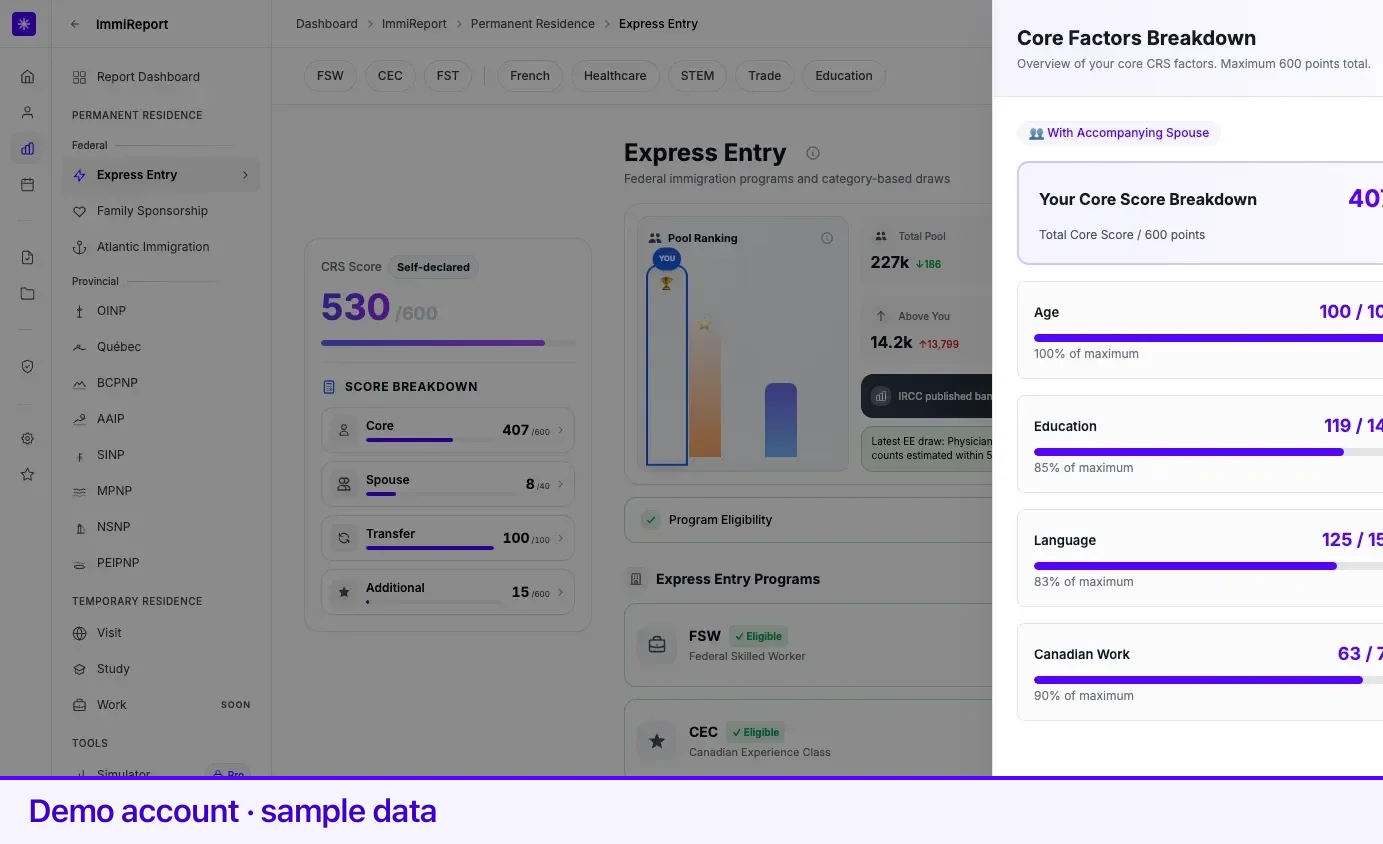
The Score Breakdown panel on the Express Entry hub shows all four. Opening a component — Core, in the shot below — slides in a Core Factors Breakdown drawer with the rows behind it. Each factor also has a scoring-rules drawer showing the point table Lexpoint applies for that factor, split by whether a spouse accompanies you.
Lexpoint applies the tables; it does not set them. For the rules themselves, see immigratic.com.
Self-declared, not official
Section titled “Self-declared, not official”The CRS score on ImmiReport is labelled Self-declared, and the label is doing real work. It is Lexpoint’s calculation from the answers in your Lexpoint profile. Your official score is the one IRCC computes from the Express Entry profile you submit to them.
They can differ for ordinary reasons — a credential assessed differently, a work period counted from different dates, an answer you gave one way here and another way there. Treat the Lexpoint number as what your profile implies, and reconcile it against IRCC’s before you rely on it.
Provincial scores
Section titled “Provincial scores”Provincial programs are scored separately, on their own scales, and stored beside the CRS numbers. Each province’s hub shows the total Lexpoint calculated for it, and the stream pages show what went into it. Ontario’s Workforce Priority score and Québec’s Arrima score are the two most visible examples.
A provincial score and the CRS total are not comparable to each other. They answer different questions on different scales.
Eligibility flags
Section titled “Eligibility flags”Alongside the scores, the same calculation writes one true/false flag per stream — that is what the
N/M badges on the hubs count, and what the Yes / Maybe / Not yet chip on a program page reads
from.
A flag is set by evaluating the requirements Lexpoint checks for that stream against your profile. A stream shows as ineligible when a requirement Lexpoint checks is unmet, and the requirements section on the stream’s page names which one.
Streams Lexpoint has archived are excluded from these counts, so the denominator reflects what is open, not the full history.
What is kept
Section titled “What is kept”Lexpoint records each recalculation and each simulator run, with a snapshot of your report before and after. Two things on the product use those records:
- Delta chips on the ImmiReport hub — a small
+8or-1beside a number that a recent recalculation moved, labelled since your last update with the date. Lexpoint looks back through your most recent runs and shows the first one that actually moved a card. - Run history on the simulator page’s History tab, listing your recent runs with what each one was, who triggered it, and how the score moved.
Older snapshots are not offered as a long-term score chart, and for good reason: a snapshot from before a province was added to ImmiReport would understate what the report covered at the time.
Related
Section titled “Related”- Your profile — the fields every number here is derived from
- Express Entry — where the CRS breakdown is displayed
- The simulator — testing a change without making it
- What ImmiReport is — when the calculation runs
Frequently asked questions
Where does the calculation actually run?
In Lexpoint's database, not in your browser. One orchestrating function reads your profile tables, computes every score and eligibility flag, and writes them to your report record in a single pass. Nothing is calculated on the page you are looking at.
Why did my score change when I did not touch the field it depends on?
Most factors are combinations. Changing a language test can move transferability points that depend on both language and work experience, and adding Canadian work experience can change several scores at once. If your partner's account is linked to yours, their profile edits can move your spouse factors too. The score breakdown shows which component moved.
Can I see what my score was before?
Yes, in a limited way. The ImmiReport hub shows a delta chip beside a number that a recent recalculation moved, labelled with the date. ImmiReport Pro's simulator page also carries a run history of your recent recalculations and scenarios.