

The simulator
The simulator answers one question: if a fact about you changed, what would your report look like? It runs the same calculation your real report uses, applies your chosen changes on top of a snapshot of your profile, and shows you the difference — without touching anything.
Before you start
Section titled “Before you start”The simulator is an ImmiReport Pro feature. On a free account, opening
/app/immireport/simulator returns you to the ImmiReport hub with the upgrade panel open, rather
than showing a locked page you cannot use.
Building a scenario
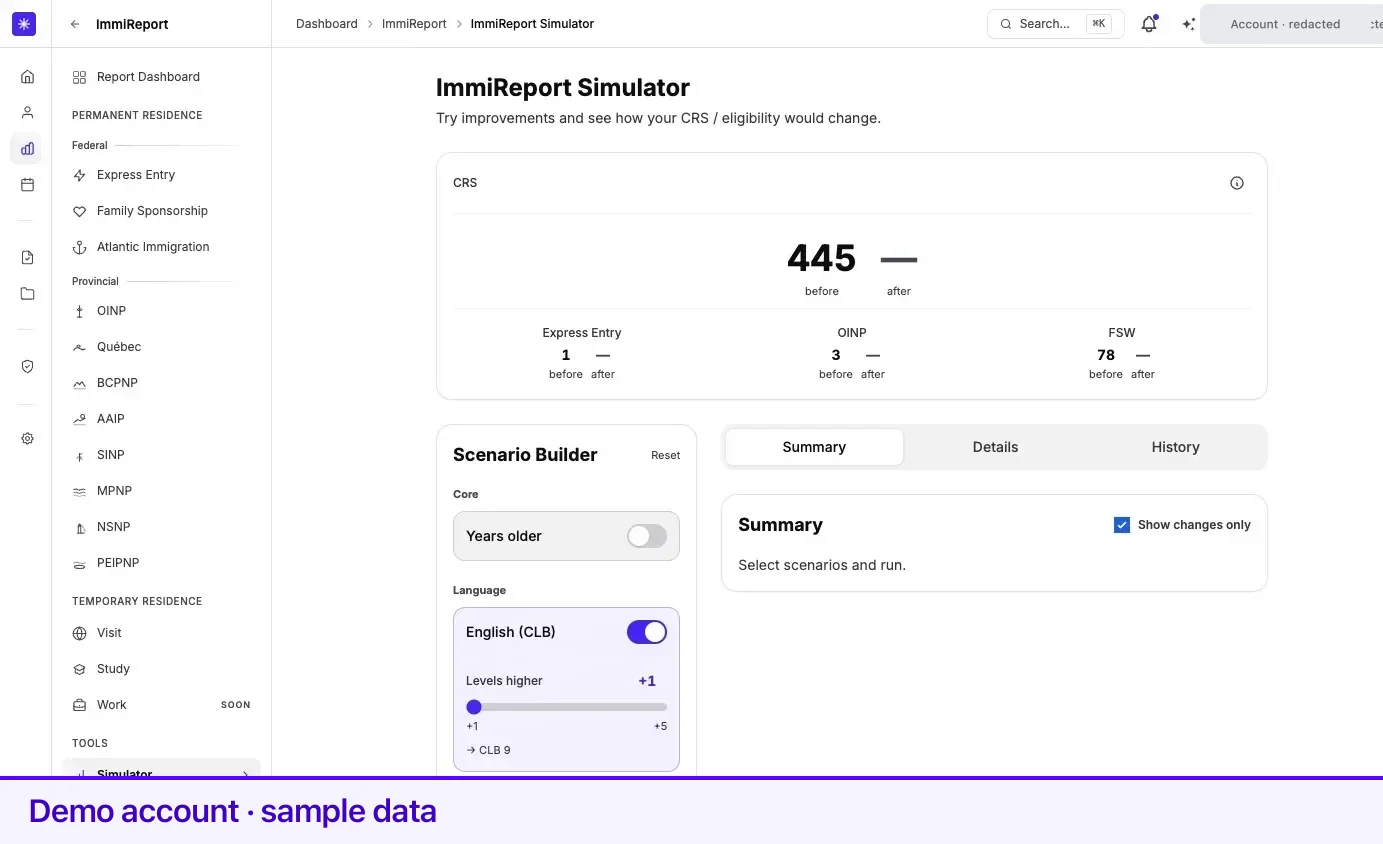
Section titled “Building a scenario”Open ImmiReport Simulator. The left column is the Scenario Builder, in sections:
| Section | What you can change |
|---|---|
| Core | Years older — add years to your age |
| Language | Levels higher — raise your English or French level |
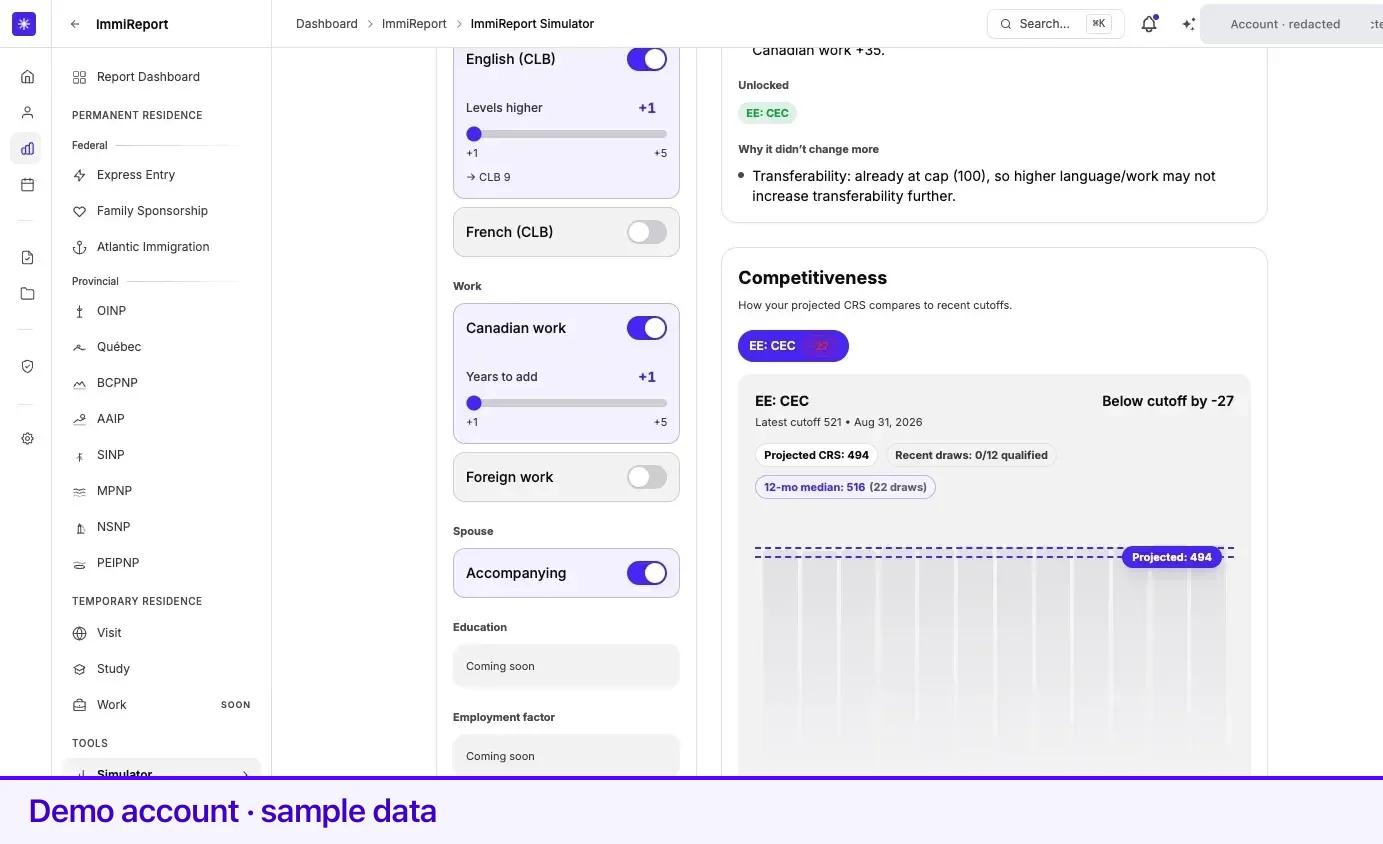
| Work | Canadian work and Foreign work — add years to either |
| Spouse | Accompanying — switch your spouse or partner to accompanying you, or not |
| Education, Employment factor, Region | Coming soon |
Each control is a toggle with a value beside it, so you can stack several changes into one scenario: two more years of Canadian work and a higher language level, together.
The Spouse section appears only when your family details include a spouse or common-law partner who is not a Canadian citizen or permanent resident. Its Accompanying toggle starts at what your profile says today; flip it to see your scores with or without them.
When the scenario is ready, select Run simulation. The button reads Running… while Lexpoint works through analyzing, applying, calculating, and finalizing.
Reading the result
Section titled “Reading the result”The right side has three tabs: Summary, Details, and History.
Summary is the default. It gives the projected score, What changed? listing the score deltas the scenario produced, Unlocked for streams that became eligible that were not before, and Competitiveness, comparing your projected CRS against recent cutoffs.
When a scenario moves nothing, the panel says so plainly — No score deltas detected under the selected scenarios — and offers Why it didn’t change more rather than leaving you to work it out. A change that produces no movement is a real answer, and the simulator gives it as one.
Details opens a Detailed breakdown of the same result factor by factor, grouped as CRS core, Spouse, Transferability, Additional, and FSW factors, with each row’s before and after.
History shows your Run history — your five most recent runs, both simulations and recalculations — with what each one was, who triggered it, and how the score moved.
What a projection is and is not
Section titled “What a projection is and is not”The simulator projects from the same rules and the same profile snapshot your report uses, so it is internally consistent. It is still a projection:
- It applies the change you specify and nothing else. Real life rarely changes one fact in isolation.
- Cutoff comparisons use recent draw data. Past cutoffs are not a forecast of future ones.
- Every caveat on your real score applies here too, including that the score is self-declared rather than IRCC’s.
Related
Section titled “Related”- Scores and how they are calculated — the calculation the simulator reuses
- Express Entry — where the CRS breakdown lives
- Your profile — where to make a change for real
- What ImmiReport is — what happens after you do
Frequently asked questions
Does running a simulation change my profile or my report?
No. The simulator computes a projection and never writes to your profile or your report. Your real scores are untouched, and a scenario you run does not need to be undone.
Is the simulator a different calculation from my real report?
No. It runs the same database logic your report uses, with your chosen changes applied on top of a snapshot of your current profile. That is the point — a projection from a different engine would not be comparable.
Why do the Education, Employment factor, and Region sections say "Coming soon"?
Those scenario types are not built yet. The simulator today covers age, language, work experience, and — when you have a spouse or partner on file — whether they accompany you.