

Job offers
A job offer is a role you have been offered but have not necessarily started. Work you have actually done goes in Work experience. The one link between the two: a current job in Canada on your work history also appears here as a Synced offer.
Job offers in Lexpoint are Canada-only. The form asks for a Canadian city and fills the province in from it; there is no country picker.
The list
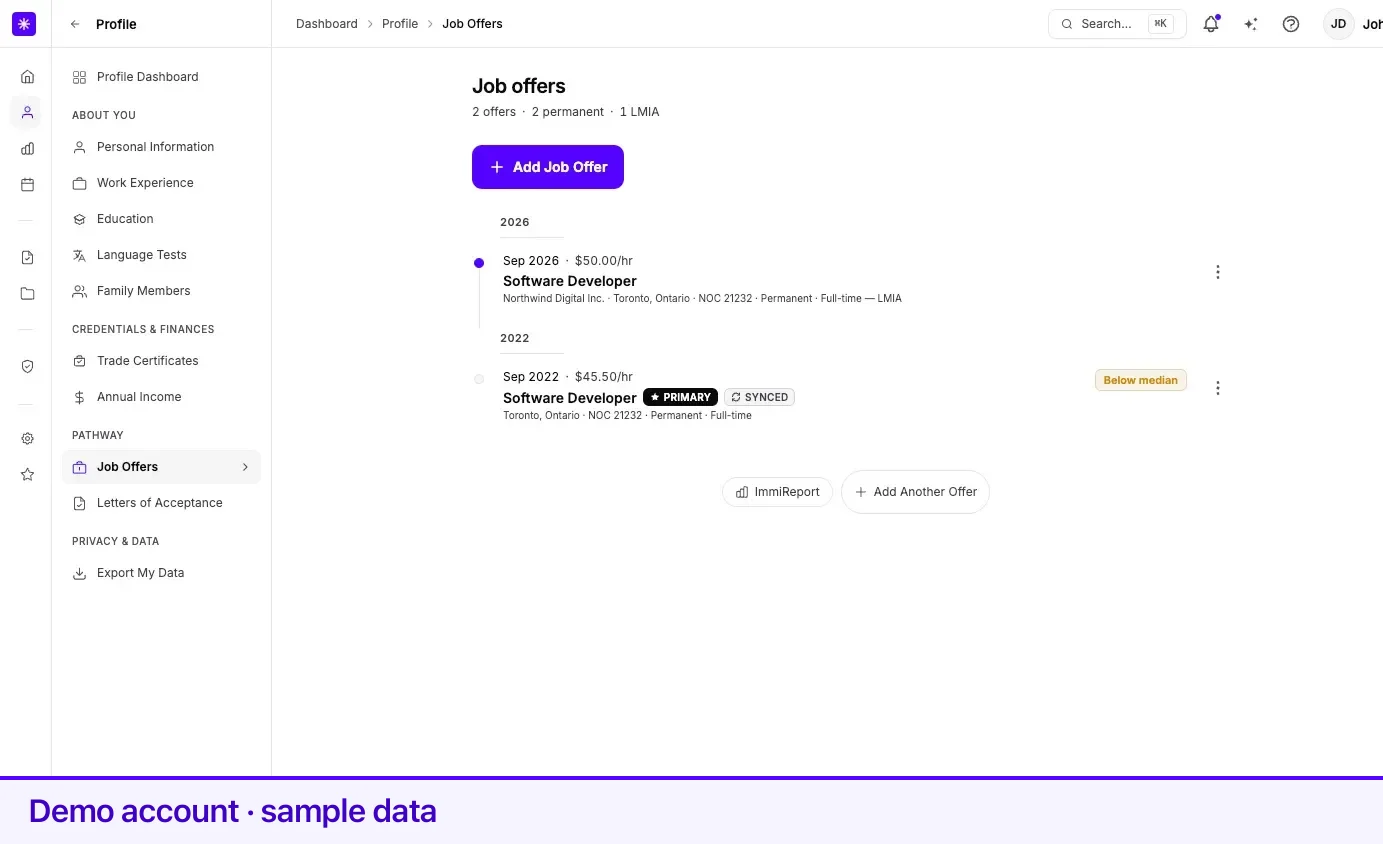
Section titled “The list”Offers are shown as a timeline, newest offer date first. The line under the Job offers heading reads N offers · N permanent · N LMIA.
| Element | What it does |
|---|---|
| Row | Offer month and hourly wage, job title, and a caption: company, place, NOC, Permanent or Temporary, Full-time or Part-time, and LMIA after a dash. |
| Markers | Primary on the primary offer. Synced on an offer mirrored from a current job. |
| Chips | NOC missing when the offer has no NOC. Below median when the wage is under the median reference wage for the NOC and place. |
| Selecting a row | Opens a panel with Edit record →, Make primary → (on any other offer), NOC Intelligence →, and, on the primary offer, the Employer eligible switch. |
| More actions menu | Make primary (on any other offer), Edit, and Delete. Deleting asks Are you sure you want to delete this job offer? |
Section 1 — Employer
Section titled “Section 1 — Employer”| Field | What it means | Required |
|---|---|---|
| Company Name | The employer making the offer. | Yes |
| City in Canada | Searchable list of Canadian locations. Province is set from the city you pick. | Yes |
| Province | Not entered directly — set from the city you pick. | Derived |
Section 2 — Role
Section titled “Section 2 — Role”| Field | What it means | Required |
|---|---|---|
| Occupation (NOC Code) | Searchable by code or job title. | Yes |
| Occupation inside this NOC | Appears only when the NOC is split into more than one OaSIS occupation. Optional. This is which job the work was, not a second immigration code. | No |
| Your job title | The title on the offer — not the official NOC title. Pre-filled from the NOC you pick; you can change it. | Yes |
A Selected NOC card shows the code, TEER, and title, and its info icon opens the NOC’s duties and requirements. On a saved offer the card links to NOC Intelligence → — the labour-market and program briefing for that NOC, with no employment-letter section. See NOC Intelligence.
Section 3 — Terms
Section titled “Section 3 — Terms”| Field | What it means | Required |
|---|---|---|
| Offer Date | Date on the offer letter — today or earlier (not a future start date). | No |
| Permanent job offer | Toggle. | No |
| Has LMIA | Toggle — a Labour Market Impact Assessment supports this offer. | No |
| LMIA Number | Appears when Has LMIA is on. | No |
| Job Offer Number | Appears when Has LMIA is on. Marked Optional in the form. | No |
Section 4 — Pay
Section titled “Section 4 — Pay”| Field | What it means | Required |
|---|---|---|
| Work schedule | Hours per week, between 1 and 168. How many hours you will work each week. Full-time = 30+. | Yes |
| Hourly pay rate | Your wage in Canadian dollars per hour. | Yes |
| Full-time | Not a field you set — Lexpoint marks the offer full-time when the work schedule is 30 hours or more. | Derived |
With a NOC and a city set, the section loads a Job Bank wage band for the place. It plots your rate against up to four markers — Provincial floor, Low, Median, and High — and marks each one Met or Below.
Synced offers
Section titled “Synced offers”A current job on your work history appears here as a Synced offer when its country is Canada and it has a province and a NOC. The offer follows the job: it is removed when the job ends or is deleted.
- Edit record on a synced offer reads Edit in work history → and takes you to Work experience.
- A synced offer has no Delete.
- A synced offer can be your primary offer.
The primary offer
Section titled “The primary offer”One offer at a time is primary; it carries the Primary marker. Choose Make primary from any other offer’s More actions menu or its panel.
Your first Canadian offer can be made primary at no cost. Switching primary away from an offer once you have more than one Canadian offer requires ImmiReport Pro — the attempt opens the upgrade dialogue rather than failing silently. The same gate applies to deleting an offer that is currently primary.
The primary offer’s panel also carries the Employer eligible switch. It is a self-declared flag for the primary offer’s province, and it appears only on the primary offer. What the primary offer drives is covered on Your primary job.
Adding and editing
Section titled “Adding and editing”- Open Profile → Job Offers.
- Select Add Job Offer.
- Work through Employer, Role, Terms, and Pay with Continue. Save on the last section adds the offer.
- To change an offer, choose Edit from its More actions menu.
Saving changes shows Job offer updated! Your Immireport will refresh within 24 hours.
Related
Section titled “Related”- NOC Intelligence — market and programs for an offer’s NOC
- Your primary job — what the primary offer changes and what it does not
- Work experience — for work you have already done, and the source of synced offers
- How your profile is used — what recalculates when you add an offer
Frequently asked questions
Can I record a job offer from outside Canada?
No. The job offers form is Canada-only — it asks for a Canadian city and derives the province from it. Work done outside Canada belongs in Work experience instead.
Why is the offer date rejected when I enter my start date?
Offer Date is the date printed on the offer letter, not the date the job starts. Lexpoint requires it to be today or earlier and rejects any future date.
Why is there an offer I never added?
A current job in Canada with a NOC on your Work experience also appears here as a Synced offer. You edit it in Work experience, and it cannot be deleted here.
Why can I not switch which offer is primary?
Your first Canadian offer becomes primary without restriction. Switching primary to a different offer once you have more than one requires ImmiReport Pro.