

Personal information
Personal information is the smallest section of your profile and the one everything else is checked against. Your date of birth, citizenship, residence, and status appear on almost every other screen.
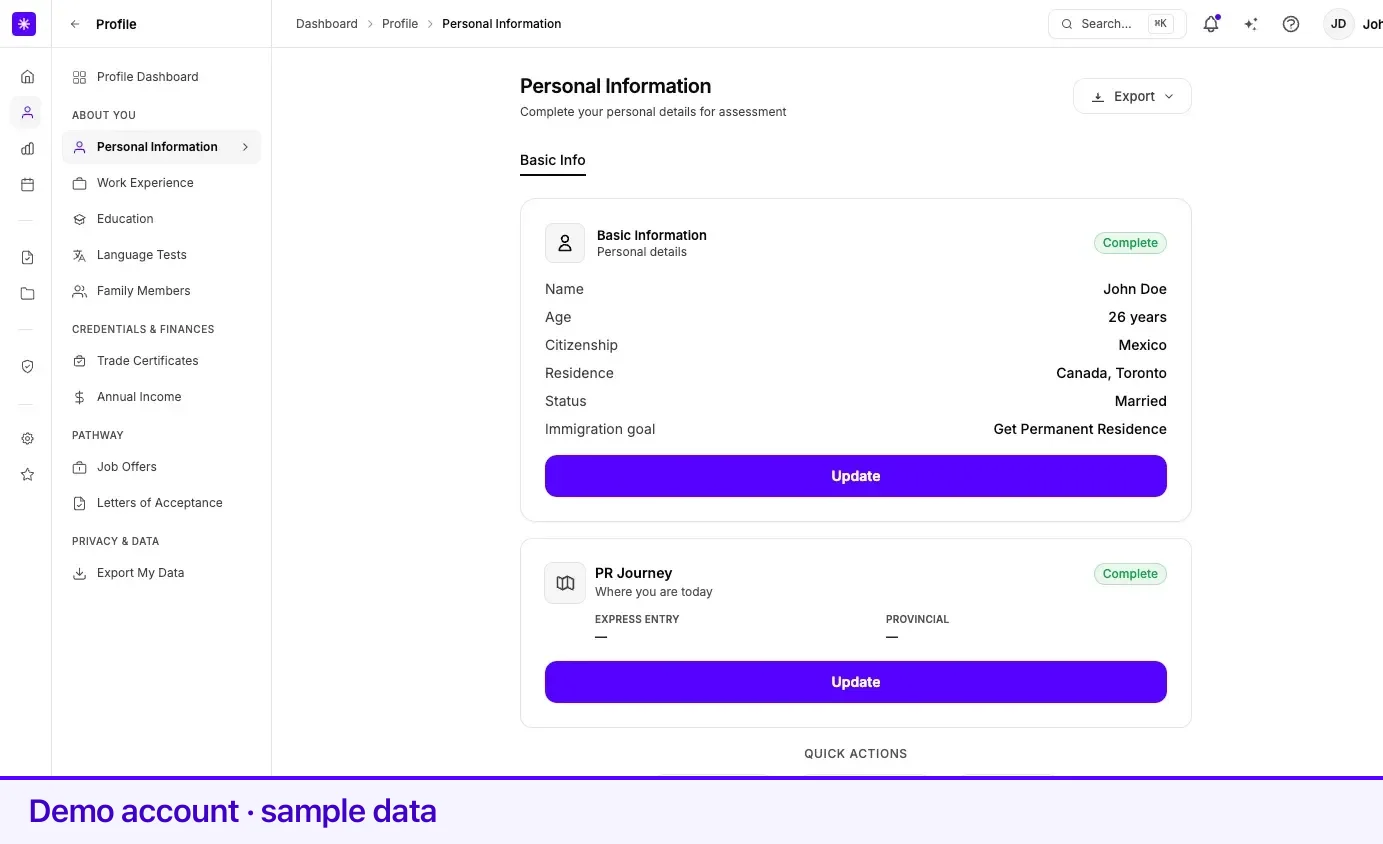
The page at Profile → Personal Information opens as a Basic Information summary card and a PR Journey card. Selecting Update — or Complete info if the summary is not complete yet — opens the four-section editor: Identity, Citizenship & residence, Family & status, and Sponsor eligibility.
Section 1 — Identity
Section titled “Section 1 — Identity”| Field | What it means | Required |
|---|---|---|
| First Name | Given name as it appears on your documents. Up to 100 characters. | Yes |
| Last Name | Family name as it appears on your documents. Up to 100 characters. | Yes |
| Date of Birth | Helper text: Used for age calculation and eligibility assessment. Must imply an age between 16 and 100. | Yes |
| Email Address | Displayed but disabled — Email cannot be changed here. | Read-only |
| Phone Number | Include the country code. At least 10 digits; digits, spaces, hyphens, plus signs, and brackets only. | No |
Section 2 — Citizenship & residence
Section titled “Section 2 — Citizenship & residence”| Field | What it means | Required |
|---|---|---|
| Citizenship Country | The country you hold citizenship in. | Yes |
| Country of Residence | Where you live now. | Yes |
| Current Immigration Status | Citizen, Permanent Resident, Work Permit Holder, Study Permit Holder, Visitor / Tourist, Refugee / Protected Person, or Other Status. The helper text names your country of residence, because the status is your status there. | Yes |
| City in Canada | Searchable list of Canadian locations. Appears only when your country of residence is Canada. Province will be automatically determined from your city. | Yes when you live in Canada |
| Province | Not entered directly — set from the city you pick. Cleared if you move your residence out of Canada. | Derived |
Two behaviours are worth knowing before you edit this section:
- Changing your country of residence clears your immigration status. You pick it again for the new country. If both your citizenship and residence are Canada, Lexpoint sets the status to Citizen instead of clearing it.
- A Canadian citizen living in Canada must be Citizen or Permanent Resident. Any other status is rejected with If you are a citizen living in Canada, your status must be “Citizen”.
Section 3 — Family & status
Section titled “Section 3 — Family & status”| Field | What it means | Required |
|---|---|---|
| Marital Status | Never Married / Single, Legally Married, Common-Law Partnership, Divorced, Widowed, or Legally Separated. | Yes |
| Immigration goal | Get Permanent Residence, Work in Canada, Study in Canada, Visit Canada, Apply for Citizenship, or Other / Not sure yet. Helper text: What you are mainly working toward in Canada — used to tailor your dashboard and tools. | Yes |
Spouse and children details are not entered here. When your marital status is Married or Common-Law and no spouse is on file yet, the section says so: Spouse and children details live under Family — not here.
Marital status and your spouse record
Section titled “Marital status and your spouse record”Marital status on this form and the spouse entry in Family and dependants are kept in step with each other, which produces three behaviours:
| What you do | What Lexpoint does |
|---|---|
| Set the status to Married or Common-Law with no spouse on file | Blocks the save and offers Add Spouse / Partner. Your marital status updates automatically once the spouse is added. |
| Switch between Married and Common-Law | Updates the existing spouse record’s relationship to match. |
| Set the status to Divorced, Separated, or Widowed with a spouse on file | Asks When did this take effect?, then archives the spouse record with that date. |
Section 4 — Sponsor eligibility
Section titled “Section 4 — Sponsor eligibility”These questions are about you as a sponsor. They are asked only if you are a Canadian citizen, or a permanent resident living in Canada. For anyone else the section reads Not needed — these questions apply to Canadian citizens and to permanent residents living in Canada.
| Field | What it means | Required |
|---|---|---|
| Became a permanent resident as a sponsored spouse or partner | Toggle. | No |
| Date you became a permanent resident | Appears when the toggle above is on. | No |
| Sponsored a spouse or partner before | Toggle. | No |
| Start date of that undertaking | Appears when the toggle above is on. | No |
| Receiving social assistance | Toggle — Other than for a disability. | No |
When your spouse or partner is connected with you, their report reads these answers — see Link with your partner. What they mean for a sponsorship is IRCC’s to decide; see immigratic.com.
PR Journey
Section titled “PR Journey”The PR Journey card — Where you are today — is optional. Start (or Update) opens Where are you in your PR journey?, two short branches of yes/no questions:
| Branch | Asks |
|---|---|
| Express Entry | Whether you have a profile, whether you received an Invitation to Apply and from which draw, and whether and when you submitted your PR application. |
| Provincial Nominee | Whether you have a profile in a provincial program, whether you received a provincial invitation or nomination and from which draw, and whether and when you submitted your provincial application. |
Answering no skips the rest of that branch. Your answers help tailor your dashboard. If a branch is synced from your case with Immigratic, it is shown read-only.
Related
Section titled “Related”- Family and dependants — where the spouse record your marital status points at lives
- Profile completeness — the three fields that make this section count as complete
- How your profile is used — which screens read these fields
Frequently asked questions
Why can I not change my email here?
The email field is disabled on this form and reads "Email cannot be changed here". Your sign-in email is managed in account settings.
Why does changing my marital status to Married send me to Family?
A Married or Common-Law status needs a matching spouse record. If none exists, Lexpoint asks you to add the spouse first and then sets your marital status automatically.
Why did my immigration status clear when I changed my country of residence?
Status is specific to where you live, so changing the country of residence resets it — you pick the status again for the new country. The one exception is a Canadian citizen living in Canada, where Lexpoint sets the status to Citizen for you.