

What your employer can see
A workforce connection gives your employer a narrow, named set of facts. This page lists all of them and says plainly what is left out.
The short version: your employer sees who you are, whether Lexpoint has confirmed your identity, when your work permit expires, whether your profile’s main sections are complete, the requests you send them, the employment facts they recorded themselves, and jobs in your work history that name their organization. They do not see the rest of your immigration profile, your ImmiReport, your documents, your consultations, or any case.
The two consent scopes
Section titled “The two consent scopes”When you accept a workforce invitation, two scopes are recorded on the connection. Neither you nor your employer chooses them — every acceptance under the current consent writes both.
| Scope | What it unlocks |
|---|---|
| Employer servicing | The employer may act on your employment relationship: keep your employment record, handle your time-away requests, and prepare and issue the letters you request |
| Roster visibility | You appear on the employer’s workforce roster, and your worker page opens |
Both scopes must be granted and the connection must be active before the employer workspace loads a single field about you. If any of the three fails, it loads nothing — there is no partial view.
On Workforce, each employer shows these as chips: Roster visibility, Employer servicing, and Right-to-work record · off. The third is always off: sharing that record with an employer is not enabled.
Exactly what loads
Section titled “Exactly what loads”From your account
Section titled “From your account”| Field | Where it comes from | Note |
|---|---|---|
| First and last name | Your account | Falls back to your email address if no name is set |
| Email address | Your account | The address you sign in with |
| Profile photo | Your account | Only if you have set one |
| Identity-verification status | Your account | Whether Lexpoint has confirmed your identity — the status only, never the documents you verified with |
| Work-permit expiry date | Your immigration compliance record | The date only |
| Profile readiness | Your profile | Whether your Personal Info, Work History, Education, and Language sections are complete. The employer sees the names of incomplete sections, never their contents |
| Matching work-history jobs | Your profile work history | Only jobs whose employer name contains the organization’s name. The period editor looks them up (title, NOC code, dates, hours) and lists up to two titles under Profile job match, so a period can be linked to your job |
| Date connected | The connection itself | When the connection became active |
Profile readiness and identity appear on the employer’s worker page under Still needed from them, as Profile (with the incomplete section names) and Identity.
From what you send them
Section titled “From what you send them”| What | What the employer sees |
|---|---|
| Letter requests | The kind of letter, its status, and the date |
| Time-away requests | The type, the dates, and your note |
| Activity | A dated log of events on the connection, such as a request you made |
From your employment record
Section titled “From your employment record”Everything else — job title, NOC code, weekly hours, wage, duties, worksite, supervisor, start and end dates, permanence and contract end, full-time or part-time — is recorded by the employer, not read from your account. See Your employment record.
Before you connect
Section titled “Before you connect”While an invitation is pending, nothing from your account is visible. The employer sees the invitation they sent, and whether its email was delivered, when it was opened, and when its link was clicked.
Who at the employer sees it
Section titled “Who at the employer sees it”Your worker page opens only for teammates with the Owner or HR role in the employer’s workspace. You are never added to that team by being connected.
What the connection never exposes
Section titled “What the connection never exposes”None of the following is part of a workforce connection:
- The contents of your immigration profile — nationality, family, education, language tests, travel and status history, and your work history (apart from the matching jobs above)
- Your ImmiReport — program eligibility, CRS or provincial scores, pool position, simulations
- Your documents — everything in your document vault, including the identity documents you used to verify your identity
- Your case — retainers, applications, requirements, timelines, and anything a representative has filed for you
- Consultations and proposals — including whether you have booked one
- Your messages, your Lexi conversations, and your notifications
- Other employers — a connection to one employer reveals nothing about a connection to another
- Your sign-in activity and your account security settings
How to check what is connected
Section titled “How to check what is connected”- Workforce → Employers → the employer has a What <employer> can see panel, split into Shared and Never shared, based on the scopes on that connection. It notes that per-scope sharing changes are not enabled.
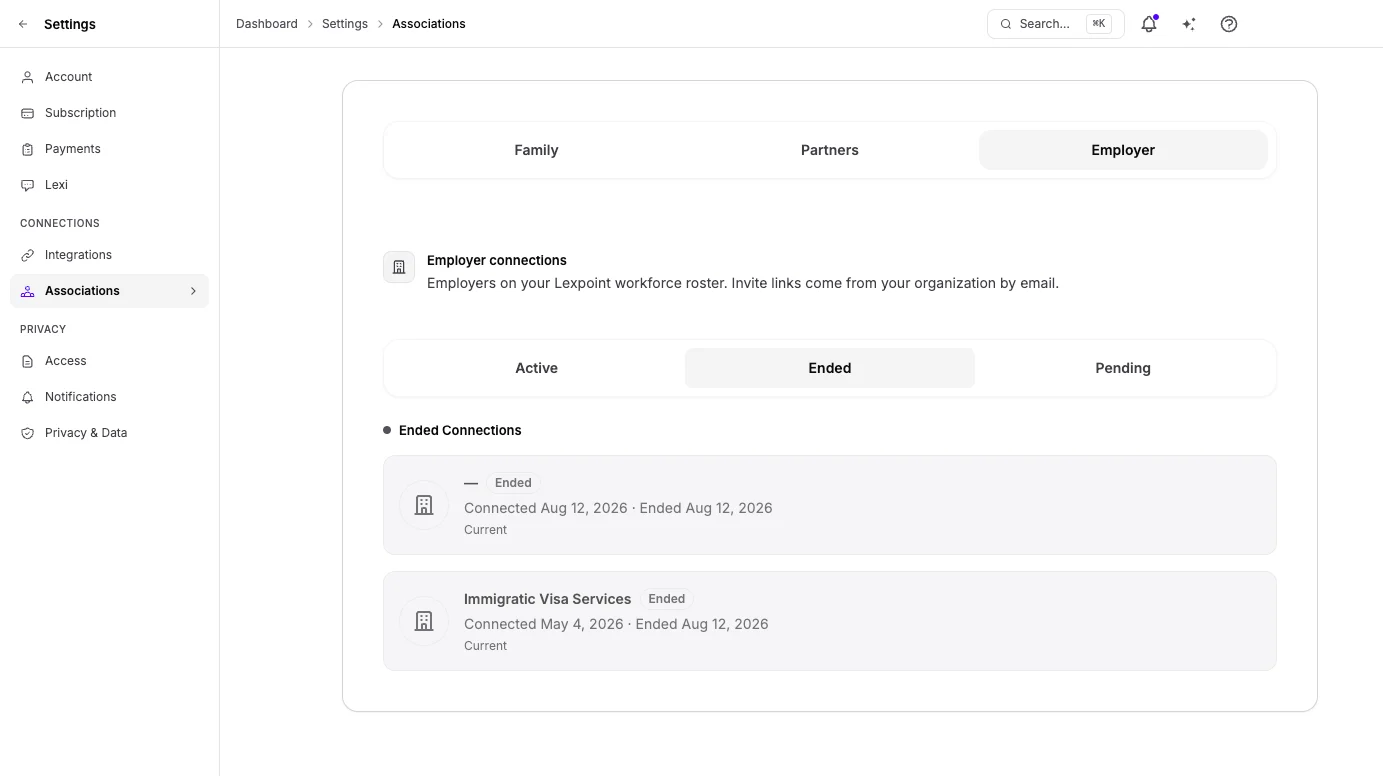
- Settings → Associations → Employer lists every connection under Active or Ended, with its dates, and invitations you have not accepted under Pending.
Withdrawing your consent
Section titled “Withdrawing your consent”You can end a connection yourself, at any time, without asking your employer.
- Go to Settings → Associations → Employer.
- Find the connection on the Active list.
- Select End, and confirm.
The connection becomes ended, both scopes are set to false, and the employer workspace stops
loading anything about you. Lexpoint emails both you and the person at the employer who set the
connection up. Full detail is in Leaving an employer.
What happens to what they already had
Section titled “What happens to what they already had”Ending the connection ends the live view. It does not reach back into records the employer authored — the employment periods they recorded and any letter they issued remain in their workspace. Their History list keeps an entry with the email address they invited, your first job title, Employee left, and the end date.
The connection controls Lexpoint’s live read of your account. It is not a delete request for an employer’s own files, and Lexpoint cannot make it into one.
Related
Section titled “Related”- Accepting a workforce invitation — the consent you agreed to, word for word
- Your employment record — the fields your employer records about your job
- Time away — the requests your employer sees
- Leaving an employer — what changes when the connection ends
- Access and sharing — partner, household, and organization access, which work differently
Frequently asked questions
Can my employer see my ImmiReport or my Express Entry score?
No. The employer workspace loads your name, email, photo, identity-verification status, work-permit expiry date, whether your profile's main sections are complete, the letter and time-away requests you send them, the employment facts they recorded themselves, and jobs in your work history that name their organization. It does not read your ImmiReport, your scores, the rest of your profile, your documents, or any case.
Can my employer see my Lexpoint documents?
No. Documents in your account are not part of the workforce connection. The only files the connection produces are letters you ask for, which your employer issues.
Who at my employer can see me?
Teammates with the Owner or HR role in the employer's workspace. Being connected never adds you to that team.
Can I turn off part of what my employer sees and keep the rest?
No. The two consent scopes are granted together when you accept, and per-scope changes are not enabled. The control you have is ending the connection from Settings, which clears both scopes immediately.
Does my employer find out if I am working with an immigration representative?
Not through this connection. Consultations, proposals, retainers, and cases are outside the link and the employer workspace does not load them.
If I end the connection, does my employer keep what they already had?
They keep the employment records they authored, any letters they issued, and a History entry with the email address they invited, your first job title, and the end date. They lose the live view: your identity-verification status, your permit expiry, your profile readiness, and your place on their roster.