

You at a glance
You at a glance shows your record the way Lexpoint holds it, on one page. Everything on it comes from your profile, so it changes when your profile does. It is also the page you download your résumé from.
Open You at a glance. It is the second item in the ImmiReport menu, straight after Overview.
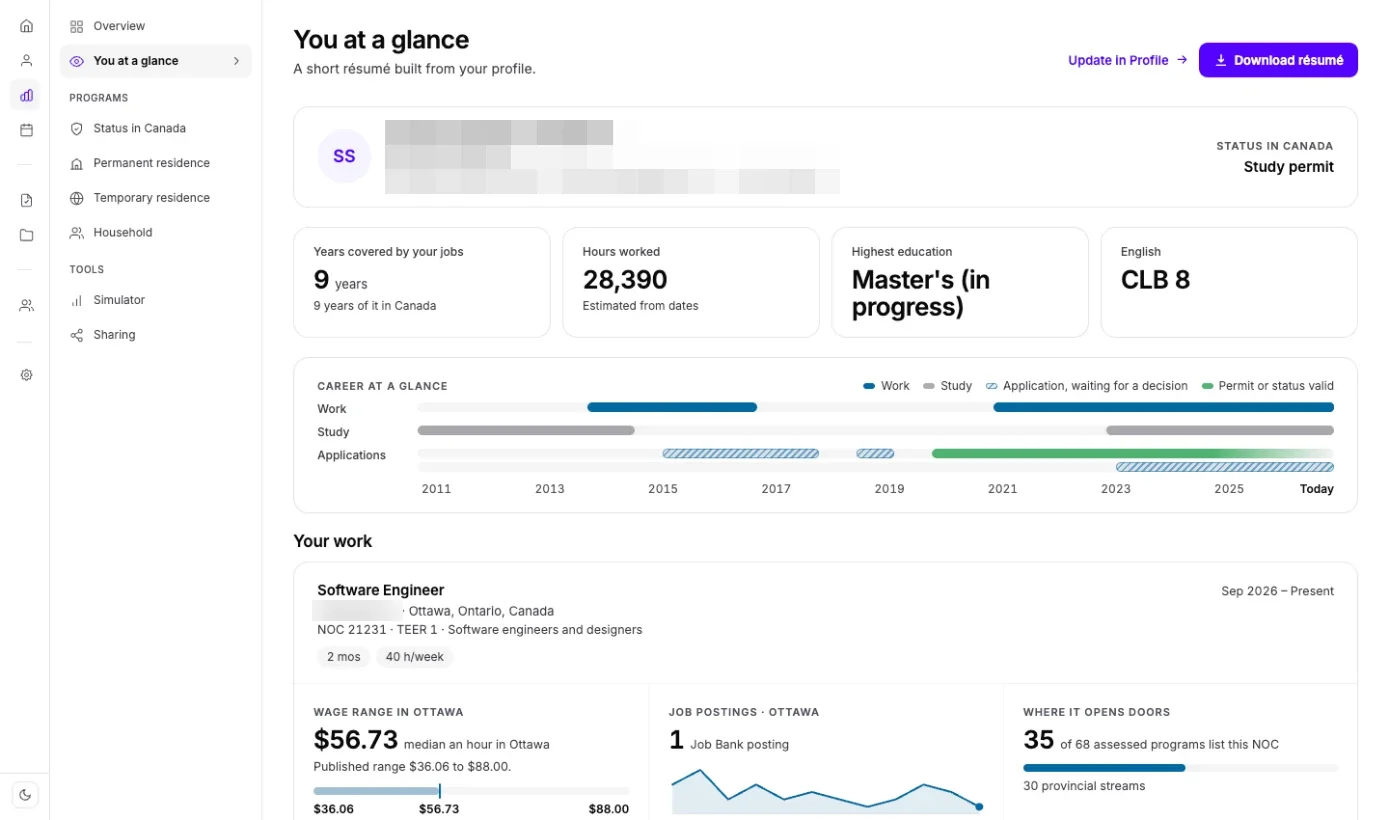
What is on the page
Section titled “What is on the page”| Block | What it shows |
|---|---|
| Header | Update in Profile, and Download résumé when there is a résumé to download |
| Identity card | Your name, a headline, and your contact line. For a person with a status record, it also shows the status |
| Tiles | Numbers from your record, such as the years covered by your jobs and how much of it is in Canada |
| Career strip | One row each for Work, Study and Applications, drawn to scale |
| Your work | A card for each of your three newest jobs, then Earlier work collapsed below |
| Your study | Your credentials |
| Languages and Certificates | Your language results and your trade certificates |
| What Lexpoint verified | The identity check, with its date, when you have passed it |
The foot of the page reads Context from public data, not a decision on your case or advice, with a link to the sources and data dates. If something is missing or wrong, the page says your résumé updates when your profile does.
Applications on the strip
Section titled “Applications on the strip”The Applications row is drawn from your application records. It marks the stretch waiting for a decision, a permit or status your records show as valid, and a refusal.
Download your résumé
Section titled “Download your résumé”Select Download résumé. The button reads Preparing… while the file is made. The PDF is built from the same record as the page, so the two say the same thing. For the account-wide download, see Privacy and data.
Each job and what it opens
Section titled “Each job and what it opens”A job with a NOC code shows up to three small tiles when the job was worked in Canada:
- a wage range for the job’s region, with the median;
- job postings for that occupation in the region;
- where it opens doors, the number of programs that list the occupation.
The wage is Job Bank’s figure for the job’s economic region, and the tile says which place it used. A job with no NOC shows a prompt, Add a NOC to this job to see its wage, demand and programs, with a link to open the job in your profile.
See the full picture opens the One job page.
The One job page
Section titled “The One job page”/app/immireport/glance/work/{id} shows one work record
in full. Its sections include the wage trend, job postings, the outlook for the occupation, employers
approved near you, where the occupation opens doors, and what the work involves. The breadcrumb takes you
back to You at a glance.
On a free account the labour-market sections are blurred, with a prompt to upgrade. ImmiReport Pro shows them in full.
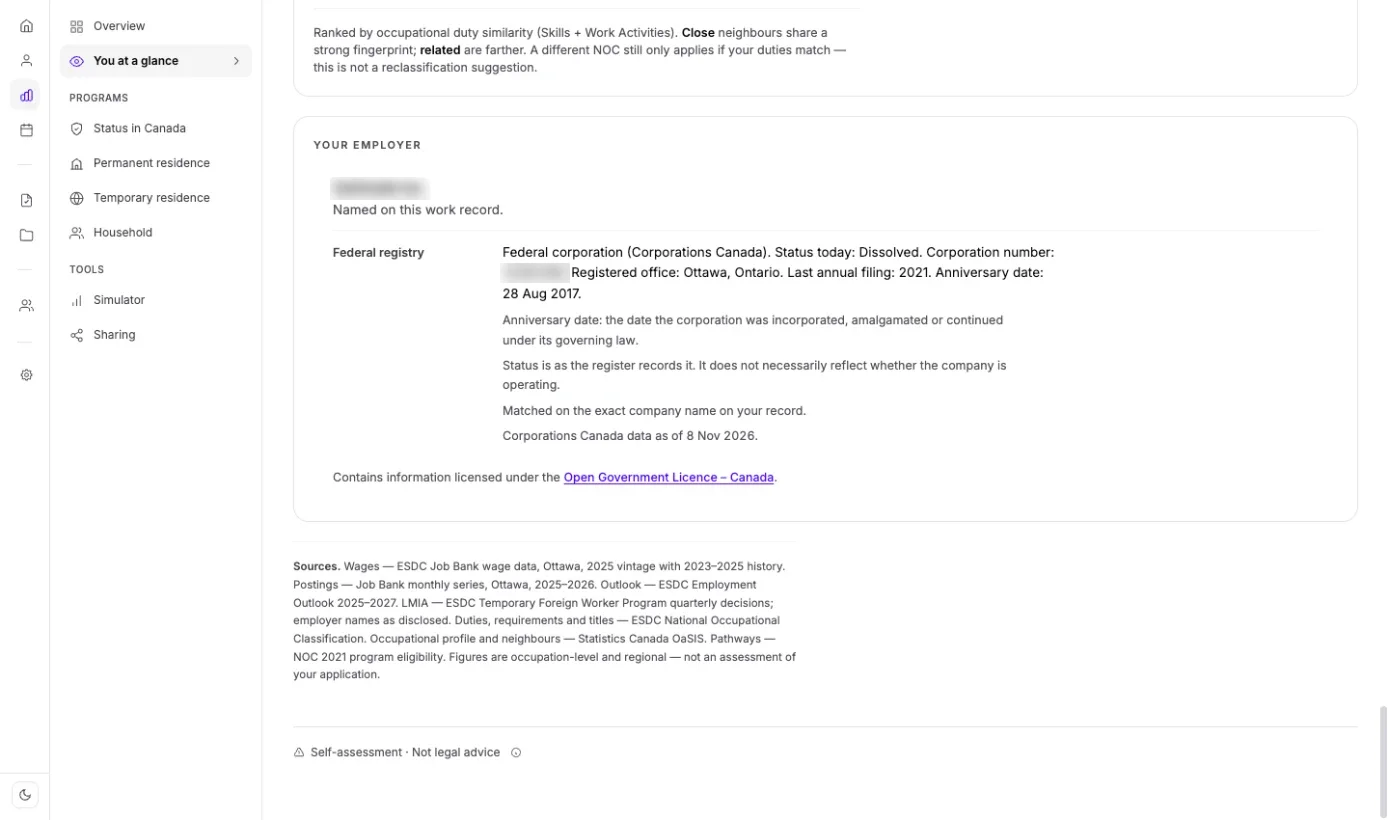
Your employer
Section titled “Your employer”For ImmiReport Pro, on a Canadian job that names an employer, Your employer shows what public records say about the company named on your own work record:
- Federal registry. Whether the name matches one federal corporation in Corporations Canada’s list, and if so its status, corporation number, registered office, last annual filing and anniversary date (the date the corporation was incorporated, amalgamated or continued). If several federal companies share the name, or none do, the block says so. Provincial and territorial companies and sole proprietors are not on the federal list.
- Positive LMIAs. Whether the employer appears on the published Employment and Social Development Canada list of positive Labour Market Impact Assessments, with the approved LMIAs and positions in total since 2022, up to the latest quarter ESDC has published, by year, and the occupations with the most positions.
The match is made on the exact company name on your record. When Lexpoint cannot tell which company it is, the block says Lexpoint could not tell which company this is. Check the name as it appears on your contract.
The block shows records. It is not a rating, and Lexpoint does not judge the employer. A registry status does not necessarily mean the company is operating. For a job outside Canada, the block reads Canadian employer registry and list records do not apply to work outside Canada. Employer records are published under the Open Government Licence – Canada.
Related
Section titled “Related”- Your profile: where every fact on this page is entered
- NOC Intelligence: the labour-market briefing behind each job
- Status in Canada: your permit and key dates
- Reading your report: the rest of the ImmiReport menu
Frequently asked questions
Why does You at a glance say my résumé appears once I add work or education?
The page is built from your profile. With no work and no study entered there is nothing to show, so the page prints one line and an Update in Profile link. Add a job or a credential and the page fills in.
Can I change something on this page?
Not here. The page reads your profile, so change the record in your profile and the page and the downloaded résumé follow. Each job card has a link back to that job in your profile.
What is the employer block on the One job page?
It shows what two public records say about the employer named on your own work record, the federal corporations registry and the positive Labour Market Impact Assessment (LMIA) list. It is a record, not a rating. The block is part of ImmiReport Pro and appears for Canadian jobs that name an employer.