

Case timeline
The timeline is the record of what has happened on your case, in order. Open it from Timeline in the Case section of the left case tree.
It records milestones, not activity. File uploads, deletions, review-status flips, checklist regeneration, and internal notes are deliberately excluded — those belong to the Documents tab.
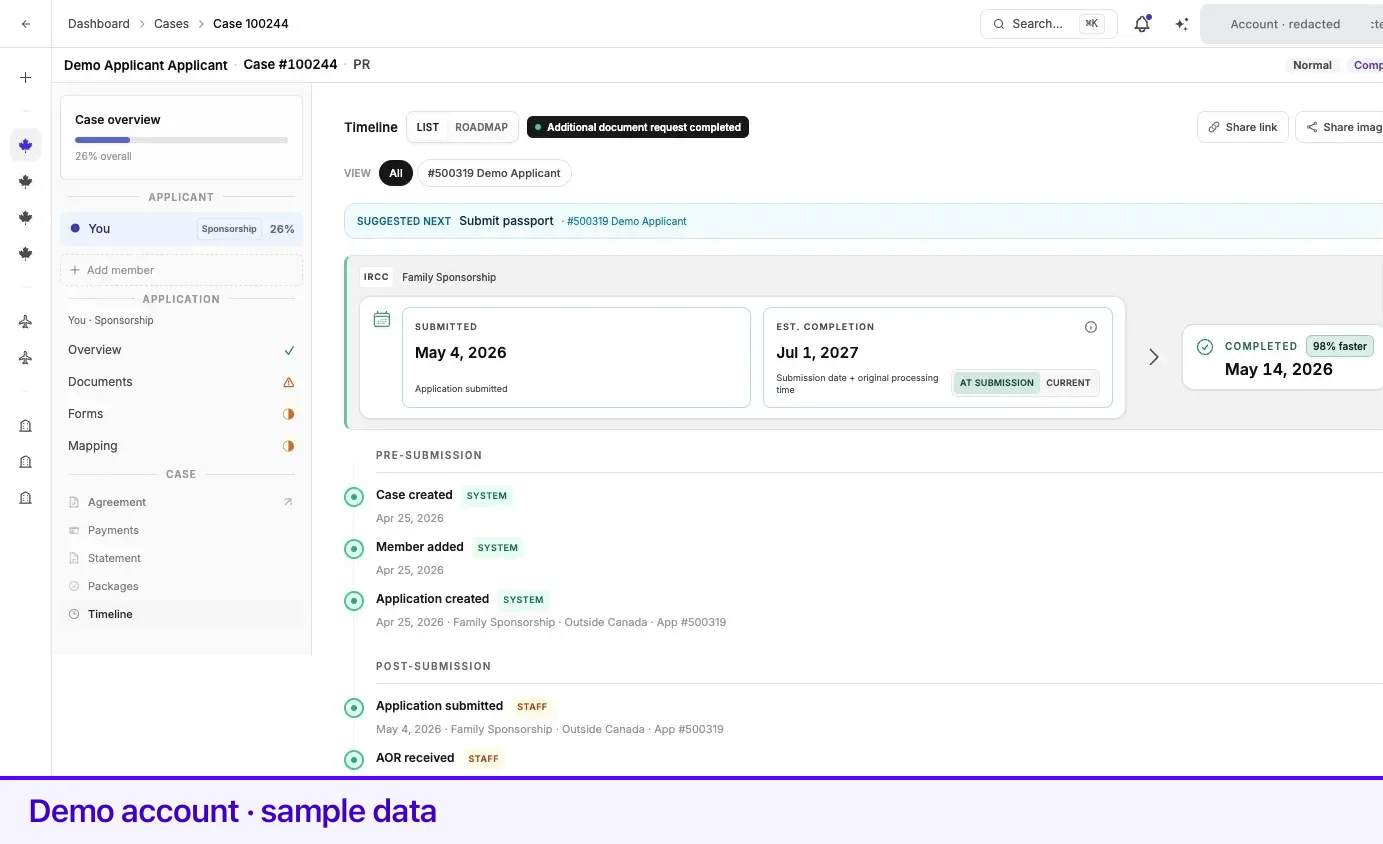
The controls
Section titled “The controls”| Control | What it does |
|---|---|
| History / Tracker | History is the chronology of milestones. Tracker shows IRCC’s four assessments for each application. See The IRCC tracker below. |
| Status chip | The case’s current status, beside the heading. |
| Share image | Produces a shareable picture of your milestones. Only milestones marked shareable are included, and only the principal applicant’s. |
| Share link | Turns the timeline into a private web link. See Sharing your timeline as a link below. |
| Corrections | On a self-reported case, shows superseded entries alongside the corrected ones. Off by default. |
| + Add update | On a self-reported case — one you are tracking yourself rather than being represented on — lets you log your own milestone. It does not appear on a represented case. |
In History the events are grouped under Pre-submission and Post-submission. The boundary is the earliest filing milestone on the case; before that everything is pre-submission.
When a request carries a deadline, its row shows Response due with the date.
The IRCC tracker
Section titled “The IRCC tracker”Tracker shows one card per application with IRCC’s four assessments, in IRCC’s order: Biometrics, Medical exam, Eligibility and Background check. The ring on each card counts how many are complete.
- Each assessment shows Not started, In progress or Completed, the way IRCC’s tracker words it, with the date it was checked and where it came from (for example Oct 20 · IRCC tracker).
- Completed means IRCC has finished that assessment. It does not say whether it went your way; IRCC’s tracker never does.
- Not available yet on one assessment means nothing has been recorded for it yet, while the others have values.
- Select an assessment to see every value recorded for it, newest first. Each time your representative checks IRCC’s tracker, the values are recorded again with that day’s date, even when nothing changed, so the date on each assessment is the last day it was checked.
When IRCC’s tracker does not show an application yet, you see IRCC tracker not available yet instead of a card, with the list of applications IRCC’s tracker covers today: spouse, partner or dependent child sponsorship, Express Entry (Canadian Experience Class, Provincial Nominee Program, Federal Skilled Worker Program and Federal Skilled Trades Program), study permits, work permits and visitor visas. On a case where one application has values and another does not, the other one shows as a single line, IRCC tracker not available yet.
Tracker values are recorded by your representative and are always visible to you. The first time an application has tracker values, you get one email (and a Telegram message if you connected Telegram) with the values and an Open the tracker button that opens this view. After that, each time your representative checks, you get a short message for that day: what changed, or that nothing has changed. Provincial nominations and judicial reviews are not on IRCC’s tracker, so those cases say so instead of showing cards.
Letters attached to an event
Section titled “Letters attached to an event”When your representative files the letter behind a milestone — a biometrics instruction letter, a request, a decision — an eye icon sits on that event’s row.
- With one letter, select the icon to open it.
- With several, the icon carries a count. Select it, then pick a file from Attachments.
A letter filed with your case opens in the document viewer, with a Discussion rail marked Staff & client beside it. Comment there to ask about that letter. Other letters open in a preview.
Processing time and pool ranking
Section titled “Processing time and pool ranking”Above the events, a panel can show where the application stands against IRCC’s own figures. It follows the application selected in the filter; with all applications shown, it follows the principal applicant’s.
- Processing time. Where IRCC publishes a processing time for the program, the panel shows IRCC’s Bulletin average until the application is submitted. After that it shows Submitted and Est. completion; the estimate switches between At submission — saved when you applied — and Current, from today’s bulletin. Once a completion milestone is recorded, a Completed date appears beside them. IRCC figures are approximate, not a guarantee for any file.
- Pool ranking. For an Express Entry profile with a CRS score recorded on the timeline, the panel shows that score and where it ranks in IRCC’s pool snapshot instead.
Sharing your timeline as a link
Section titled “Sharing your timeline as a link”Share link opens a small panel headed Public live timeline, described there as Private link for milestones and dates. No names or documents. Off anytime.
- Turn the switch on. A link appears in the panel.
- Copy link puts it on your clipboard; Preview opens it in a new tab so you can see exactly what a recipient sees before you send it.
- Regenerate mints a new link. The one you already sent stops working.
The button carries a small green dot whenever sharing is live.
Once an application on your case has been submitted, the principal applicant may be offered this in a prompt, Share a live timeline. Share link turns sharing on and copies the link; Not now hides the prompt for 7 days.
What reaches you by email
Section titled “What reaches you by email”Government milestones logged on your case also notify you outside the app. When your representative records a milestone and makes it visible to you, Lexpoint emails the principal applicant on the case — and sends a Telegram message too if that channel is connected.
| Kind of milestone | What arrives |
|---|---|
| A request that carries a response due date — an additional document request, a biometrics instruction letter, a medical request, a procedural fairness letter, an interview request, a landing invitation | An email whose subject begins Action required —, naming the milestone and the date to respond by. |
| A package ready for your review | An Action required email. |
| A refusal | A refusal email. |
| An approval, or a milestone on the approval path such as a passport request or the start of the COPR stage | An approval email. |
| An invitation | Its own invitation email. |
| Everything else visible to you — an acknowledgement of receipt, biometrics completed, a pre-arrival letter, a port of entry letter | A plain announcement email. |
Two things never notify you: a milestone your representative keeps internal, and a correction to an entry already on the timeline. Case Updates is a required notification category and cannot be turned off — see Notification preferences.
A family member added to the case sees the same timeline in the app, but these emails are addressed to the principal applicant only.
The two phases
Section titled “The two phases”The timeline is grouped into Pre-submission — everything up to the application being filed — and Post-submission, everything that happens afterwards. The boundary is the day the application was submitted, and the product uses the same split on screen.
Every event you can see is listed, with what it means and whether it needs anything from you, in Case events — along with the ones that are recorded but never reach your timeline.
Related
Section titled “Related”- Document review statuses — what a reopened application does to the checklist
- Requirements and checklists — where a post-submission request lands
- Finalization and the submission package — the package events in context
- Case Studio tour — where Timeline sits in the case tree
Frequently asked questions
Why is my document upload not on the timeline?
The timeline records case milestones, not file-by-file activity. Uploads, deletions, and checklist regeneration are kept out of it deliberately, so the timeline stays a record of what happened to your application rather than a log of clicks. Document activity lives on the Documents tab instead.
What is the difference between History and Tracker?
History is the record of milestones on your case, in order. Tracker shows what IRCC's application status tracker says about each of the four assessments for each application, as of the day it was checked.
Why does the Tracker say IRCC tracker not available yet?
IRCC's online tracker does not show that application yet. Today it only covers spouse, partner or dependent child sponsorship, Express Entry (Canadian Experience Class, Provincial Nominee Program, Federal Skilled Worker Program and Federal Skilled Trades Program), study permits, work permits and visitor visas, and a new application often shows nothing for a while. When it shows your application, the four assessments appear here.
An event says "Response due" with a date. What is that?
It is the date recorded against a request that reopened your application. Work the items shown under the Current scope chip on the application's Documents tab.