

What Lexi can do
Lexi works from a fixed set of capabilities. It is not a general-purpose chatbot with access to the internet — every answer it gives about your situation comes from reading a specific part of your own Lexpoint account. Every change it makes to your records goes through a named action you confirm first.
This page lists what exists today. If a capability is not on this page, Lexi does not have it.
What Lexi can read
Section titled “What Lexi can read”All of these are scoped to your own account. The one thing Lexi reads from someone else’s account is your linked partner’s facts, and only while that link is active — see Your linked partner.
Your profile and report
Section titled “Your profile and report”| Lexi can | What that means |
|---|---|
| Read your full profile bundle | Your personal details, family members, work history, education, language tests, job offers, and letters of acceptance, as they are saved today. |
| Check profile completeness | Which of the four sections — personal, work, education, language — still have gaps. |
| Read your ImmiReport summary | The report as it currently stands. |
| Read a single program snapshot | One program family within your report, in more detail. |
| Read your Express Entry pool position | Where your profile sits in the pool, as the product calculates it. |
| Review the NOC codes on your jobs | What each job in your work history is currently coded as. |
| Look up a NOC code | The occupation profile behind a code. |
| Read an occupation’s character | ESDC’s OaSIS description of one official occupation — duties, requirements, ratings, workplaces, and similar occupations. When a NOC code covers more than one occupation, Lexi lists them rather than guessing which you mean. This describes the occupation; it is not a score. |
| Match a role to a NOC | Compare a job title and its duties against the occupation database and explain the fit. |
See Your profile and ImmiReport for what these surfaces are.
Your linked partner
Section titled “Your linked partner”| Lexi can | What that means |
|---|---|
| Read your partner’s facts | When your spouse or common-law partner has linked their account to yours, the facts your ImmiReport uses for them — date of birth, education, English and French results, Canadian work, status in Canada, and sponsorship history — come from their own account. Lexi says whether a fact came from their account or from the family record you entered. |
Without an active link, Lexi reads only the family record you entered yourself. See Link with your partner.
Your cases and applications
Section titled “Your cases and applications”Point Lexi at a case with @ first — see Asking Lexi.
| Lexi can | What that means |
|---|---|
| List your cases | Cases you are the principal on, or a member of. |
| Find a case by number | Match a case identifier you half-remember to a real case. |
| Read a case’s context | The overview of one case. |
| Read a case timeline | What has happened on that case, in order. |
| Read open tasks on a case | The same open action items the case surfaces show you. |
| Read processing estimates for a case | The IRCC bulletin estimates attached to that case. |
| Read an application snapshot or checklist | One application’s state and its document checklist. |
Your documents
Section titled “Your documents”| Lexi can | What that means |
|---|---|
| List your documents | Everything in your vault, and files linked to your cases. |
| Read a document summary | The extracted summary of a file you point it at. |
| Check analysis status | Whether a document you uploaded has finished processing. |
Public immigration data
Section titled “Public immigration data”Lexi reads the same reference data the rest of Lexpoint runs on. This is data, not advice.
| Lexi can | What that means |
|---|---|
| Look up draw history | Past Express Entry and provincial draw results. |
| Look up processing times | Published IRCC processing times for a program. |
| Read official source updates | Recent changes and publications picked up from IRCC and provincial sources. |
| Look up a designated learning institution | A Canadian DLI’s number and details. |
Your deadlines and support tickets
Section titled “Your deadlines and support tickets”| Lexi can | What that means |
|---|---|
| Read your expiry deadlines | Passport, biometrics, and permit expiry clocks held on your account. |
| List your support tickets | The tickets you have open with Lexpoint. |
What Lexi can change
Section titled “What Lexi can change”Every item below pauses and asks you to confirm before it happens. Nothing on this list can occur silently — see Confirmations and limits for how that works and what a confirmation looks like.
| Lexi can | Confirmation |
|---|---|
| Add a work history record | Confirm in chat |
| Update a work history record | Confirm in chat |
| Add an education record | Confirm in chat |
| Update an education record | Confirm in chat |
| Add a language test record | Confirm in chat |
| Update a language test record | Confirm in chat |
| Save its assessment of a job’s employment letter and NOC fit | Confirm in chat |
| Queue a document for analysis | Confirm in chat |
| Refresh your ImmiReport on demand | Confirm in chat — Pro only |
| Open a support ticket for you | Confirm in chat |
| Mark one of your support tickets resolved | Confirm in chat |
| Save draft notes to your Drive as a Google Doc | Confirm in chat — Google Drive must be connected |
Message my case team — no confirmation
Section titled “Message my case team — no confirmation”Message my case team is the one action that does not pause. From your private Lexi chat, with a case in scope, Lexi posts a message from you into that case’s application or requirement thread straight away, so a question raised in chat reaches the people working on your case. The message shows in the thread as sent by you (via Lexi), your case team is notified, and repeated sends are rate-limited.
What Lexi cannot do
Section titled “What Lexi cannot do”| Not available | Why |
|---|---|
| Edit your personal details — name, date of birth, contact information | Not a Lexi capability at all. You edit these yourself in your profile. |
| Delete a work history, education, or language record | Only adds and updates exist. Delete it yourself in your profile. |
| Read your case payment records or invoices | Not available to Lexi on your side of the product. See Case fees and statements. |
| Read another person’s file | Every capability is bound to the account you are signed in as. Your linked partner’s facts are the only exception, and only while the link is active. |
| Write an internal case note | That is a staff capability, and it is blocked for client accounts. |
| Change your account, security, or billing settings | Not a Lexi capability. See Your account. |
| Submit an application to IRCC | Lexpoint does not give Lexi any capability that transmits anything to a government system. A Google Doc Lexi saves is a draft in your Drive, not a filing. |
| Tell you whether you qualify, or what to do about a refusal | Regulated advice. Lexi will say so and point you to a consultation. |
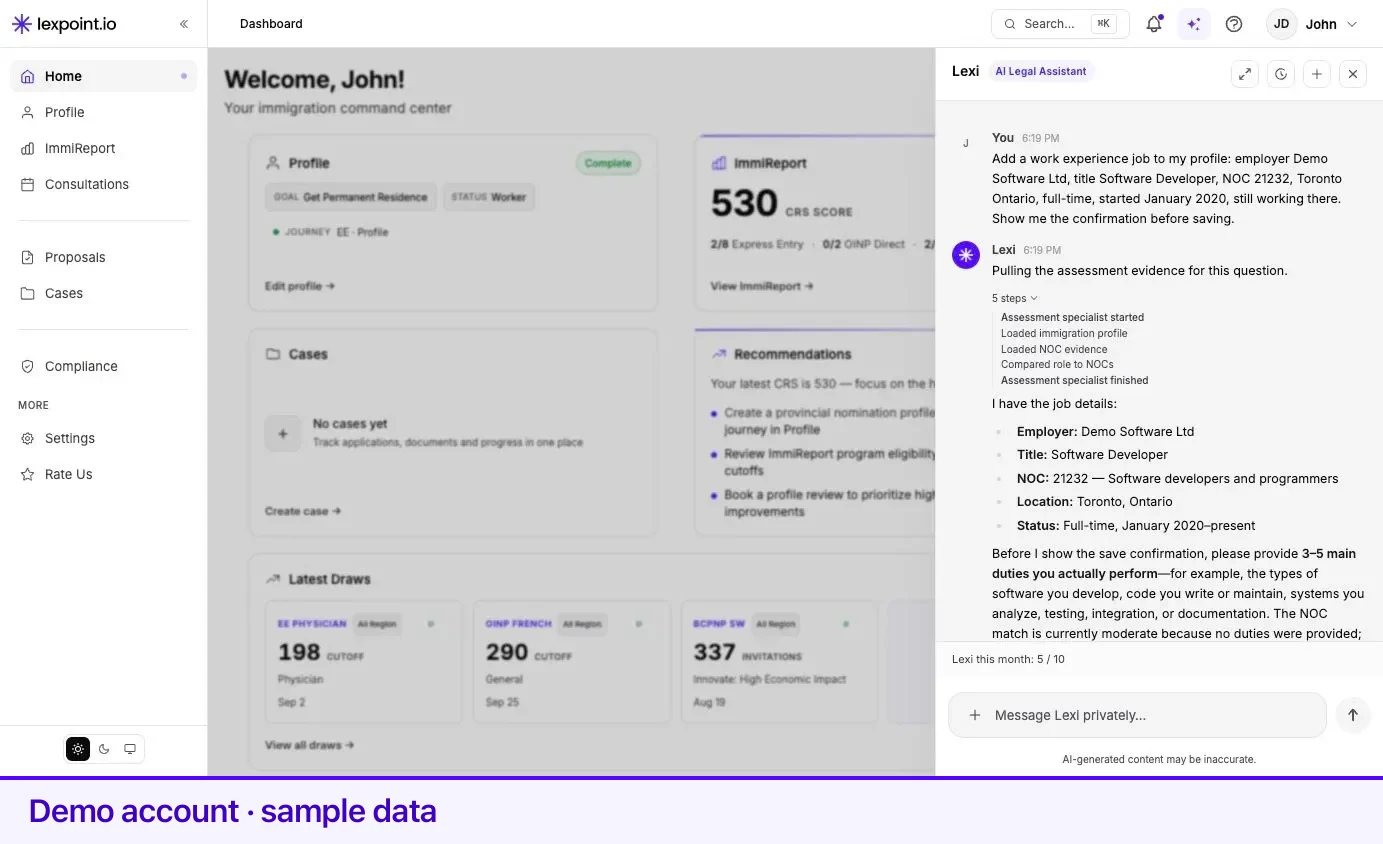
Lexi shows its work: as it answers, each read it performs appears as a labelled step — Reviewing profile gaps…, Listing your cases…, Checking IRCC processing estimates… — so you can see which part of your account an answer came from before you rely on it.
Related
Section titled “Related”- Asking Lexi — how to point a capability at the right case or document
- Confirmations and limits — the rules around anything that changes your data
- Integrations — connect Drive before Lexi can save a Doc
- Lexi settings — engine and monthly message allowance
- ImmiReport — the report most of the assessment reads are about
Frequently asked questions
Can Lexi see my documents?
It can list the documents in your account, read the summary of one you point it at, and check whether a document you uploaded has finished being analyzed. It only ever reads files belonging to your own account.
Can Lexi change my profile?
Yes, for work history, education, and language test records — and only after you confirm the exact change in the chat. Personal details such as your name and date of birth are not editable by Lexi; you edit those yourself in your profile.
Can Lexi see my partner's profile?
Only when your spouse or common-law partner has linked their account to yours. Lexi then reads the partner facts your ImmiReport uses — such as education, language results, and Canadian work — from their account. Without a link, it reads only the family record you entered yourself.
Can Lexi tell me whether I qualify for a program?
No. Lexi explains what your own file contains and what the product is showing you. Eligibility is a professional judgment — book a consultation, and read the immigration research at immigratic.com.