

Work experience
Each job is one record at Profile → Work Experience. The form has four sections — Location, Role, Terms, and Pay — and the country you pick first decides which fields the rest of the form asks for.
The list
Section titled “The list”Jobs are shown as a timeline, newest start date first, grouped under the year each job started. The line under the Work Experience heading reads X years · Y Canadian · Z foreign.
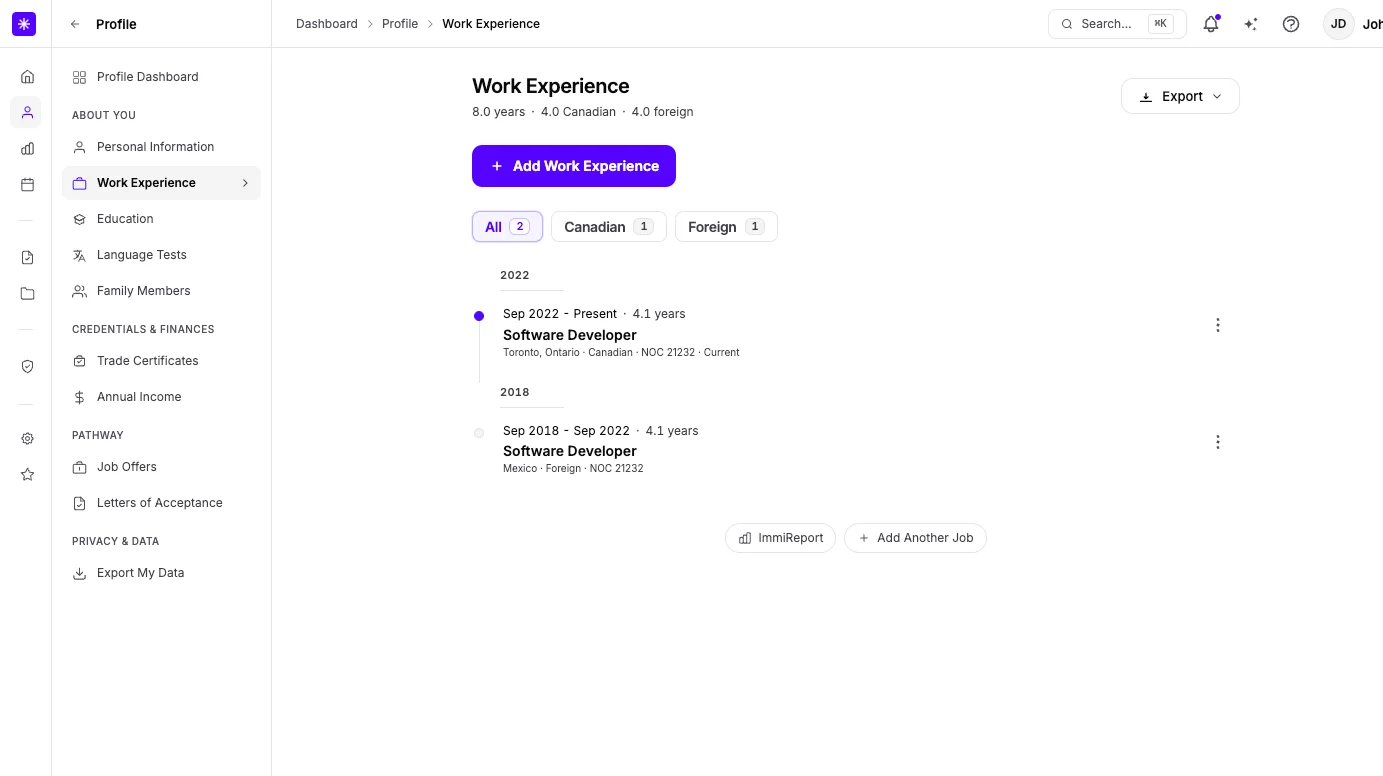
| Element | What it does |
|---|---|
| Filters | All, Canadian, Foreign, and Workforce, each with a count. An empty filter is disabled. |
| Row | Date range and length, job title, and a caption: employer and place, Canadian or Foreign, NOC, and Primary, Current, or Concurrent (overlaps another job). During study and Self-employed follow a dash. |
| Selecting a row | Opens a panel with Edit record → and, when the job has a NOC, NOC Intelligence →. |
| More actions menu | Edit and Delete. Deleting asks Delete this work record from your profile? and cannot be undone. |
A row can carry one status chip:
| Chip | Means |
|---|---|
| Missing country | The job has no country. Older records predate the requirement; edit the job to add one. |
| Incomplete dates | A past job with no end date, or no start date. |
| Checking NOC fit… | An employment letter check is running on NOC Intelligence. |
| NOC fit · Fail | The last letter check did not pass on the letter, the NOC, or both. |
| NOC fit · Stale | The job’s details, such as its NOC, changed after the last letter check. |
| NOC fit · Retry | The last letter check could not run. |
How the years line is counted
Section titled “How the years line is counted”The years line adds each counted job’s eligible days, not the raw span. A job is left out when:
| Condition | Applies to |
|---|---|
| Started more than ten years ago | Any job |
| NOC TEER outside 0–3 | Any job |
| Self-employed is on | Canadian work |
| Work during full-time study is on | Canadian work |
These are Lexpoint’s display rules for the numbers on this page. Whether a job counts toward a program is IRCC’s and the provinces’ to decide — see immigratic.com or book a consultation.
Section 1 — Location
Section titled “Section 1 — Location”| Field | What it means | Required |
|---|---|---|
| Country of Work | Must be selected from Lexpoint’s country list. | Yes |
| Employer | Appears for Canadian work. Search the federal corporate registry, type a name (Add ”…”), or leave it blank. Searching starts at three letters. | No |
| City in Canada | Searchable Canadian locations list. Appears for Canadian work. Province is set from the city you pick. | Yes for Canadian work |
| State | US state list. Appears when the country is United States. | Yes for US work |
| City | Free text. Appears for US work beside the state. | No |
| City/Location | Free text. Appears for every other country. | No |
Picking a registry employer whose city is on the Canadian locations list also fills City in Canada and the province.
Section 2 — Role
Section titled “Section 2 — Role”| Field | What it means | Required |
|---|---|---|
| Occupation (NOC Code) | Searchable by NOC code or job title. Stored as a five-digit code. | Yes |
| Occupation inside this NOC | Appears only when the NOC is split into more than one OaSIS occupation. Optional. This is which job the work was, not a second immigration code. | No |
| Your job title | What you were called at work — not the official NOC title. Pre-filled from the NOC you pick; you can change it. | Yes |
A Selected NOC card shows the code, TEER, and title. Its info icon opens the NOC’s duties and requirements. On a saved job the card also links to NOC Intelligence →.
Section 3 — Terms
Section titled “Section 3 — Terms”| Field | What it means | Required |
|---|---|---|
| Start Date | Cannot be in the future. | Yes |
| End Date | Hidden when Current job is on. Must be after the start date and not in the future. | Yes for past jobs |
| Current job | Toggle. | No |
| Permanent position | Toggle. Appears only for Canadian work. | No |
| LMIA or job offer | Toggle. Appears only for Canadian work. | No |
| Self-employed | Toggle. | No |
| Work during full-time study | Toggle. | No |
Section 4 — Pay
Section titled “Section 4 — Pay”| Field | What it means | Required |
|---|---|---|
| Work schedule | Hours per week, 1 to 80. How many hours you worked each week. Full-time = 30+. | Yes |
| Hourly pay rate | Your wage in Canadian dollars per hour. Up to 500. Appears only for Canadian work. | Yes for Canadian work |
For Canadian work with a NOC, the section loads a Job Bank wage band for the place. It plots your rate against up to four markers — Provincial floor, Low, Median, and High — and marks each one Met or Below.
Jobs your employer confirms
Section titled “Jobs your employer confirms”If your employer uses Lexpoint for its workforce, a job they confirm appears in your list before it is on your profile. It carries a Workforce marker and an Action required chip. A job that has not started yet shows Starts {date} instead of the chip.
- Select the row, or choose Add to work history from More actions.
- Check What they confirmed — title, NOC, dates, hours, pay, employer, and location.
- If you already have a job at that employer, choose it under Apply to, or Keep as a new job.
- Turn on This was during full-time study if it applies.
- Select Add to work history (new job) or Update this job (replaces the chosen job).
Once added, the job keeps the Workforce marker and is locked. The form says These terms come from {employer}. Title, dates, hours, pay, location, and job conditions stay with them. You can still say if this was during full-time study. The job cannot be deleted from your profile.
Adding and editing
Section titled “Adding and editing”- Open Profile → Work Experience.
- Select Add Work Experience.
- Work through Location, Role, Terms, and Pay with Continue. Save on the last section adds the job.
- To change a job, choose Edit from its More actions menu. When editing, Save & Continue saves each section as you go.
Saving changes shows Work experience updated! Your Immireport will refresh within 24 hours. Your report is not recalculated at the moment you save — see How your profile is used.
Related
Section titled “Related”- NOC Intelligence — market, letter, fit, and programs for a job
- Your primary job — what Primary means
- Job offers — a current Canadian job also appears there as a synced offer
- Your employment record — the employer’s side of a confirmed job
- Privacy and your data — download a résumé composed from these jobs
Frequently asked questions
Why does Lexpoint insist I pick my city from a list?
For Canadian work the city must come from Lexpoint's Canadian locations list, because the city selects the wage benchmark and sets the province. A typed city that is not on the list is rejected.
Why is hourly wage required for one job and not another?
Hourly pay rate is asked only for work in Canada. For any other country the Pay section reads "Hourly wage is only required for Canadian work experience."
Why do my total years not match the dates I entered?
The years line under the heading adds up only the jobs Lexpoint counts, using the eligible days calculated for each job rather than the raw date range. Older, TEER 4 and 5, self-employed, and during-study work can be left out. The rows themselves do not show the reason.
Why can I not edit a job my employer confirmed?
Title, dates, hours, pay, location, and job conditions on that job come from your employer's record. Only "Work during full-time study" stays yours to change, and the job cannot be deleted from your profile.