

Contacting support
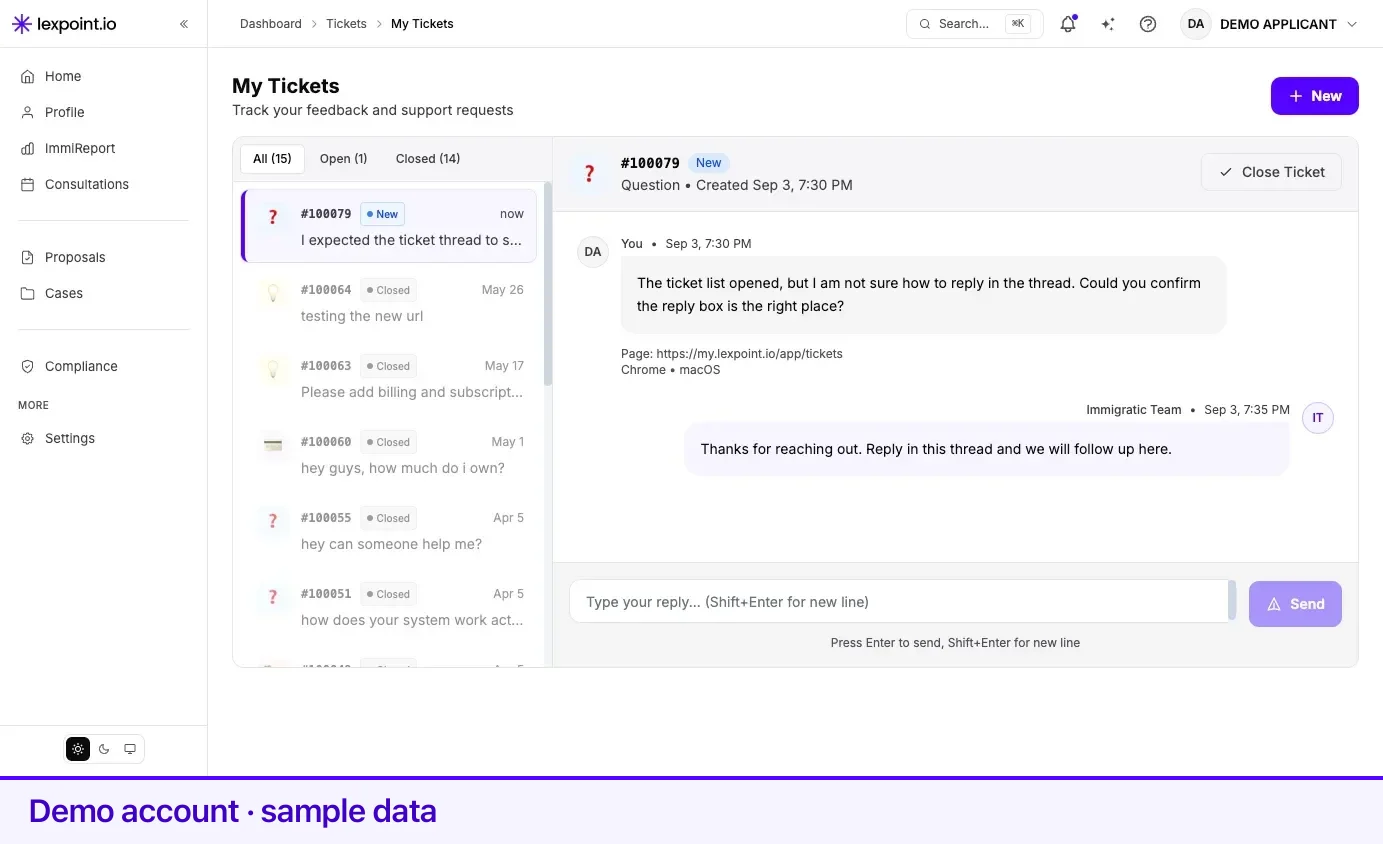
Support lives inside the product. Open a ticket at my.lexpoint.io/app/tickets — the page is titled My Tickets, Track your feedback and support requests, and every ticket you have ever sent is listed there with its replies.
Lexpoint support answers questions about the product. Questions about your immigration matter — what a program requires, whether a plan is sound — belong in a consultation with a licensed representative. See getting help.
Where the ticket form is
Section titled “Where the ticket form is”Four routes, one form:
| Where | What to select |
|---|---|
| The tickets page | New, top right of My Tickets |
| Settings | The Help & Support card — View tickets, get assistance |
| Your dashboard | The Contact Us chip in the quick actions strip under the widgets |
| Anywhere in the app | The floating feedback button, tooltip Send Feedback |
All four open the same Send Feedback window and produce a tracked ticket.
Filling it in
Section titled “Filling it in”- Under What would you like to share?, pick the type. Four are available: Report a Bug (Something not working as expected?), Suggestion (Ideas to improve), Question (Need help with something?), and Billing (Payment or subscription help).
- Write into Your message. This is the only required field — the Send Feedback button stays disabled until there is text in it. There is room for a long description; a character counter appears as you approach the limit.
- Optionally use Capture Screenshot to attach a picture of the screen you are on. Remove Screenshot takes it back off.
- Select Send Feedback.
Write in English using Latin characters. When a reply is typed in another script the app says so directly — Please write in English (Latin characters) so we can help faster — because a message support can read without translating is a message answered sooner.
What Lexpoint already captures
Section titled “What Lexpoint already captures”The form notes it: We automatically capture page info to help resolve your issue. Attached to every ticket, without you typing anything:
| Captured | Why it matters |
|---|---|
| The page address you were on | Locates the exact screen, including the case or application in the URL |
| The page title | Names the screen in human terms |
| Browser and operating system | Rules out browser-specific behaviour |
| Device type and window size | Separates a phone-layout problem from a desktop one |
So do not spend your message describing where you were. Spend it on what happened.
What makes a ticket answerable on the first reply
Section titled “What makes a ticket answerable on the first reply”Four things, in this order. A ticket with all four is usually answered without a follow-up question; a ticket missing them costs a round trip before anyone can even start.
- The page URL — if you are writing from a different screen than where the problem happened, or from the tickets page itself, paste the address of the screen that went wrong. The automatic capture records where you were when you wrote, not where the problem was.
- What you expected. One sentence. I expected the file to appear under the requirement.
- What happened instead. One sentence, with anything you can count. The window closed and only two of the four files are listed.
- The exact message shown. Copied word for word, not paraphrased. On-screen messages are specific — Not authenticated, exceeds 10MB limit, We couldn’t combine these PDFs — and each points at a different cause. A summary like “it gave an error” throws that away.
Then add, where it applies: the case number, the file name and size, the time you tried and your time zone, and whether it happens every time or once.
What happens after you send it
Section titled “What happens after you send it”The window confirms with Thanks for your feedback! and shows a ticket number in large type —
# followed by the number. Selecting it copies it to your clipboard, and the note underneath says
to save it if you need to reference it later.
From then on the ticket lives at My Tickets, in a two-panel view: the list of your tickets on the left, the conversation on the right.
Ticket statuses
Section titled “Ticket statuses”Each ticket carries a status badge at the top of its thread.
| Status | What it means |
|---|---|
| New | Received, not yet picked up |
| Open | Being worked on |
| Pending | Waiting — commonly on something from you |
| In Progress | Actively in hand |
| Resolved | Answered or fixed |
| Closed | Finished. The header notes whether it was closed by you or by the team |
Replying
Section titled “Replying”While a ticket is open, a reply box sits at the bottom of the thread: Type your reply… (Shift+Enter for new line). Enter sends; Shift+Enter starts a new line. Your replies stay in the same thread, so the whole exchange reads in order.
Once a ticket is Resolved or Closed, the reply box is gone and the thread ends with a line reading This ticket is closed, with the date. If the problem returns, open a new ticket and quote the old number in your message.
Where support cannot help
Section titled “Where support cannot help”- Immigration advice. Whether you qualify, which program to choose, how to answer a question on a form — book a consultation. For program research and education, see immigratic.com.
- Anything on your case that your representative owns. A question about a specific requirement, a document that came back as Needs Changes, or a deadline belongs on the case itself, where the people working on it will see it. See messages on a case.
- Changing a document’s review status. That is your representative’s judgement to make, and an attempt from a client account is refused by design. See review and verification.
Before you open a ticket
Section titled “Before you open a ticket”The four symptom pages in this section name the actual cause for most common problems, and each ends with the detail to bring if the fix does not work.
Related
Section titled “Related”- Getting help — consultations, proposals, and retainers, for the questions support cannot answer
- Messages on a case — the right place for a question about your own file
- Notification preferences — how you are told when something on your file changes
Frequently asked questions
Where do I contact Lexpoint support?
Open a ticket at my.lexpoint.io/app/tickets, or reach the same form from Help & Support in Settings, the Contact Us chip on your dashboard, and the feedback button in the app. All four open the same window and produce a tracked ticket.
Do I need to write out the page I was on?
No. Lexpoint captures the page address and title, and your browser, operating system, device, and window size, with every ticket. The form says so. Everything else — what you expected and what happened — is yours to write.
Can I reply to a ticket after it is resolved?
No. Once a ticket is Resolved or Closed the reply box is replaced by a line confirming it was closed and when. If the problem comes back, open a new ticket and quote the old ticket number.