

Your account details
Your name and phone live on the Profile tab at Settings → Account, under Personal Information. Your email sits there too, but read-only.
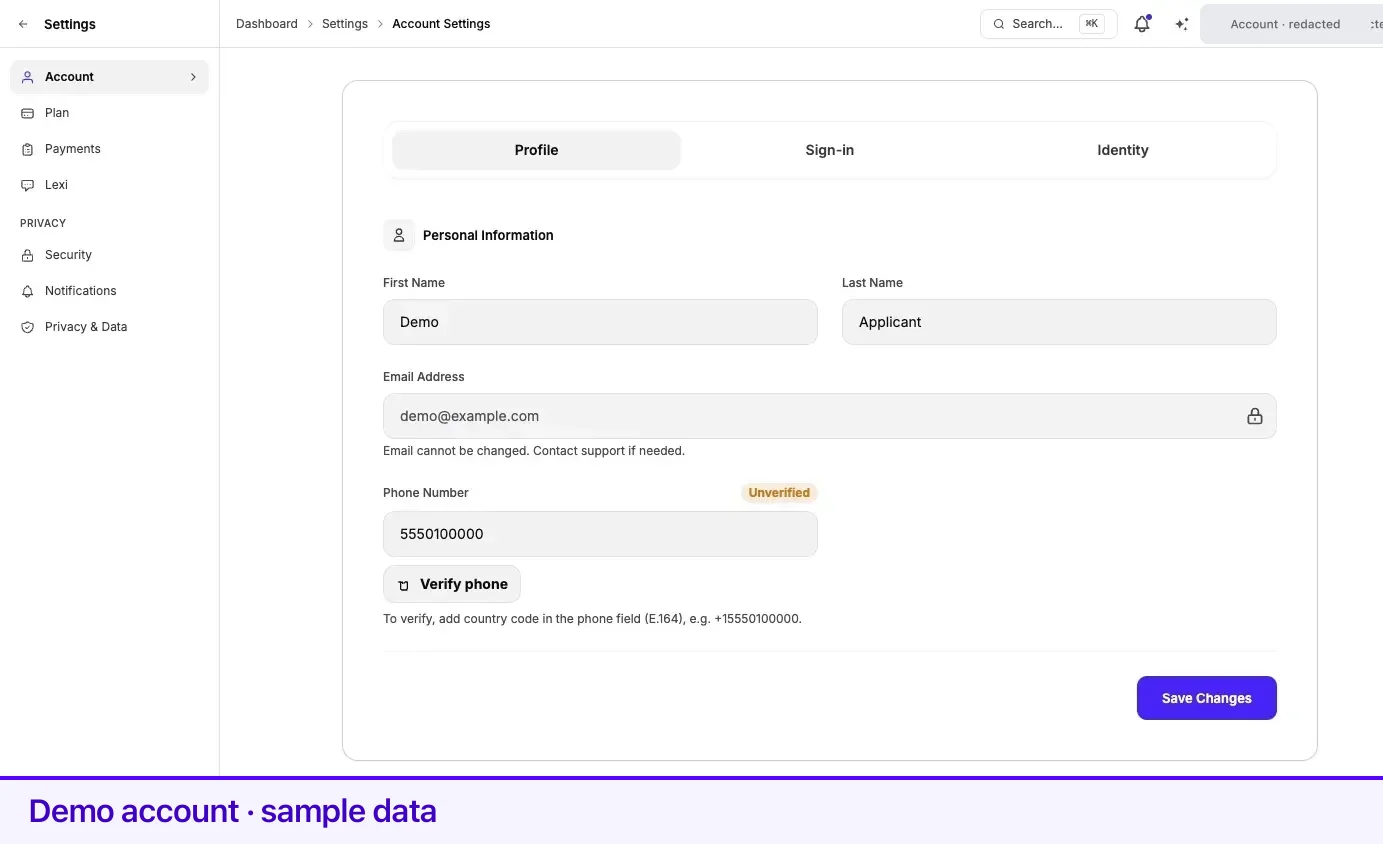
First Name and Last Name are free text. Edit them and press Save Changes; a Changes saved successfully! confirmation appears.
Email Address is displayed with a padlock and cannot be edited. The page says so directly: Email cannot be changed. Contact support if needed.
The reason is not arbitrary. Lexpoint has no password — you sign in with Google or with a magic link sent to this address — so your email is not merely a contact field. It is the credential itself, and it is what your notifications and every access grant on your account are keyed to, including case access other people hold. Changing it is a support operation with checks, not a text field. Raise it through Help & Support.
Phone number
Section titled “Phone number”Phone Number accepts international E.164 format only: a plus sign, the country code, then
the number, with no spaces or punctuation. The placeholder shows the shape — +16134561234. A
number in any other format is rejected by the field.
The label carries a status pill:
| Pill | Meaning |
|---|---|
| Not added | No number saved |
| Unverified | A number is saved but has not been confirmed by SMS |
| Verified | The saved number has been confirmed |
Verifying your number
Section titled “Verifying your number”- Enter your number in E.164 format and press Verify phone. The button only appears once there is a number to verify.
- A dialog opens — Verify your phone — showing the exact number the code will go to. If it is wrong, press Change number to go back to the field.
- Press Send code.
- Enter the code you receive under Verification code, then press Confirm.
Once confirmed, the pill turns Verified, and Lexpoint stores the verified number as your displayed phone number so the two can never drift apart.
After Send code, the button stays disabled while the dialog counts down You can resend in 60s. Send another code only once the countdown ends.
If the SMS does not arrive
Section titled “If the SMS does not arrive”The page is upfront that this happens: Some countries/carriers may block verification SMS — you can still save your number and verify later.
Press Save Changes to keep the number as Unverified. Your account works; the number is on file for contact. You can verify it later from the same panel, or try a different number.
Related
Section titled “Related”- Sign-in methods — the Google and magic-link sign-in behind this email
- Two-step verification — protecting the account this email opens
- Identity verification — proving who you are, which is a different check
- Notification preferences — where a verified phone and email are used
- Your profile — the immigration data behind an application
Frequently asked questions
Can I change the email address on my Lexpoint account?
Not yourself. The email field is read-only and the page says "Email cannot be changed. Contact support if needed." Lexpoint sign-in is passwordless, so this address is the credential your account, your case access, and your record are all keyed to.
Why is my phone number rejected?
The field accepts international E.164 format only — a plus sign, the country code, then the number, as in +16134561234. No spaces, dashes, or brackets.
What if the verification SMS never arrives?
You can save the number unverified and carry on. The page states that some countries and carriers may block verification SMS, and that you can still save your number and verify later.