

Sharing your report
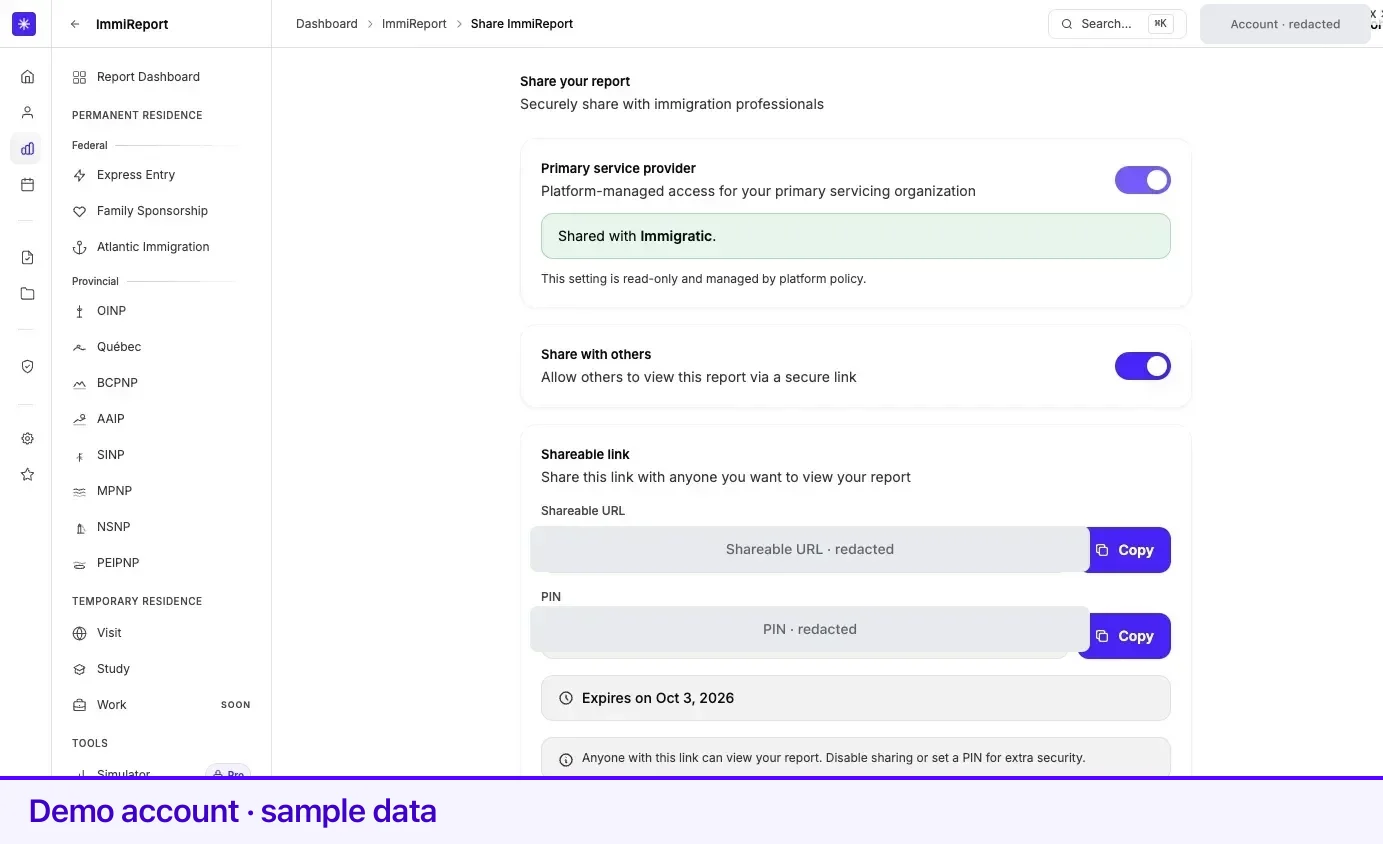
Sharing turns your ImmiReport into a read-only page at a private link you can send to an immigration professional. You control whether it is on, whether a PIN is needed, and you can switch it off at any time.
Everything is on one page: Share your report, reachable from the Share button beside the report title and from Share Report in Quick Actions.
Turn sharing on
Section titled “Turn sharing on”- Open Share your report.
- Switch the sharing toggle on. Lexpoint generates the link and a six-digit PIN at the same time.
- Four cards appear: Shareable link, PIN management, Link expiration, and Access log.
- Copy the link from the Shareable link card, and send the PIN separately.
While sharing is off, the page shows a single card reading Sharing is disabled, listing what enabling it gives you.
The PIN
Section titled “The PIN”The PIN management card shows whether a PIN is Active or Inactive, the current PIN, and a copy button. A PIN is exactly six digits, and you enter it twice to set it.
You can set a new PIN or generate one. Either action renews the link for another 30 days, and the confirmation message says so.
Expiration
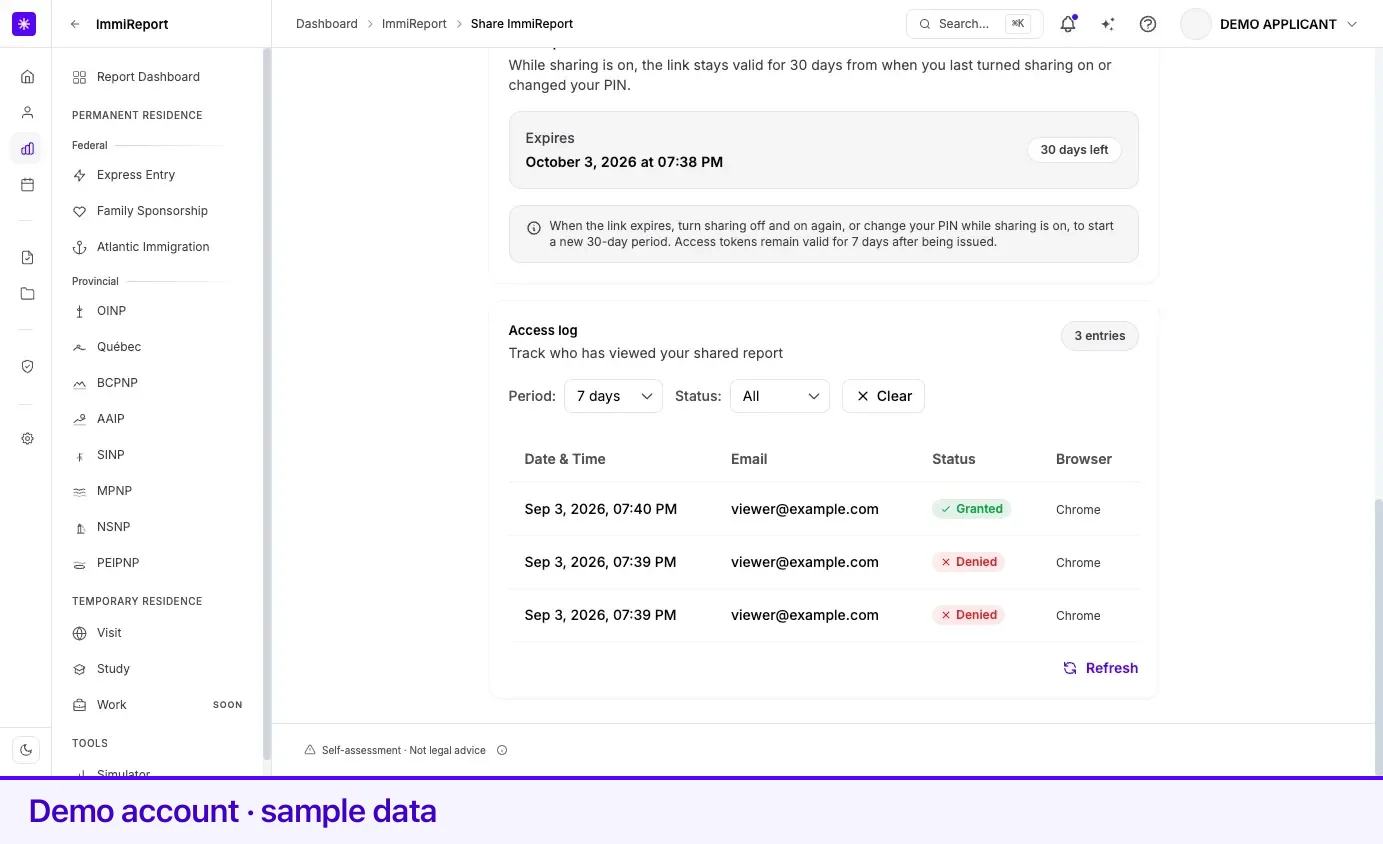
Section titled “Expiration”The Link expiration card states the rule plainly: While sharing is on, the link stays valid for 30 days from when you last turned sharing on or changed your PIN. It shows the exact expiry date and time, and the days remaining. When seven days or fewer remain the card turns amber; once past the date it turns red and reads Expired.
When the link expires, access ends for everyone, including anyone who already entered the PIN. While the link is open, a visitor who entered the PIN stays in for up to 7 days before being asked again.
Who has opened it
Section titled “Who has opened it”The Access log card lists opens of your link — date and time, the email address the visitor entered, whether access was Granted or Denied, and the browser. You can filter by period (all time, 7, 30, or 90 days) and by status. Before anyone has opened the link it reads No access logs yet.
The access log is an ImmiReport Pro feature. On a free account the card is present with a Pro badge, and selecting it opens the upgrade panel. Sharing itself, the link, and the PIN are free.
What the recipient sees
Section titled “What the recipient sees”Opening the link asks for an email address, then the PIN when one is set. After that the report opens as a read-only page headed Viewing Shared Report, in dark mode, with a Log out control. Search engines are told not to index it. The recipient moves between four panels:
| Panel | What it shows |
|---|---|
| Overview | Your CRS score and its breakdown, your FSW score, and how many programs you are eligible for |
| Profile | Counts of your credentials, jobs, tests, and offers, then tabs: Work experience, Education, Language, Job offers, Letter of acceptance, Family info, Trade cert, and Income |
| Programs | One program family at a time; provincial streams are marked Eligible, Not eligible, or Not assessed |
| Scenarios | A what-if builder with three changes — English CLB 9+, French CLB 7+, and one more year of Canadian work |
Work experience cards show the town and country of each job. On Family info, your spouse or partner carries their household link status: Connected, Invite sent, Invite expired, Disconnected, or Not invited.
The recipient cannot change anything — not your profile, not your report, not the sharing settings. A scenario they run is a projection only; your report stays as it is.
Your primary service provider
Section titled “Your primary service provider”Above the sharing toggle is a Primary service provider card. It shows whether your ImmiReport is visible to your default servicing organization, and names them. This is report access, not a retainer. The toggle is read-only — it is separate from the link you generate here, and turning your share link off does not affect it. Changing it does not change who a consultation or case would be routed to. When no provider is assigned, the card says so.
Turning it off
Section titled “Turning it off”Switch the sharing toggle off. Access ends for everyone — new visitors and anyone who already entered the PIN. The next time the report loads for them, they see that it is no longer shared. If they have it open at that moment, what is already on screen stays until they reload, but nothing new loads. The PIN, expiration, and access log cards disappear. There is no separate revoke step.
Turning sharing back on later gives you a fresh 30-day window. Earlier visitors must enter the PIN again.
Related
Section titled “Related”- What ImmiReport is — what the recipient is looking at
- Scores and how they are calculated — the numbers on the shared page
- Access and sharing — account-wide sharing, separate from this link
- Getting help — booking a consultation with a professional
Frequently asked questions
How do I revoke a shared report?
Turn the sharing toggle off at Share your report — /app/immireport/share. Access ends for everyone, including anyone who already entered the PIN. The next time the report loads for them, they see that it is no longer shared. The PIN, expiry, and access log cards disappear. Turning sharing back on later starts a fresh 30-day window, and earlier visitors must enter the PIN again.
Can whoever opens my link change anything?
No. A shared report is read-only. The viewer can read your scores, profile, and program results, and try a few what-if scenarios. They cannot edit your profile, your report, or the sharing settings, and a scenario they try changes nothing.
Does the link expire on its own?
Yes. While sharing is on, the link stays valid for 30 days from the last time you turned sharing on or changed your PIN. The expiration card shows the exact date and warns you when seven days or fewer remain.