

Family and dependants
Your family directory at Profile → Family is one list of people reused across cases, not a per-application form. Each person is added once and edited in place.
The form has five sections — Person, Status, Contact, Background, Sponsorship — and which of them apply depends on the relationship you pick and on whether that person is Canadian. Sections that do not apply stay visible in the navigation and show a one-line explanation instead of fields.
The list
Section titled “The list”The directory lists partners first, then children, then everyone else. When people from at least two groups are on file, filters appear: All, plus Partner, Children, Parents, Siblings, or Extended for each group you have.
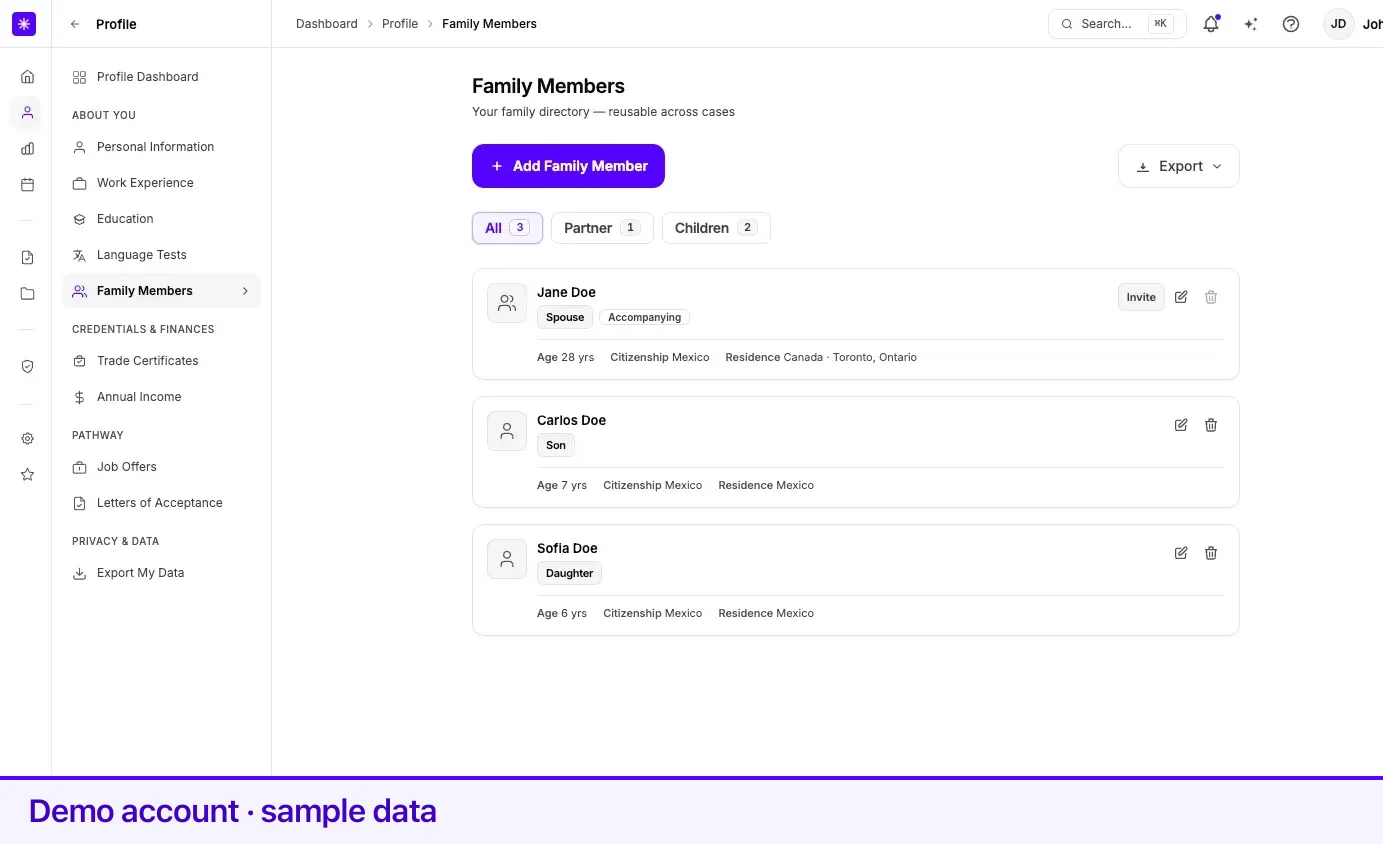
Each card shows the person’s name, relationship, age, citizenship, and residence. It can also carry:
| Mark | Means |
|---|---|
| CA | The person is a Canadian citizen or permanent resident. |
| Accompanying / Not accompanying | Spouse or partner only — from the Accompanying to Canada toggle. |
| Under 18 | A Canadian citizen or permanent resident younger than 18. |
| Invite, Invited, Connected, Resend, Re-invite | Spouse or partner only — see Household invites. |
Relationships you can add
Section titled “Relationships you can add”| Value | Group |
|---|---|
| Spouse | Partner |
| Common-Law Partner | Partner |
| Son | Children |
| Daughter | Children |
| Mother | Parents |
| Father | Parents |
| Brother | Siblings |
| Sister | Siblings |
| Aunt | Extended Family |
| Uncle | Extended Family |
| Other | — |
Spouse, Common-Law Partner, Mother, and Father are unique — you can hold one of each at a time. Choosing a relationship that implies a sex or a marital status fills those fields in for you: Son, Brother, Father, and Uncle set Sex to Male; Daughter, Sister, Mother, and Aunt set it to Female; Spouse sets Marital Status to Married and Common-Law Partner sets it to Common-Law.
Section 1 — Person
Section titled “Section 1 — Person”| Field | What it means | Required |
|---|---|---|
| Relationship to You | Which of the values above describes this person. | Yes |
| First Name | Given name. English letters, spaces, apostrophes, and hyphens only. | Yes |
| Last Name | Family name. Same character restriction. | Yes |
| Date of Birth | Must be in the past and imply an age of 120 or under. For a spouse or partner it must imply an age of at least 18. | Yes |
| Sex | Male, Female, or Other. Pre-filled from the relationship where the relationship implies it. | No |
Section 2 — Status
Section titled “Section 2 — Status”| Field | What it means | Required |
|---|---|---|
| Citizenship Country | The country this person holds citizenship in. | Yes |
| Country of Residence | Where they live now. | Yes |
| City in Canada | Searchable list of Canadian locations. Appears only when Country of Residence is Canada. Province fills in from the city. | Yes when they live in Canada |
| Status in Country of Residence | Citizen, Permanent resident, Visitor, Worker, Student, Protected Person, Refugee Claimant, Foreign National, or Other. | Yes when citizenship and residence countries differ |
| Marital Status | Single, Married, Common-Law, Divorced, Separated, or Widowed. Asked here for everyone who is not your spouse or partner. | Yes for non-partners |
Lexpoint treats the person as a Canadian citizen or permanent resident when their citizenship country is Canada, or when they live in Canada with the status Permanent resident. That single derivation decides whether the Background section or the Sponsorship section applies.
Section 3 — Contact
Section titled “Section 3 — Contact”Applies to a spouse or common-law partner only. For every other relationship the section reads Contact details apply to spouses and partners.
| Field | What it means | Required |
|---|---|---|
| Their email address. It is also the address an invite goes to. | Yes for a spouse or partner | |
| Phone | Their phone number, with country code. | No |
| Marital Status | Pre-filled from the relationship (Married or Common-Law). | No |
| Accompanying to Canada | Toggle — Will travel with you to Canada. On by default. | No |
Whether your partner accompanies you stays yours to set, whether or not you are connected.
Section 4 — Background
Section titled “Section 4 — Background”Applies to a spouse or partner who is not a Canadian citizen or permanent resident. For a Canadian or permanent-resident partner it reads Not needed — this partner is a Canadian citizen or permanent resident.
The family form does not collect a partner’s education, language results, or Canadian work. Your partner’s own Lexpoint account is the only source for those, once the two of you are connected. What the section shows depends on whether anything was entered here before the form was locked:
| On file | What you see |
|---|---|
| Nothing | A panel headed Background comes from {name}‘s own Lexpoint account, with the next step for your household state. |
| Facts entered earlier | Those facts — education, Canadian credential, test and scores, Canadian work — read-only, with a note for your household state. Saving the record leaves them untouched. |
The note follows your household state:
| Household state | The section says |
|---|---|
| Not invited | Invite {name} from Settings → Family, using the email in Contact. Facts on file stay in use until {name} connects. |
| Invite sent | Invite sent to {name} — waiting for them to accept. |
| Invite expired | Your invite to {name} expired. Resend it from Settings → Family. |
| Disconnected | You and {name} are no longer connected. Re-invite them from Settings → Family. |
| Connected | Education, language, and Canadian work come from {name}‘s account. Facts entered earlier are shown but no longer used. |
Until you connect, the panel with nothing on file also states Until then, your report treats you as accompanied by a spouse with no spouse facts on file, so no spouse points are awarded.
Section 5 — Sponsorship history
Section titled “Section 5 — Sponsorship history”Applies to a spouse or partner who is a Canadian citizen or permanent resident. Otherwise the section reads Not needed — this partner is not a Canadian citizen or permanent resident.
| Field | What it means | Required |
|---|---|---|
| Was previously sponsored | Toggle. | No |
| Approximate sponsorship date | Appears when the toggle above is on. Must be in the past. | No |
| Has sponsored others | Toggle. | No |
| Approximate date | Appears when the toggle above is on. Must be in the past. | No |
| Currently on social assistance | Toggle. | No |
When you are connected and your partner has answered Sponsor eligibility on their own Personal information, their answers are used instead of this section.
Adding, editing, and archiving
Section titled “Adding, editing, and archiving”- Open Profile → Family.
- Select Add Family Member.
- Work through the sections with Continue. Save on the last section adds the person.
- Back on the list, the pencil icon reopens a person for editing.
To remove someone, use the bin icon on their card. Lexpoint asks Archive [name]? They can still be found in existing cases. Archiving hides the person from the directory without deleting the record.
The reverse is also enforced: setting your marital status to Married or Common-Law when no spouse record exists sends you here first, and your marital status updates once the spouse is added.
Household invites
Section titled “Household invites”A spouse or partner card carries one chip — Invite, Invited, Connected, Resend, or Re-invite — for whether that person has connected their own Lexpoint account with yours. Selecting it opens Settings → Family, where invites are sent and managed. Adding someone to your family directory does not by itself give them an account or any access to yours.
Connecting, what each of you shares, and disconnecting are covered in Link with your partner.
Related
Section titled “Related”- Link with your partner — invite, connect, and disconnect
- Personal information — your marital status drives the spouse record
- How your profile is used — what a connected partner’s report reads
Frequently asked questions
Why can I not archive my spouse from the family list?
The archive button is disabled for a spouse or common-law partner. Lexpoint ties that record to your marital status, so you remove it by changing your marital status on Personal information instead. When you do, Lexpoint asks for the date the relationship ended and archives the spouse record with that date.
Does archiving a family member delete them?
No. Archiving hides the person from your family directory but keeps the record, and they can still be found in existing cases.
Why can I not enter my partner's education or language scores?
The family form no longer collects a partner's education, language results, or Canadian work. Those come from your partner's own Lexpoint account once you are connected. Facts you entered before the change stay visible, read-only.