

NOC Navigator
The NOC Navigator helps you find the National Occupational Classification (NOC) code for a job, and shows which Canadian immigration programs list that occupation. Open lexpoint.io/tools/noc-navigator. You do not need an account.
Find a code
Section titled “Find a code”- Search by job title or code, or build a filter. Filters cover the code, the job title, the TEER level, program matches and the Express Entry high-wage tag.
- The results table lists each code with its job titles, its TEER level and the programs that list it. The Express Entry high-wage column carries the Express Entry high-wage tag where it applies.
- Select a row to open the detail window.
Read a code
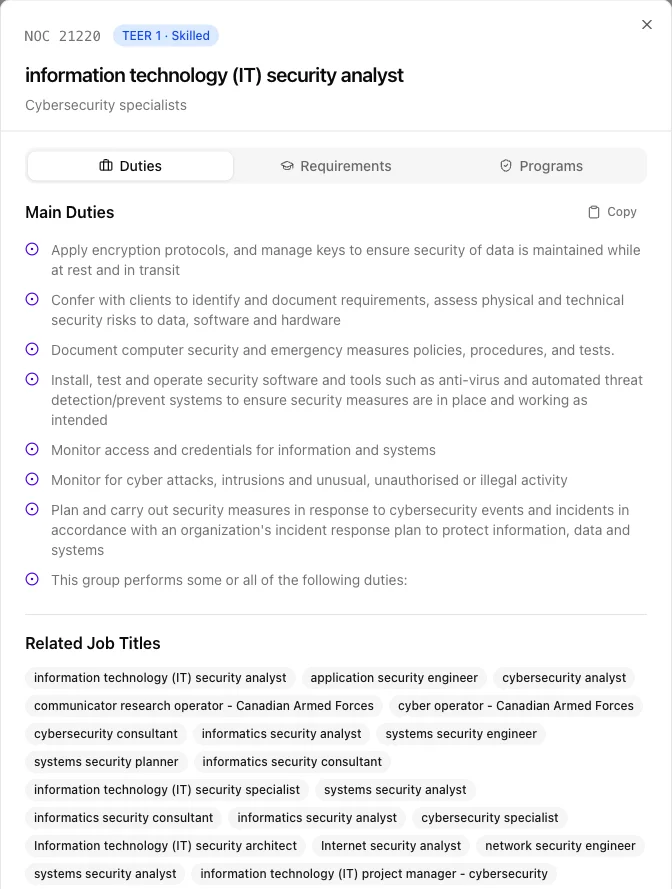
Section titled “Read a code”The detail window has three tabs:
| Tab | What it holds |
|---|---|
| Duties | The main duties, with a button to copy them, and related job titles |
| Requirements | The employment requirements, exclusions and additional information |
| Programs | The programs that list the occupation, grouped by Express Entry, provincial and other programs |
Choose a code by comparing the duties with the work you actually did, not only the title.
Related
Section titled “Related”- NOC Intelligence: the same kind of briefing for a job on your profile
- Work experience: where a NOC goes on a job, and the high-wage tag
- Wage Navigator: the wage for the occupation you picked
- Free tools: the other tools
Frequently asked questions
Does the NOC Navigator tell me which NOC code is mine?
It helps you search by job title and read the duties and requirements of each code. The match between your real duties and a code is yours to judge. Read the main duties on the Duties tab against the work you did.
What does the Express Entry high-wage column mean?
It tags an occupation that is on IRCC's Express Entry high-wage list. The same tag appears on a job in your work history in ImmiReport.
Is this the same as NOC Intelligence?
No. The NOC Navigator is a public search of codes. NOC Intelligence is a briefing inside your account, for a job on your own profile, with wage, demand and program facts for that job.