

Reading your report
ImmiReport is three levels deep, and each level answers a narrower question than the one above it.
| Level | Where | What it answers |
|---|---|---|
| The hub | /app/immireport | Your CRS score, how many programs you clear, and what changed |
| A program hub | Permanent Residence, Express Entry, a province, a temporary residence purpose | Which streams inside that family you clear |
| A program page | One stream — CEC, BCPNP Skilled Worker, Study Permit | Whether you clear this one, and how you compare |
The hub
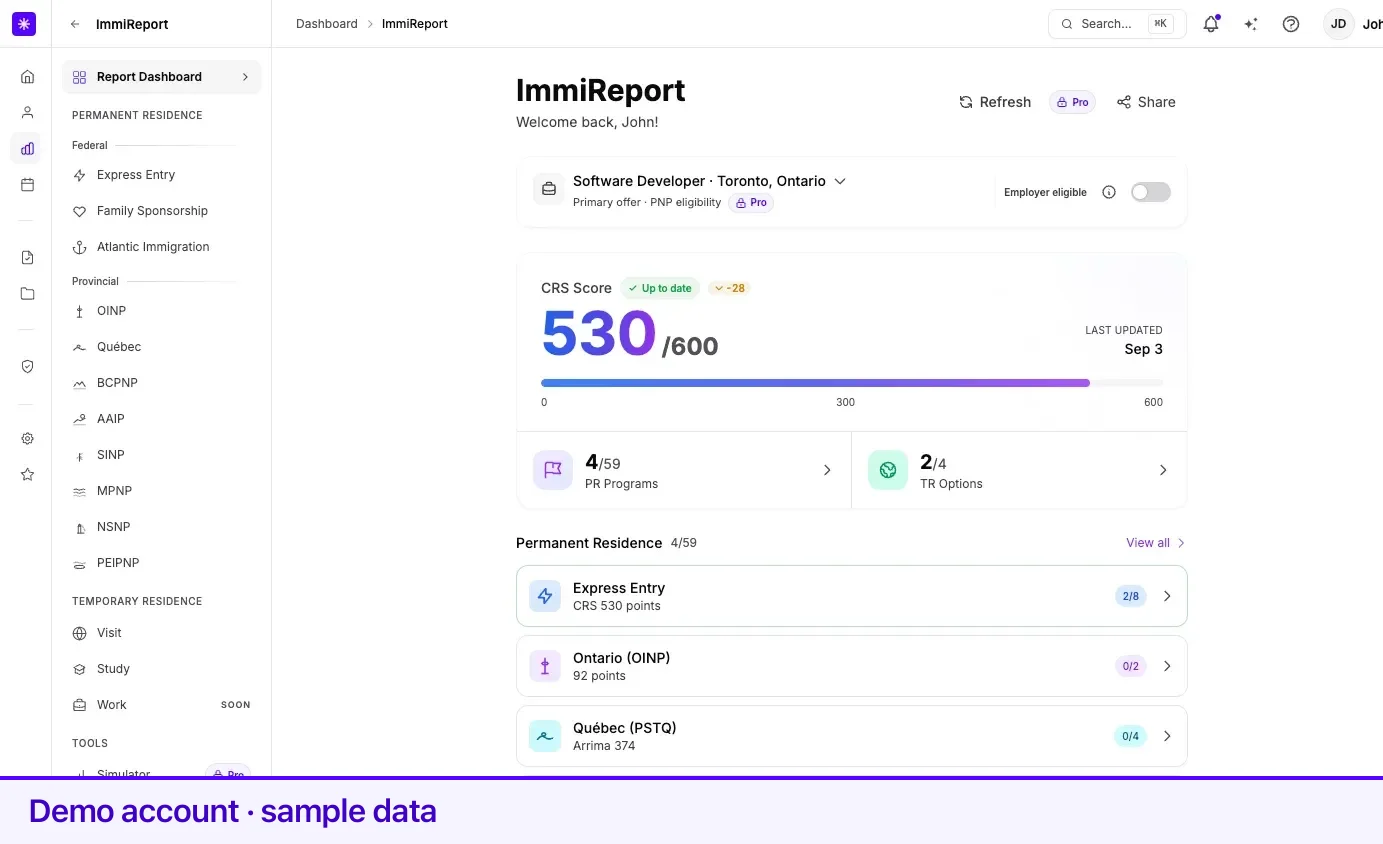
Section titled “The hub”The top of the hub is your CRS Score out of 600, with a progress bar and a freshness badge. Under it, two cards split the report in two: PR Programs with an eligible-over-total count, and TR Options. Below those, the Permanent Residence list gives one row per program family, and the Temporary Residence list gives one row per instrument.
Every row carries a count badge, and a row with at least one eligible stream is outlined in green. When a recent recalculation moved one of these numbers, a small delta chip appears beside it reading since your last update with the date.
Above the score sits your primary job offer — the offer provincial streams are scored against — or No primary offer set. Its Employer eligible switch records whether that offer’s employer meets the province’s employer rules; changing it queues a recalculation. With more than one offer on file, switching which one is primary carries a Pro badge. See job offers.
A program page, section by section
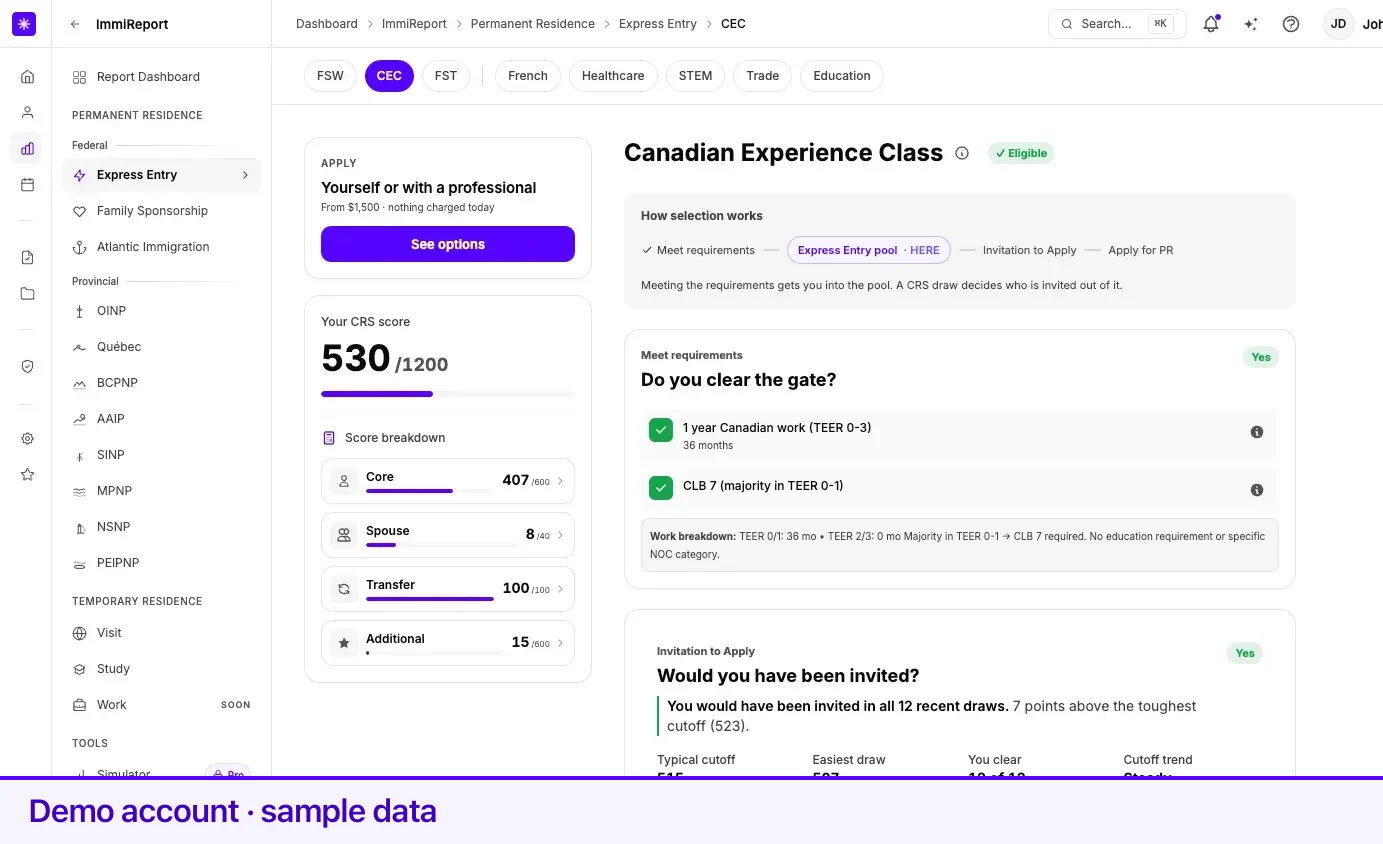
Section titled “A program page, section by section”Every program detail page renders from one shared shell, so the sections always appear in the same order. Each is optional and collapses when there is nothing to show — you will not see an empty card.
| Order | Section | The question it answers |
|---|---|---|
| 1 | Hero | Which stream is this, and what is my headline number? |
| 2 | Verdict | The one-line answer, on narrow screens |
| 3 | How selection works | Is meeting the requirements the finish line, or the entry ticket? |
| 4 | Requirements | Do you clear the gate? |
| 5 | Competitiveness | Would you have been invited? |
| 6 | Next | What does this cost, how long does it take, where do I go now? |
On a wide screen a sticky rail sits to the left with your score card and any context reminders. There is exactly one rail, always on the left.
Section headings
Section titled “Section headings”Each section heading has three parts stacked together: a small stage label that matches a step on the selection ladder above it, the question as the heading itself, and — where the question is decidable — a short verdict chip on the right. Under the heading sits one sentence about you, marked with a coloured rule down its left edge.
The stage label is what ties the ladder to the sections. The ladder is the page’s table of contents; the label tells you which rung the section you are reading corresponds to.
Verdict chips
Section titled “Verdict chips”Chips are one or two words, never sentences. Lexpoint uses two vocabularies, and they are deliberately different.
| Section | Chip | Means |
|---|---|---|
| Requirements | Yes | You clear every requirement Lexpoint checks |
| Requirements | Maybe | A fact Lexpoint needs to decide is missing from your profile |
| Requirements | Not yet | At least one checked requirement is unmet |
| Competitiveness | Yes | Your score cleared at least half the draws in the window |
| Competitiveness | Sometimes | You cleared some draws, but under half |
| Competitiveness | No | You cleared none of them |
| Competitiveness | No draws yet | Not enough draw data to compare against |
Requirements say Not yet rather than No because a requirement is something you can go and meet. Competitiveness says No rather than Maybe for the opposite reason: it is a historical fact — the draws already happened, and Lexpoint knows exactly how many of them your score would have cleared.
The chip and the sentence beneath it always carry the same tone. If they disagreed, neither would be trustworthy.
On Alberta, Saskatchewan, Manitoba, Newfoundland and Labrador, and New Brunswick stream pages, one unmet requirement settles the chip: it reads Not yet even if other rows cannot be assessed. Maybe is used only when nothing checked is unmet and at least one row is still open.
Requirement rows
Section titled “Requirement rows”A requirement row is marked with a green check when met and a red cross when not. On provincial stream pages a row can also be greyed out: Lexpoint could not assess it from your profile, which is not the same as failing it. Hovering the mark reads Not assessed yet — open this row to see what it needs.
Stream cards on a province hub
Section titled “Stream cards on a province hub”On the Alberta, Saskatchewan, Manitoba, Newfoundland and Labrador, and New Brunswick hubs, each stream card uses the same rule as its detail page, so the two always agree: ✓ Eligible, Maybe, or Not eligible. The count beside each section counts confirmed ✓ Eligible streams only.
How selection works
Section titled “How selection works”This is the strip of stages near the top of a program page, and it exists to answer the thing most readers get wrong: whether qualifying is the end of the process or the start of it.
Programs that run a pool and a ranked draw show four stages with the pool in the middle. Programs you apply to directly show two, with the caption No pool, no ranking — apply directly when you qualify. Temporary residence pages show an officer decision as the final stage. Where Lexpoint can work out which stage you are at, that stage is marked as current in words, not only in colour.
Hub pages show no ladder at all — they route between programs rather than selecting anyone.
Moving between programs
Section titled “Moving between programs”Program pages inside a family carry a pill switcher under the header. On Express Entry the switcher splits into two groups either side of a divider: the base programs on the left, the category streams on the right. Most provincial switchers split the same way — job-offer and base streams on the left, Express Entry-aligned streams on the right. Saskatchewan’s is one flat list, matching its hub.
Breadcrumbs above the page title walk you back up to the family hub.
Related
Section titled “Related”- What ImmiReport is — what it covers and when it recalculates
- Scores and how they are calculated — where each number comes from
- Express Entry — the family with the most streams
- Your profile — everything on the report is derived from it
Frequently asked questions
Why does the requirements section come before the draw history?
Because a cutoff means nothing until you know whether you clear the gate. Lexpoint fixes the order in the shared page shell — hero, verdict, how selection works, requirements, competitiveness, next — so no program page can put a score chart above the requirements it depends on.
What does the "Not yet" chip mean — is it the same as "No"?
No. On a requirements section Lexpoint uses Yes, Maybe, and Not yet. "Not yet" is used instead of "No" because requirements are achievable. "Maybe" means Lexpoint could not decide with the facts in your profile.
Why do some program pages show no "How selection works" ladder?
Hub pages route between programs rather than selecting anyone, so the ladder is omitted rather than invented. It is also omitted when Lexpoint has no recognized selection mechanism recorded for that program.